
The Payee Shares option allows for the addition and maintenance of multiple payees and agents, and the percentage share in royalties, income and deductions they are entitled to.
Distribution of Royalties payments/deductions is based on the percentage shares for the registered payees. During the calculation of an ISBN’s Royalties, Payee Balances file are updated accordingly.
- In the menu, expand Publishing Modules > Rights & Permission > Management and double-click Work with Royalty Contracts. RYW010 Work with Royalty Contracts selection panel appears.
- Enter the selection variables and click OK. The selected royalty contracts are displayed.
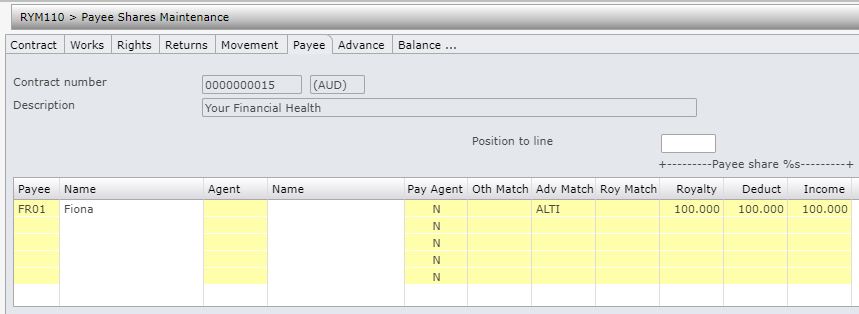
- Select the royalty contract and right click option Payee share. RYM110 Payee Share Maintenance panel appears listing all the existing payee share percentages. A highlighted Payee ID indicates the payee is held for AP payments. Payments can be released via Release Royalty Unpaid Balance. The hold flag must be turned off in creditor masterfile before the payment is released.
| Note | Payee Share Maintenance panel would appear automatically on contract creation to allow payee shares to be entered. |
| Option | Description |
| Text | Allow you to add or maintain any text (via RYM100 Royalty Payee Text) relating to the payee for the selected contract. |
| Advance details | Advances for the selected payee can be entered/maintained here. |
| Pay info | Accesses RYM110 to maintain Payee payment information details by Royalty group by Payee. Minimum payment rules setup here will take precedence over other setups i.e. TMSRY/RY-APIF and TMSRY-RY-APIF2. |
| Payee | Accesses API010 Creditor Masterfile Inquiry to inquire on the selected payee’s creditor master details. |
| Agent | Allows you to enter the agent and the percentage share in royalties, income and deductions they are entitled to. The total payee share should always equal 100%. Advances by payee can be entered from this panel using option Advance details. |
| Order |
This allows you to create sales order for either author copies or author sales. Control file TMSRY/RY-DSIF defines the dummy customer for the order along with the Type of Sale/Picking method/Document type and sub type and order entry format etc. The Billing and the Delivery address for the order will default from the payee’s creditor address so the delivery is made to the correct address. Orders created for author copies or author sales (sales at discounted price) will not attract any royalty payments. On successful order creation, the system will create a new tracking record in the Royalty tracking file with tracking type = sales type and return the process number as the tracking material. Tracking type for author copies and author sales are maintained on control file TMSRY/RY-TRKT. |
Add payee share
- On a new line, select a new payee.
- Enter the below information as required. (Payee share %s for Royalty, Deduction and Income must be in such a way that total percentage for all the payees put together is 100% each for Royalty, Deduction and Income).
| Field | Description |
| Payee/Name |
The Payee field requires the creditor code to whom royalties are payable. A payee can only be entered if either the payee’s trade or base currency is equal to the currency on the contract. Multiple payees can be defined. |
| Agent/Name | If royalties are to be paid to an agent instead of the payee, then enter the agent code. An agent can only be entered if either the agent’s trade or base currency is equal to the currency on the contract. |
| Pay Agent | Determines whether or not to pay royalties to the agent. This defaults to No and can be overridden to Yes. If Yes the Agent field becomes mandatory. |
| Oth Match | This field is used to cross account or offset other income (debit or credit). It offsets the unearned balances (early payments of royalties, returns reserve refunds etc.) against income from other contracts. This is very important as a means to ensure that author’s income is not paid when that income can legally be offset against advances/unearned balances outstanding. |
| Adv Match |
Advance Matching is used to offset repayments of Advances. For example an author may have produced two books within a short time frame. For Book A the author received an advance of $5000 and for Book B an advance of $5000 was also paid. Book A has not sold as well as Book B. The Advance on Book B may have been recovered by the publisher and any Royalties earned from Book B can offset the Advance still owing on Book A. A user defined code is entered in this field for both Title Contracts. There is no Control file set up required for this code. It is important to use the same code in all Contracts to offset each other. Note: Contracts can only be offset with each other if the contract currencies are the same. The Payee must also be the same for all Contracts with Advance Matching. Advance Match codes must only exist for contracts of the same currency. Matches can only ever be made for a payee between their contracts with the same currency. |
| Roy Match |
Royalty Matching is used to offset Royalties earned and paid. Note: Contracts can only be offset with each other if the contract currencies are the same. Royalty Match codes must only exist for contracts of the same currency. Matches can only ever be made for a payee between their contracts with the same currency. In the case of negative Royalties, this amount needs to be recovered. Negative Royalties could arise if the Provision for Returns was not sufficient. The Royalties of another book can be used to recover this loss. Note the Payee must also be the same for all Contracts with Royalty Matching. The code is user defined and there is no Control File set-up for this code. Using the Payee number as the code, may be useful for easy tracing. A search for a list of offsetting Contracts can be done. |
| Royalty | This is the Payee Share Royalty Rate i.e.the percentage share a specific payee receives of the total royalties due. Distribution of Royalty payments is based on the percentage split across all payees. If the Royalties are split across a number of payees, the total of the percentages for each payee must add up to 100%. |
| Deduct | This is the Payee Share Deduction Rate i.e. the percentage share of deductions a specific payee can offset against any Royalties earned. The payee share percentage caters for those instances where payments and deductions need to be distributed between several payees. Distribution of payments/deductions is based on the percentage share of the registered payees. If the Deductions are split across a number of payees, the total of the percentages for each payee must add up to 100%. |
| Income | This Payee Share Percentage contains the Rights/CAL (Copyright Agency Limited) percentage share to which a specific payee is entitled. The payee share percentage caters for those instances where payments and deductions need to be distributed between several payees. If the Income is split across a number of payees, the total of the percentages for each payee must add up to 100%. |
Add payee share by Royalty period
During the course of the contract payee share setups can be changed to be setup by Royalty period if required, i.e. different share % setups can be maintained for each Royalty period in a contract. The total payee share for each Royalty period should always equal 100%. The original payee share setup is the default and cannot be removed. The default setup would apply unless there is a setup for a specific Royalty period. Any new setup for a specific period will be the arrangement until the next effective period.
- In the menu, expand Publishing Modules > Rights & Permission > Management and double-click Work with Royalty Contracts. RYW010 Work with Royalty Contracts selection panel appears.
- Enter the selection variables and click OK. The selected royalty contracts are displayed.
- Select the royalty contract and right click option Payee share. RYM110 Payee Share Maintenance panel appears listing all the existing payee share percentages.
- Click function Copy. This will copy the existing payee share setup to a new setup where you can maintain the effective Royalty period.
- Enter the Effective Royalty period.
- Update payee and payee share percentages as needed. Payee must be an existing payee either on the same or different contract. Ensure total payee share for each Royalty period is equal to 100%.
- Click OK. The Royalty payee shares will now be listed by Effective Royalty period. The original payee share will be the default setup with Effective Royalty period as ‘00/0000‘.
| Note | When you next select the Payee share option for this contract, the payee shares will be listed by Effective Royalty period. |
