
Contents
Introduction
This procedure outlines the consolidation of 3rd party sales invoices or credits into a single document for payment and assignment of external invoice numbers for tax reporting as per government requirements of specific countries.
3rd party invoice consolidation
Iptor IP1 allows invoices and credits from 3rd party warehouse distributor sales to be uploaded into IP1 Data Interface Sales Reporting system. This function within IP1 allows invoices and credits to be uploaded and held until they are required to be posted. On posting all the temporary held invoices/credits can be consolidated into a single invoice/credit note. The posting and consolidation is a manual process and must be run as required.
External invoice numbering
As per the government requirements of a country, specific numbering range and sequence can be setup for invoices and credit notes. When allocated this invoice/credit note number (Government invoice number – GIN) will be recorded as an external document number for tax reporting purposes. The external document number will be held in the transaction header text section. The internal IP1 invoice/credit note number will be generated as normal. Both the internal IP1 document number and the external document number (GIN) will be on the document to be submitted to the 3rd party warehouse distributor.
View the process flow- Invoices and credits are loaded into the IP1 Data Interface Sales Reporting system. The invoiced stock will be moved to a Held location. The mint credited stock will be loaded to a Putaway location and the damaged credited stock will be loaded to the Damaged location.
- Uploaded invoices and credits are validated and posted or consolidated and posted. On posting the invoiced stock is removed from the Held location and overall stock on hand is reduced. The mint credited stock is moved to the physical location and the overall stock on hand is increased.
- If GIN is active then an external document number will be allocated in the required format and held in the Text section of the transaction header. The invoice/credit will show the external document number for submission to the 3rd party warehouse distributor, as well as the internal IP1 document number.
| Note | External document numbering is independent of invoice/credit note consolidation. If all the requirements are setup accurately and GIN is active for the company then the external document number will be allocated. |
The following business rules have to be setup to handle 3rd Party Invoice Consolidation & External Invoice Numbering. Business rules for 3rd Party Invoice Consolidation & External Invoice Numbering must be setup with support from Iptor IP1 consultants. It is critical to understand the setting of control files and how it works. Control files must be setup correctly for the system to operate as intended. Any changes to the control files setup should be addressed cautiously and in consultation with Iptor IP1 consultants.
| Note | This document does not cover customised setup tasks of specific companies. Deviations from this setup should be covered by setup tasks written by individual companies. |
| Control files | Setup |
| TMSDS/CFM-ACT Generic action messages |
Add record for calling program DSO400E.
|
| TMSDS/CFM-MSG Generic confirm screen messages |
Add new key and message.
|
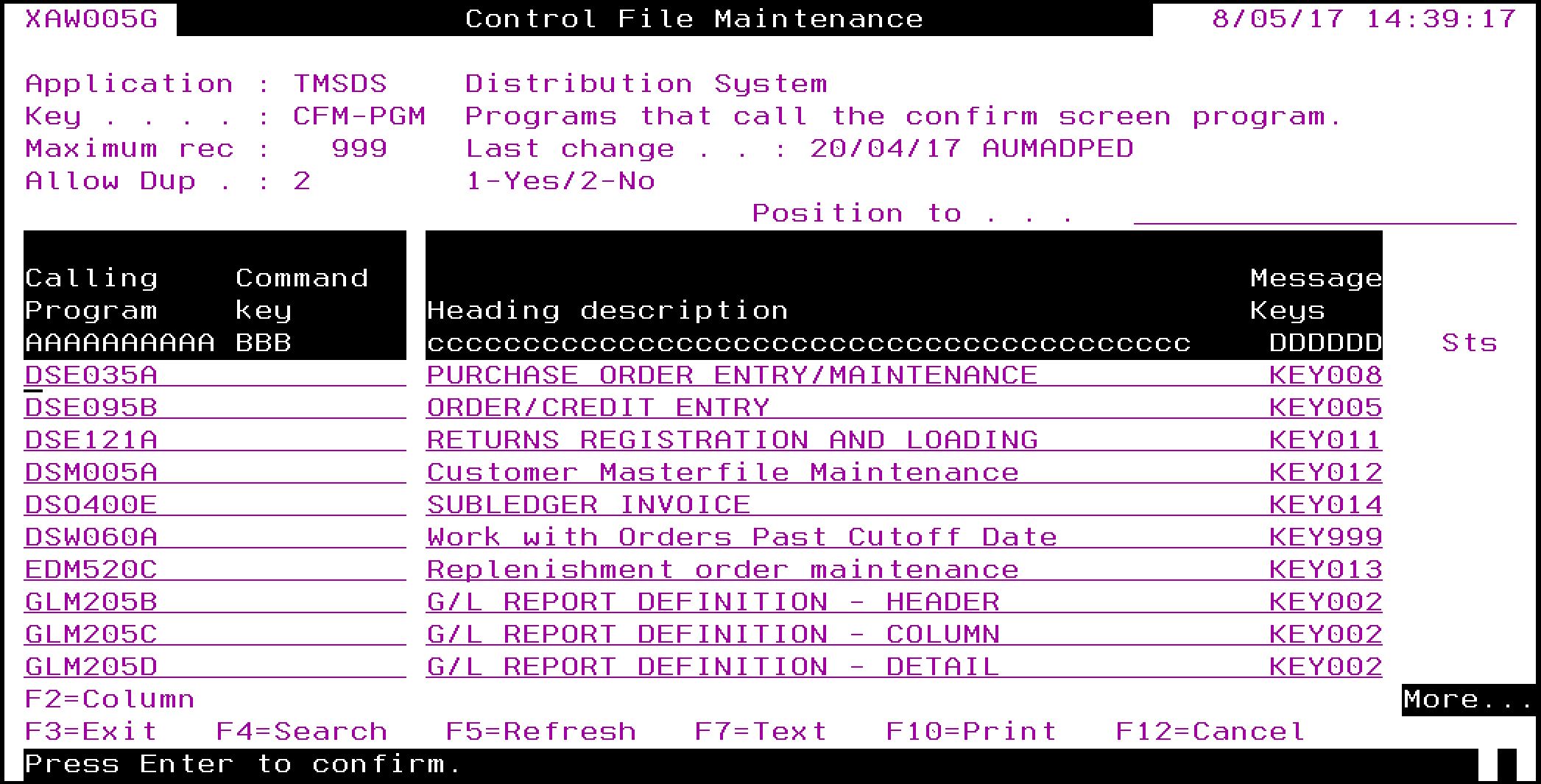
| TMSDS/CFM-PGM Programs that call the confirm screen program |
Add record for calling program DSO400E.
|


The following control files and control number setups are required for External document numbering. If external numbering is not used then these do not have to be setup.
| Control files & control numbers | Setup |
|
TMSDS/CC-TYPES Customer classification types |
Add new customer classification type for GIN for country XX.
|
|
TMSDS/CC-GINXX GIN code |
New control for customer class type GIN for country XX.
|
|
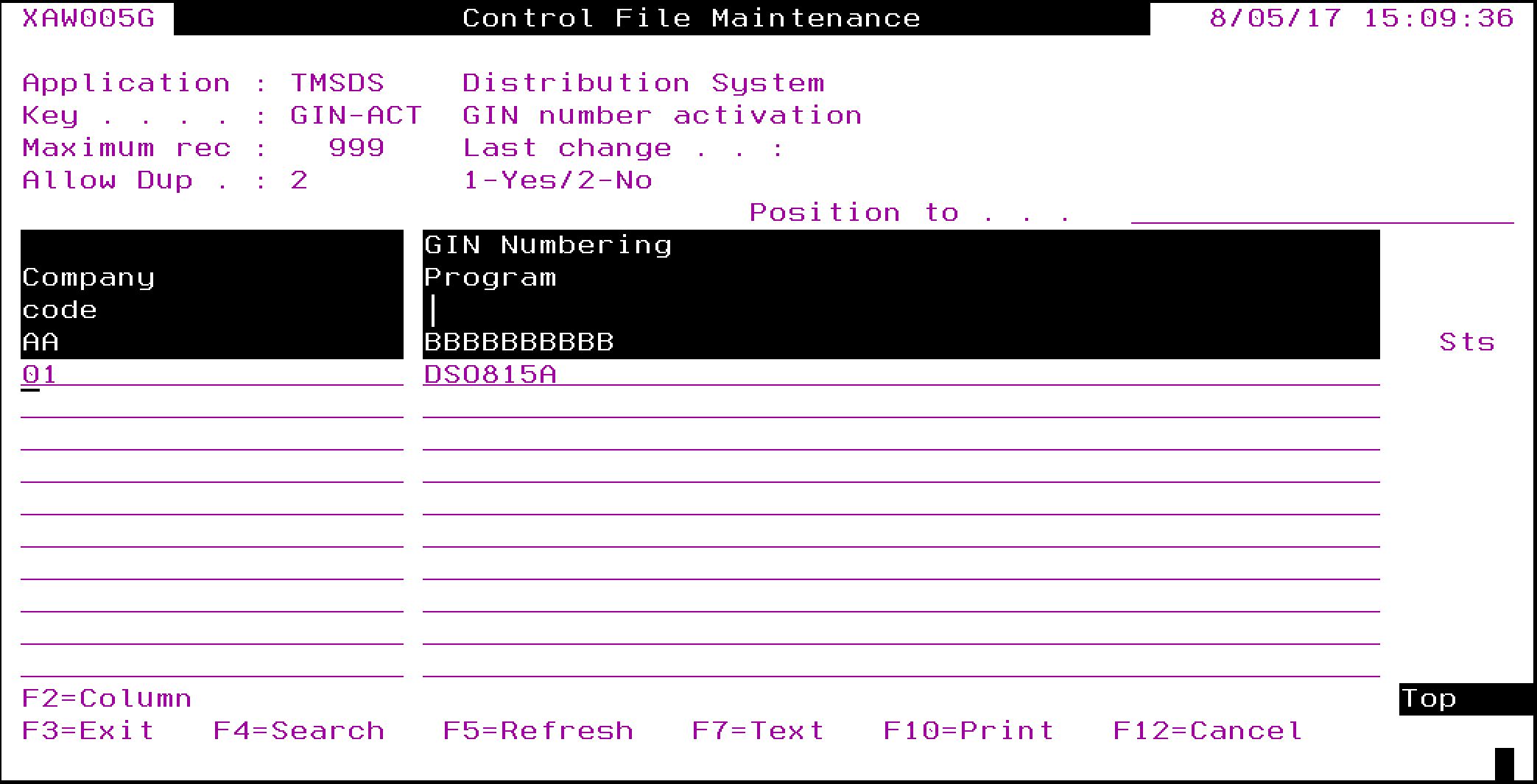
TMSDS/GIN-ACT GIN number activation |
Activate GIN by company, with a call to DSO815 (GIN number assignment program). |
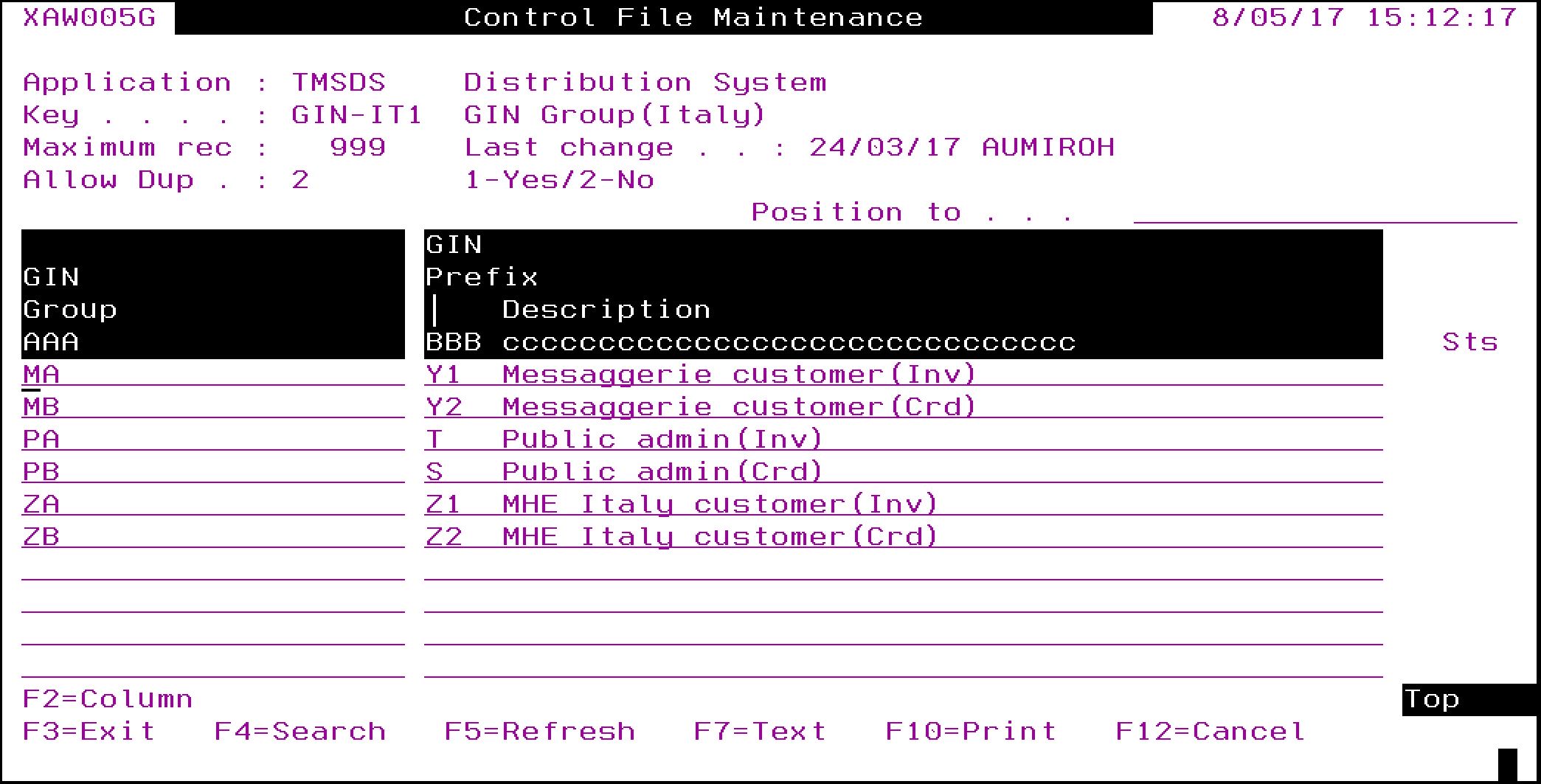
| TMSDS/GIN-XX1 GIN group |
Allocate GIN groups, if different GIN prefixes and number ranges are required for the country XX. |
| TMSDS/GIN-XX2 GIN selection |
Setup the GIN group selection criteria for country XX.
|
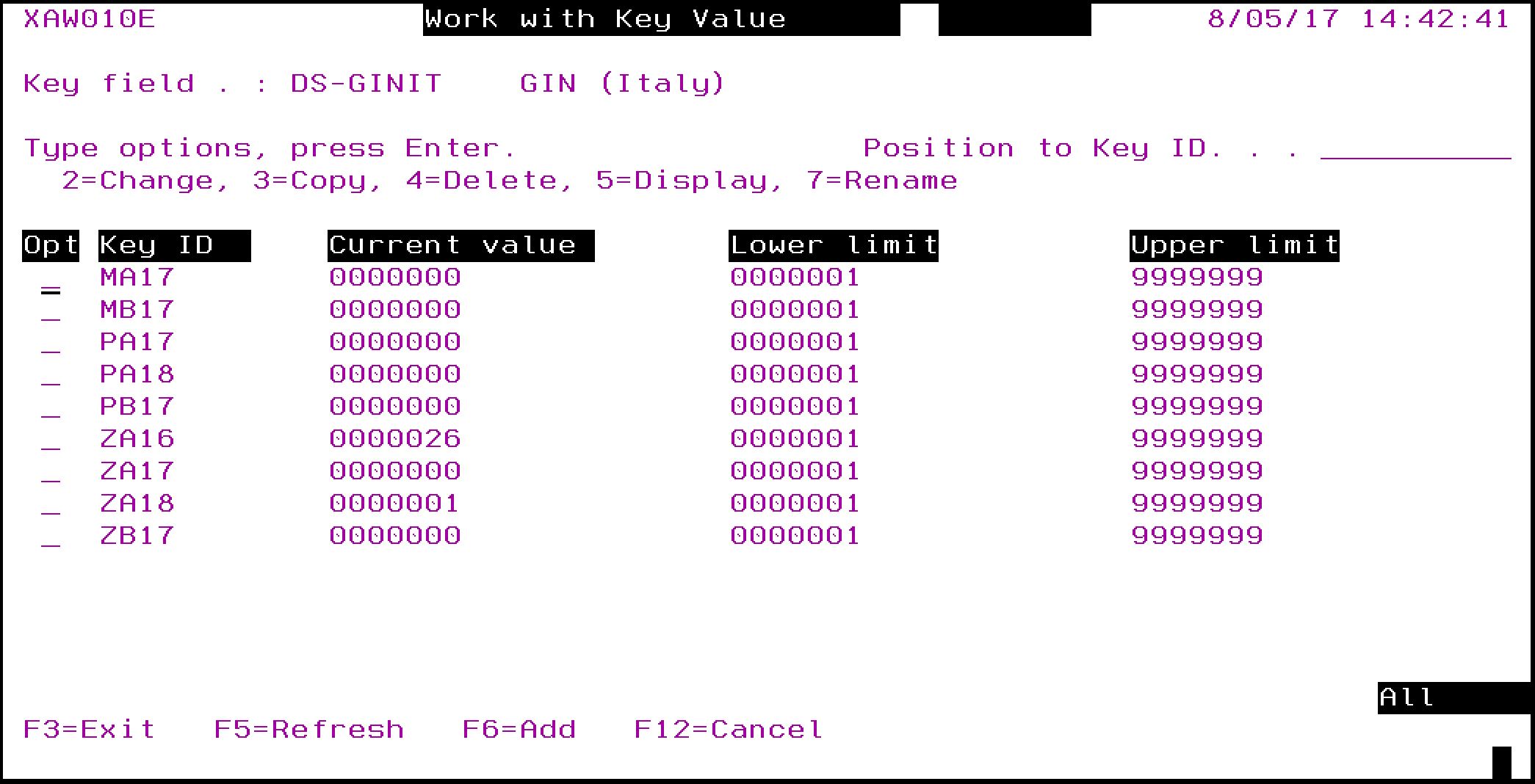
| DS-GINXX GIN Control number |
New control number by GIN Group for country XX.
|
| TMSDS/TR-TXT Transaction text types |
New text type ‘GIN’ to hold the Government invoice number.
|




Procedure
It is your responsibility to ensure that you understand this procedure before performing the following tasks.
| Note |
Deviations from this procedure should be covered by procedures written by your company. Before performing any tasks please ensure all the business rules are set-up accordingly. |
Process 3rd party invoices & credits
| Tasks | Instructions | ||
| Upload 3rd party invoices/credits, |
|
||
| Validate 3rd party invoices/credits |
The invoices and credits uploaded into the interface file can be validated before posting and consolidation. To validate individual transactions;
To validate all the transactions for a specific subledger system or even by sub-ledger transaction type;
If any errors are encountered then the status of the interface transaction will be changed to ‘X’=Error. |
||
| Post 3rd party invoices/credits |
Error free interface transactions can be posted. This process will create the Distribution transactions but will not consolidate any invoices. To post and consolidate together follow the steps outlined in the next process.
|
||
| Post & consolidate uploaded invoices/credits |
This process will create the Distribution transactions, where the interface transactions will be consolidated into a single invoice or credit.
The selected transactions will be consolidated into a single invoice or credit and posted. |
External invoice number allocation
On invoicing, if external document numbering is active for the company (setup in control file TMSDS/GIN-ACT) then IP1 will automatically allocate the external document number from the range setup in control number DS-GINXX. This external document number can be viewed in the transaction enquiry and will be printed on the document, along with the internal IP1 document number. The IP1 document number will be used for normal system inquiries and reporting.
