
The Project Revenue Generation program generates multiple charge codes when generating revenue. Any actions for a project are generated for revenue. This option is used instead of F10 = Start/Finish within scheduling if the scheduling option is not being used.
- In the menu, expand Publishing Modules > Book Publishing > Processing and double-click BP Revenue Generation. BPO030 Project Revenue Generation panel is displayed.
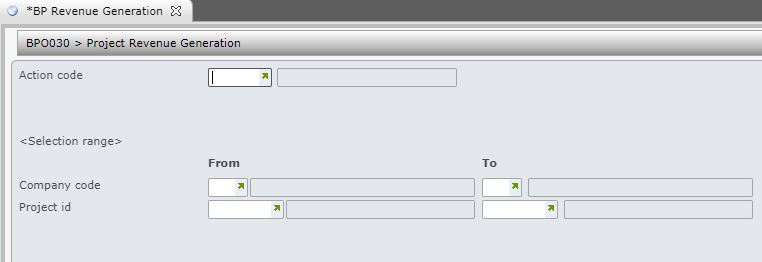
| Field | Description |
| Action code |
An Action is added to the selected Task to perform something. For example Generating Revenue, Generating an ISBN, Generating a Purchase Order. When generating revenue enter the action to generate revenue. |
| Company code | This is the Company for which the revenue is being generated. |
| Project ID | The Project ID identifies the name and/or number of the Project. Every project has a unique project ID. The ID of Project selected is the Project to be posted to the General Ledger. This is the project for which the revenue is being generated. |
- Enter all the required fields and click OK to confirm. Report submitter panel is displayed.
- Select whether to run a program in batch or immediately.
- Click OK to confirm.
