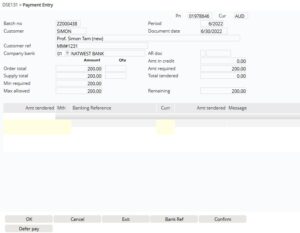
Web Payments process in IP1 allows orders for a nominated company and order type that require payment with order to be eligible for web payment. When an order is eligible for web payment the system allows you to defer the payment at order entry and send an email with the URL link for the payment. The order will remain at ‘E’ entered status while waiting for payment details.
Business rules/Other setup
The following business rules have to be setup to handle Web Payments process. These business rules must be setup with support from Iptor IP1 consultants. It is critical to understand the setting of control files and how it works. Control files must be setup correctly for the system to operate as intended. Any changes to the control files setup should be addressed cautiously and in consultation with Iptor IP1 consultants.
| Note | This document does not cover customised setup tasks of specific companies. Deviations from this setup should be covered by setup tasks written by individual companies. |
| Control files/Other | Setup |
| TMSDS/OE-SUWP1 Pay by web : default 1 |
Nominate the company and the order type that is allowed for web payment. |
| TMSDS/CM-PAYT Payment terms |
Flag ‘Web Pay’ and ‘Payment with order’ for Payment terms that are eligible for web payments. |
| TMSDS/OE-SUSTS Suspend reason code |
Holds payment suspend reason code for web payment. |
| TMSDS/OE-SUWP2 Pay by Web : default for email |
Setup the following details for the email that will be sent on order entry requesting payment detail:
|
| TMSDS/OM-OT0 Order Type Definition |
Ensure the order type setup for web payment in control file TMSDS/OE-SUWP1 is defined in this control file. |
| TMSDS/OM-OT1 Order Type Field Default Rules |
Stock allocation type (field STKALC) must be set to 1=normal for the order type for web payment. |
| TMSDS/OM-PAYT1 |
Setup payment terms for web payment by Customer type. |
| TMSDS/OM-PAYT3 |
Maintain payment type list by payment type. |
| TMSDS/OM-PAYT2 |
Maintain Customer type (TMSDS/OM-PAYT1)) and Payment Type list (OM-PAYT3) for web payment order type. |
| Standard Payment manager control files and Merchant details for credit card processing |
Ensure all the payment manager control files for the service provider and the merchant details is setup accordingly. |
Procedure
It is your responsibility to ensure that you understand this procedure before performing the following tasks.
| Note |
Deviations from this procedure should be covered by procedures written by your company. Before performing any tasks please ensure all the business rules are set-up accordingly. |
| Process | Steps |
|
Sales order entry |
Note: If the payment details are not submitted by the customer then the order will be deleted. |