
The Royalty Account Set is used to determine the accounts to be used when automatic journals are generated for GL posting. The account sets are divided into expense group and payee group for easier management and better performance.
- P&L account set – for royalty and CAL expense
- B/S account set – for payee related
Account formula
- In the menu, expand Publishing Modules > Rights & Permissions > Maintenance> Royalty Accounts > Account Formula and double-click the required account set group. RYM085 Royalty Account Set Formula panel appears.
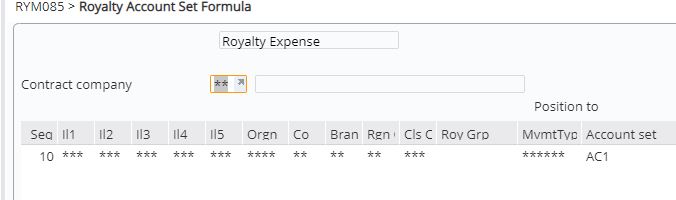
| Note | Blank values indicate there is a selection behind those fields. To view the selection, select the formula, right click option change and click function Multi. |
- Click function Add. RYM085 Royalty Account Set Formula appears in add mode.
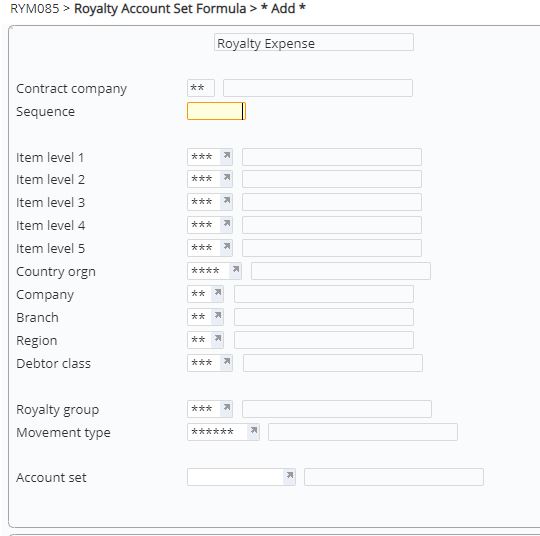
- Enter the sequence number for the rule set.
- The selection details default to catch all. To change the selection from catch all, click function Multi.
- Enter the selection as required.
- Select the account set for the rule and click OK.
- Repeat this process for all the account set groups as required.
Account set
Contract specific accounts can be setup and assigned to contracts or formulas/rules can be setup whereby an account set is selected based on the conditions of the rule set. To setup an account formula;
- In the menu, expand Publishing Modules > Rights & Permissions > Maintenance> Royalty Accounts > Account Set and double-click the required account set group. Existing account sets are displayed.
- Click function Add. RYM080 Royalty Account Set Maintenance appears in add mode.

- Enter the above details and click OK.
- Repeat this process for all the account set groups.
