
- In the menu, expand Base Modules > Distribution > Masterfiles >Database Management > Database Management > Item Masterfiles > Item masterfiles and double-click IM Masterfile maintenance. DSM015 Title Masterfile Maintenance panel appears.
- Select the ISBN for which substitute item is to be added and click option Item substitution. DSM015 Work with Title Substitution panel appears.
| Function | Description |
| Substitution | This function is active when an ISBN is substituted to another ISBN other than itself. Highlight the specific ISBN and select the function, the selected ISBN is now displayed and changes can be made. |
| Insert | Inserts a blank record before the current line the cursor is position to. |
| CustGrp | This function displays the Customer Groups with access to each group if allowed, selecting the detail to maintain for the individual groups substitution |
| WrkSub | This function enables global update by different substitution methods. Sequence 00001 is the immediate substitute and if it reflects the same ISBN as the original, it means that it has no immediate substitutions (other than itself) and any ISBNs nominated after that are only substitutes if the ISBN on sequence 00001 is no longer available (for whatever reason). |
| Field | Description |
| Sequence |
These sequences are the substitute levels. The original item is entered in the first substitute level except for immediate substitution. Order processing will go through the list of substitutions and if necessary backorder the last item on the list or the user can select which item to backorder. |
| Substitute item | This is the item to be substituted as the process progresses through each substitute level. A Substitute title is a valid title that would be supplied if there was insufficient stock of the original title ordered. If the first substitute does not have sufficient stock the system looks at the next substitute title on this list if one has been established. Unlimited levels of substitutes can be setup. If there is insufficient stock of the original and the substitute is available then all the substitutes are offered, not half and half. |
- To insert or replace substitute click function WrkSub. When you first press this function key it shows the ISBN you are currently in, plus method and substitution fields. The window screen that pops up shows you the Cust Group and the ISBN itself as shown below.
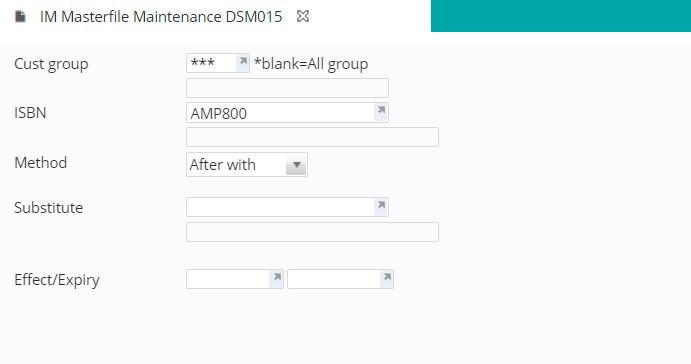
- If you wish to insert a substitute ISBN as its immediate ISBN you Replace the original ISBN (seq 00001) With the ISBN of your choice. Enter the new immediate sub ISBN into the Substitute field.
- If you wish to insert another ISBN in between two others e.g. insert ISBN B after A, but before C, you enter into the ISBN field ISBN A, then you nominate After With option, after which you enter ISBN B into the Substitute field. Alternatively, you can enter ISBN C into the ISBN field, nominate Before with and enter ISBN B into the Substitute field.
- Enter the substitute item.
- On occasions where the substitution need to be time based, i.e. the substituted item is only applicable for a period of time, you can enter effective and expiry dates into Effect/Expiry fields.
- Click OK to confirm the changes.
