
CRM program registration suite of programs controls all the functionality available to manage customers and contacts in the CRM system. Various functions and options are available to the user depending on the set-up in program registration. It is critical to understand the setting and use of variables, function groups and options to ensure it is setup to operate as intended.
Contents
CRM variable registration
CRM Variable Registration program (CRW170) defines all the variables used in the program stack to transfer control from one program to another program within the Customer/Contact Management in CRM.
| IMPORTANT | These variables are system defined; once it is copied or configured to an environment it should not be changed. |
View CRM variables
- Select option CRM Variable Registration from Publishing Modules > CRM > CRM Program Registration menu.CRW170 Variable Registration panel is displayed, listing the CRM variables.

| Field | Description |
| Variable |
Code to define the CRM variable used within the CRM module. Variables are used by the CRM programs to transfer control to relevant programs from within Customer and Contact Management. Following prefixes are used in the variables: * = Constant & = System $ = Parameter |
| Prompt label | Description/Label of the CRM variable. |
| Variable type | Type of variable as defined in TMSCRM/VAR-VTYP. |
| Validation type | Validation type, defined in TMSCRM/VAR-VLDT determines if the next value to be entered will be a control file, value list or a special program. |
CRM function groups
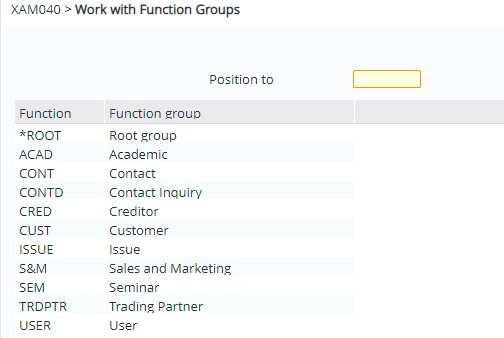
Function groups are simply used to tie different CRM options (programs) together into groups, thus determining what tabs/selections are available to you from each CRM option (assuming your user profile has access to them also – see Work with CRM User Options).
CRM option definition
CRM options are all the options that are made available as Tabs or Options on a panel. In XT:
- Tabs are displayed at the top of the screen. They allow you to change to a different program without necessarily having a specific record selected.
- Right click on a subfile list entry would display a dropdown list of Options.
Tabs and Options are displayed in the XT panel below:

The CRM options (Tabs & the dropdown list entry Options) that is available to a program is determined by:
- User Group security
- Which CRM options are linked to the same function group?
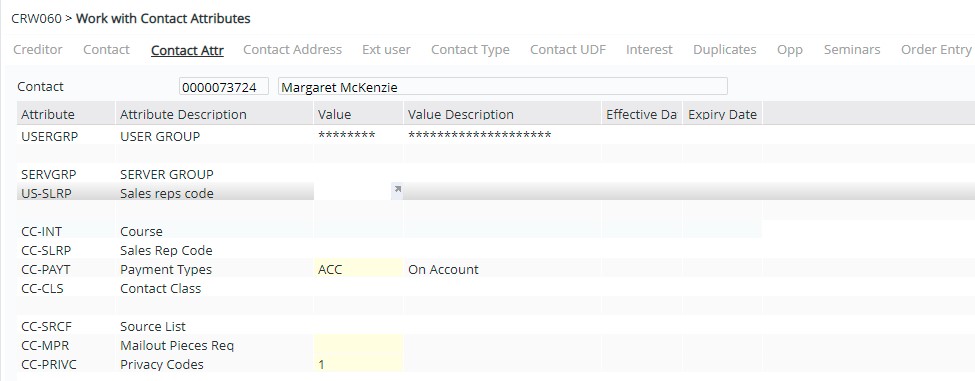
User is linked to a User Group in its CRM attributes. User Groups are defined in control file TMSCRM/CC-USRGP. User Groups can be tied to User Group Access definition with restrictions as well (DSM110).
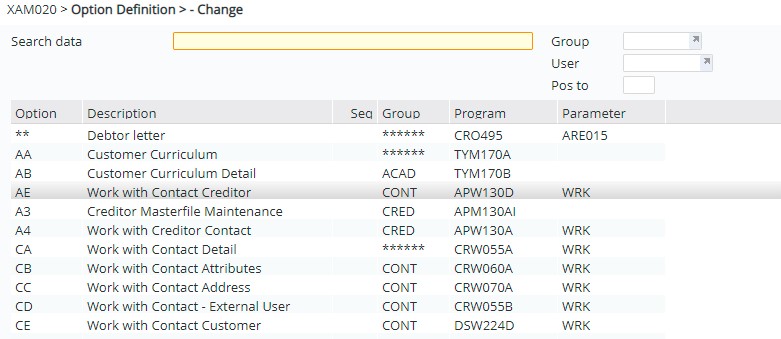
Whichever CRM option (program) you are in at anytime, it is tied to one or more Function Groups. Functions Groups can be accessed via CRM Option Definition:
Select CRM Option Definition from Publishing Modules>CRM>CRM Program Registration menu:
| Field | Description |
| Option | This is the 2 digit code for the CRM option. |
| Program | Program this option will execute when it is selected. |
| Parameter | Parameters to be used on the program call for this CRM option. |
| Description | Description of the CRM option. |
| Label text | Label that will be displayed on the panel for this option; needs to be meaningful. |
| Sequence | This is the sequence the options will appear on the panel. If left blank it will be in alphabetical order. |
CRM user options
Work with CRM User Options allows a user belonging to a User group to have access to the CRM options linked to the User group. The user is linked to the User group via Contact Attributes.
Link CRM options to user group
- Select Work with CRM User Options from Publishing Modules > CRM > CRM Program Registration menu. XAM035 Work with User Options panel appears.

- Select the User group and click option Work with.
- Click Add and enter the CRM option from the select list and click OK.
| Note | If a CRM Option that is setup for a Function Group is not available then check that the user is assigned to the correct User group, and ensure the CRM Option is linked to that User group. |
