
CRM Dashboard in IP1 provides a snapshot of all your incidents in one place thus allowing you to manage all your outstanding incidents from a central platform. It displays all the outstanding incidents in your user department (based on the settings in control file TMSCRM/UA-ACC) outlining what’s overdue. The outstanding incidents are all the incidents with status that’s not ‘Closed’ and not “Rejected’. As a user you must belong to the department to view the incidents for that department. From the dashboard you can drilldown to specific incidents and related activities and its tasks for maintenance while departmental managers can view team performance.
Access CRM dashboard
- In the menu, expand Publishing Modules > Customer Relationship Management > Activity Management and double-click CRM Dashboard. CRW015 CRM Dashboard panel appears, listing all the incidents by department. Only the departments you have access to will be listed.
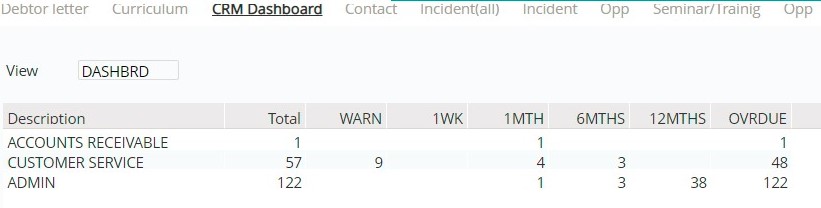
| Field | Description |
| Description | Description of the user group/department that the user belongs to which has outstanding incidents. These dashboard view descriptions are setup in control file TMSCRM/ISS-VW01. |
| Total | The total number of outstanding incidents for the corresponding department. This is all open incidents including overdue and non overdue incidents. |
| WARN – OVRDUE | These column headings after Total (WARN to OVRDUE in our example above) are defined in control file TMSCRM/ISS-VW02. These are user definable and must be setup with the number of days overdue by for each category. When the dashboard is accessed the number of outstanding overdue incidents that falls within these column definitions would be displayed. Blank means no overdue incidents falls into that category. OVRDUE column in this example is total number of overdue incidents. |
Work with an incident
You can drill down to work with any of the overdue incidents by selecting the corresponding option.
- Select the Department and click the required option. The outstanding incidents for the selected department is listed.

| Field | Description |
| Description | Description of Incident level 1. |
| Total | The total number of overdue incidents for the selected option for the department. |
| Pr | Incidents are prioritized with a number in the range of 1 to 9 with 1 being of highest priority. |
| Lv1 – Lv5 | Levels 1- 5 refers to the types of the incidents; Level 1 normally refers to the nature of the incident, levels 2 and 3 is used to identify the area and actions or activity while levels 4 and 5 further classify the incidents as required by the customer. |
- From the list of incidents select the incident you want to work with.
