
The Price in IP1 is derived from the following sources:
- Promotion Package – the initial/backup price and/or discount for the conditions defined
in the Promotional package setup. The initial price and/or discount applies to the first
order (order must have the Promotion ID on it) while the subsequent orders during the
promotion use the backup price and/or discount. However, if multiple promotion orders
are allowed and these orders have Promotion ID on the order then the initial price and/or
discount will be applied. - Special Price – Special price for each customer level defined in the Special price file by
effective period. - Order Form – Order Form price
- Direct Mail – Direct Mail price
- Normal price – Normal price
The search sequence and the Price selection keys in control file TMSDS/SEQ-PRC determines
which of the above price source to be used.
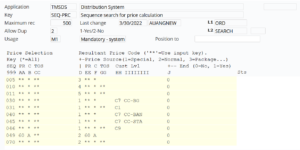
The system can be configured to search for the lowest possible price. Control files TMSDS/PR
LOW and TMSDS/SEQ-PRC must be configured to allow search for a lower price.
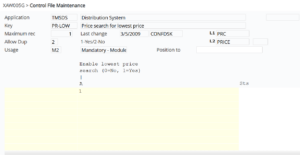
If TMSDS/PR-LOW = 1 and End = 0 (column J) in TMSDS/SEQ-PRC for the defined search
sequences, then the system will continue searching for the lowest possible price.
Note: If a matching promotional price is found and the system is configured to search for the
lowest price, it will only search Normal Price and use the lower price of the two. It will skip
searching for special price, direct mail price or order form price even if defined in the search
sequence.
TMSDS/TR-TOS can be setup to sell at zero price and discount, e.g., for complimentary items
etc.
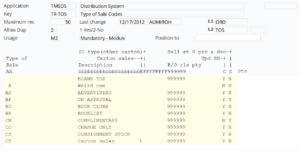
During order entry, the system will check the line item TOS and will override the price and discount
to zero if it’s configured in the above control file.
Note: Manual price and/or discount override during order entry will take precedence over all
except for Bonus Incentives.
The Discount comes from 3 sources:
- Promotion Package discount- the initial/backup discount for the conditions defined in
the Promotional package setup. Promotion Package discount can be defined with non
zero price or zero price. If Promotion Package discount has zero price, then Promotion
Package discount will apply to the normal price. - Special Price discount- Special discount for each customer level defined in the Special
price file by effective period. - Normal discount
Note: Order Form and Direct Mail have their own special price and do not have any discounts.
Special Price discount and Normal discount have discount accumulation codes to accumulate
applicable discounts to give a customer more than one discount if required. The discount
accumulation is based on the following accumulation codes.
Discount accumulation codes
| Code | Description |
| A = accumulate | Will accumulate discount and continue search for further matches. |
| O = outright | Use this discount outright and ignore all the previous discounts. |
| S = stop | Accumulate and stop search for further matches and use the accumulated discount. |
Apart from above discounts, Order based bonus reward options created either
for Coupons, Promotional Packages or Direct Mail campaign lists can affect the order line
discount. These rewards are given by means of discount rate override or an additional discount
on an order line as set up in TMSDS/BO-RWDOP.
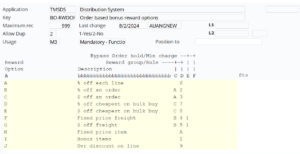
Reward rules:
- 6 = % off each line
This gives an additional discount on top of normal discount. - 9 = Override discount online
This will apply if it is more than the applicable normal discount.
