
When setting up a Contract, one of the fields is the Trade Sale Basis on the Movement detail definition screen. This screen is where the parameters for Rising royalties are established. The Price basis code is required to define the unit price on which the royalties are calculated. One of the choices is Prevailing Rate. This is usually used when the current local prevailing rate is used to determine the rate for calculating royalties on export sales.
Different Royalty rates and Price bases may come into effect, based on predefined transaction quantities.
- In the menu, expand Publishing Modules > Rights & Permission > Period Processing and Others > Monthly Royalty Run and double-click Royalty Prevailing Rate Calc. RYO040 Royalty Prevailing Rate Calculation selection panel appears.
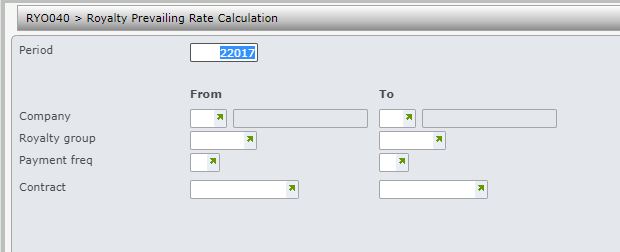
| Field | Description |
| Period | Determine for which period, royalty prevailing rate is to be calculated. This period defaults to current processing period, but can be overridden. |
| Company | This is the Royalty contract company. Select the company for which royalty prevailing rate is to be calculated. Contracts belonging to a range of companies can be selected. User access must be setup for the company/companies in control file TMSRY/UA-ACC and TMSRY/UA-ACT. |
| Royalty group | When a contract is established, the Royalty group is nominated. Contracts belonging to a range of royalty groups can be selected for for prevailing rate calculations. Accruals Post to GL & AP interface can be run for a range of Royalty groups. |
| Payment frequency | When a contract is established, the Payment frequency is nominated. Contracts for a range of payment frequencies can be selected for prevailing rate calculations. Accruals calculations, Accruals Post to GL & AP interface can be run for a range of Payment frequencies. Royalty Statements can print for a specific Payment frequency. |
| Contract | A range of contracts can be selected for prevailing rate calculations. |
- Enter the above information as required and click OK.
