
This program is used to change the different document types from one account period to another accounting period. For example, an invoice that is due in May can be re-aged to July to give the customer additional time to pay. The amount will then not appear on the overdue collection reports until the new due date comes into effect. Another example of the use of the Re-aging facility is when a customer requests delivery on the last day of the month but wants the invoice to reflect in the next month.
An audit trail is produced for any changes made to invoice due dates.
- In the menu, expand Base Modules > Distribution > Debtors & Claims > Accounts Receivable > Other and then double-click Debtor Invoice Re-age. ARE030 Debtor Invoice Re-age selection panel appears.
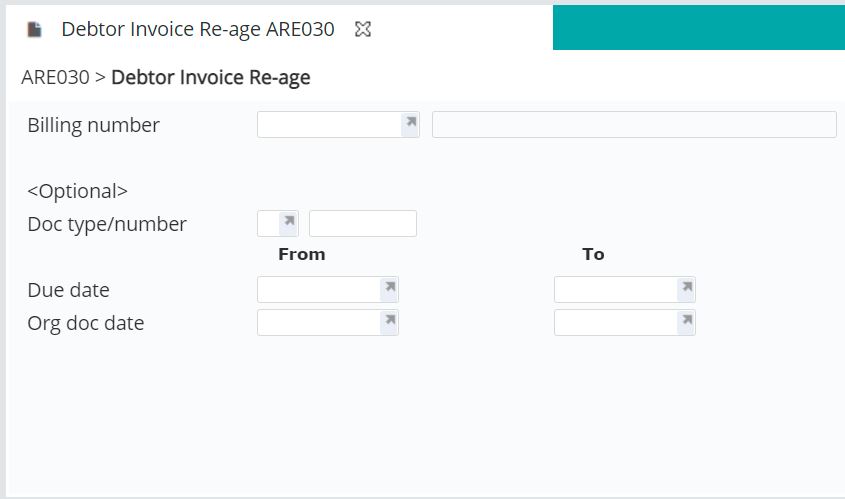
| Field | Description |
| Billing number | Billing number of the invoices to be re-aged. |
| Document type/number | Document/transaction type and the number of the document to be re-aged. |
| Due date | Due date relating to the documents. |
| Org doc date | The Original Due date of the documents. |
- Enter the above details as required.
- Click OK. ARE030 Debtors Invoice Re-age main panel appears.
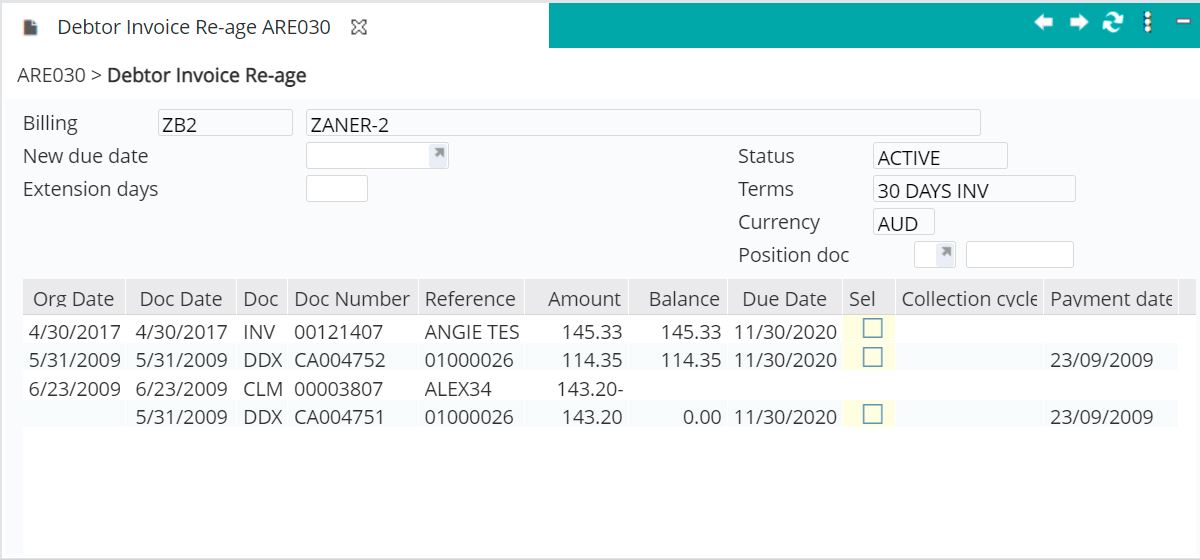
- Tick the box in the SEL column to choose which documents are to be re-aged.
- Enter either the new due date or the number of days for the extension of these document and click OK. Message will appear if due date is less than today’s date.
- Click the Complete function key. Selected invoices gets re-aged to corresponding new due date.
