
The Discount file maintenance program is used for the addition of new discount definition rules, the deletion of existing rules and copying the existing rules to create new rules. Discount definitions determine what price and discount the customers receive when purchasing a title. For example a debtor class could receive a specified discount on items belonging to a specified item level. Discount definitions are created by setting up rules combining multiple customer, item and order attributes. A definition can have individual discount rates for specified periods of time
Discount definition rules can also be set up for Promotion IDs of existing promotion packages and Direct Mail campaign lists.
Entering a sequence number is mandatory when creating a discount definition rule. The discount definition rules are added to the system in the ascending order of sequence numbers. The sequence number is used to decide which rule is to be used when more than one discount rule exists. When sales orders are processed, system will look at the rules in the system and will apply the first valid rule to the order.
Further, a single time period can have up to ten different rates depending on the quantity purchased. To do this, specify a quantity break, which means to enter a minimum quantity to be purchased and then specify a rate as the break discount.
Add a discount definition rule
Standard discount definitions
- In the menu, expand Base Modules > Distribution > Masterfiles >Database Management > Database Management > Item Masterfiles > Price & Discount and double-click IM Discounts. DSM033 Work with Discounts panel displays the discount matrix set. The set sequence is maintained in control file TMSDS/SEQ-IDIS.
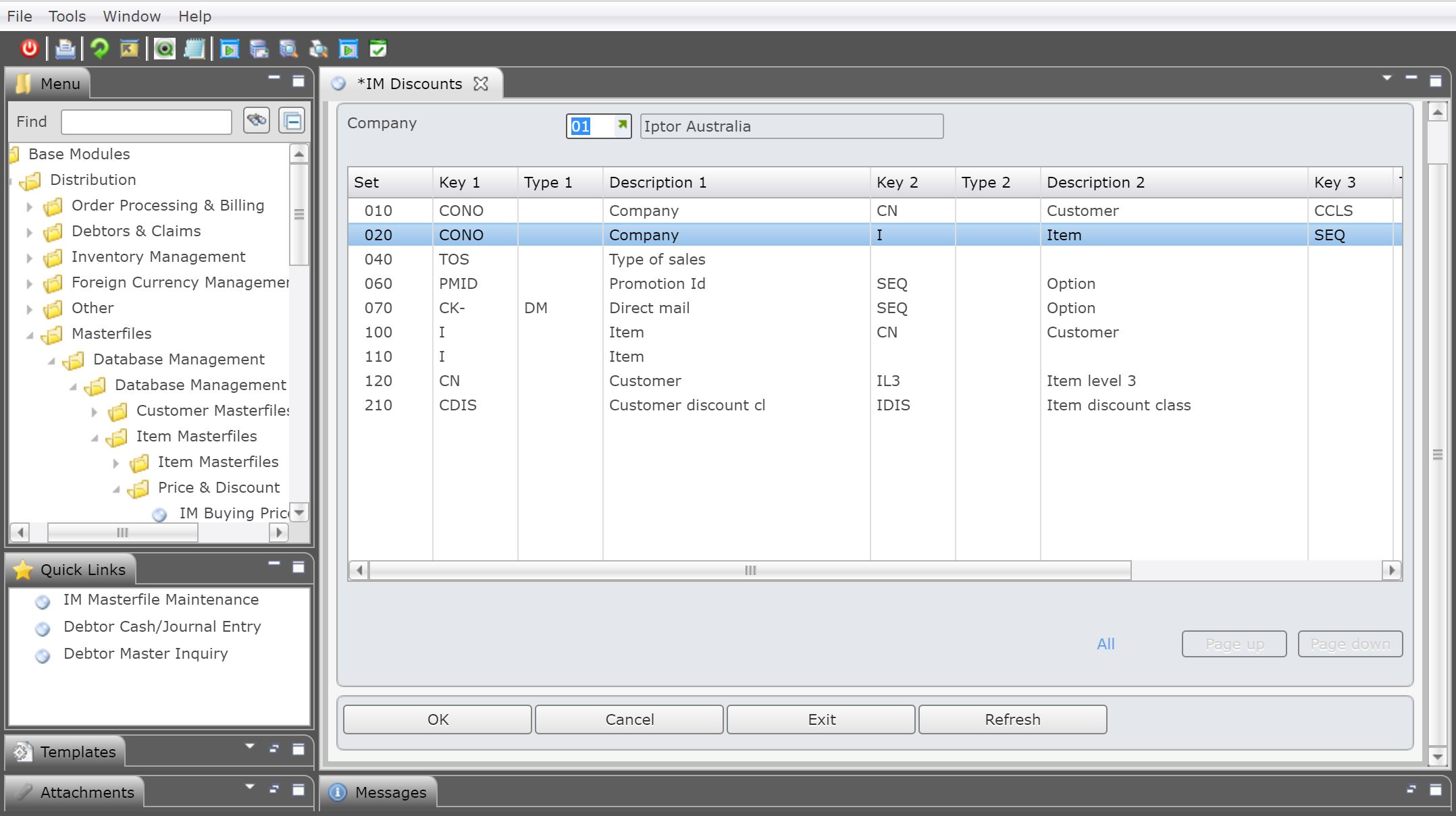
- Select the set to add the discount definition rule to. Existing definition rules for the set appears. The set sequence selected in this example is by Company (Key 1), Item (Key 2) and SEQ (Key 3). Using SEQ as a key allows multiple selections using different fields.

| Options | Description |
| Rate | Access the DSM033C Discount Rate maintenance panel where effective/expiry periods, quantity brakes and discount rates are set up. |
| Rule | Access the DSM033C Discount Rule maintenance panel where discount definition rules are set up. |
| Copy | Copy a selected discount definition rule and allow user to create a new rule with a new sequence. |
| Delete | Delete a selected discount definition rule. |
- Click Add to add a new definition. DSM033C Discount Rule Maintenance panel appears in add mode.

- Enter the values for the fixed keys, Company and Item in this example.
- Enter the next sequence number for the variable field Option.
- Search and select the fields and enter the value/s (to be included/excluded) for the selected field.
| Field | Description |
| Field | Select the fields to be included in the discount definition rule. |
| Option | The option to be used for the selected field against the values specified in the next field, example 2=Select List, 3=Omit List etc. |
| Values | Values to be used with the specified field. |
- Click OK once all the fields and values are added. DSM033C Discounts Rate panel appears.
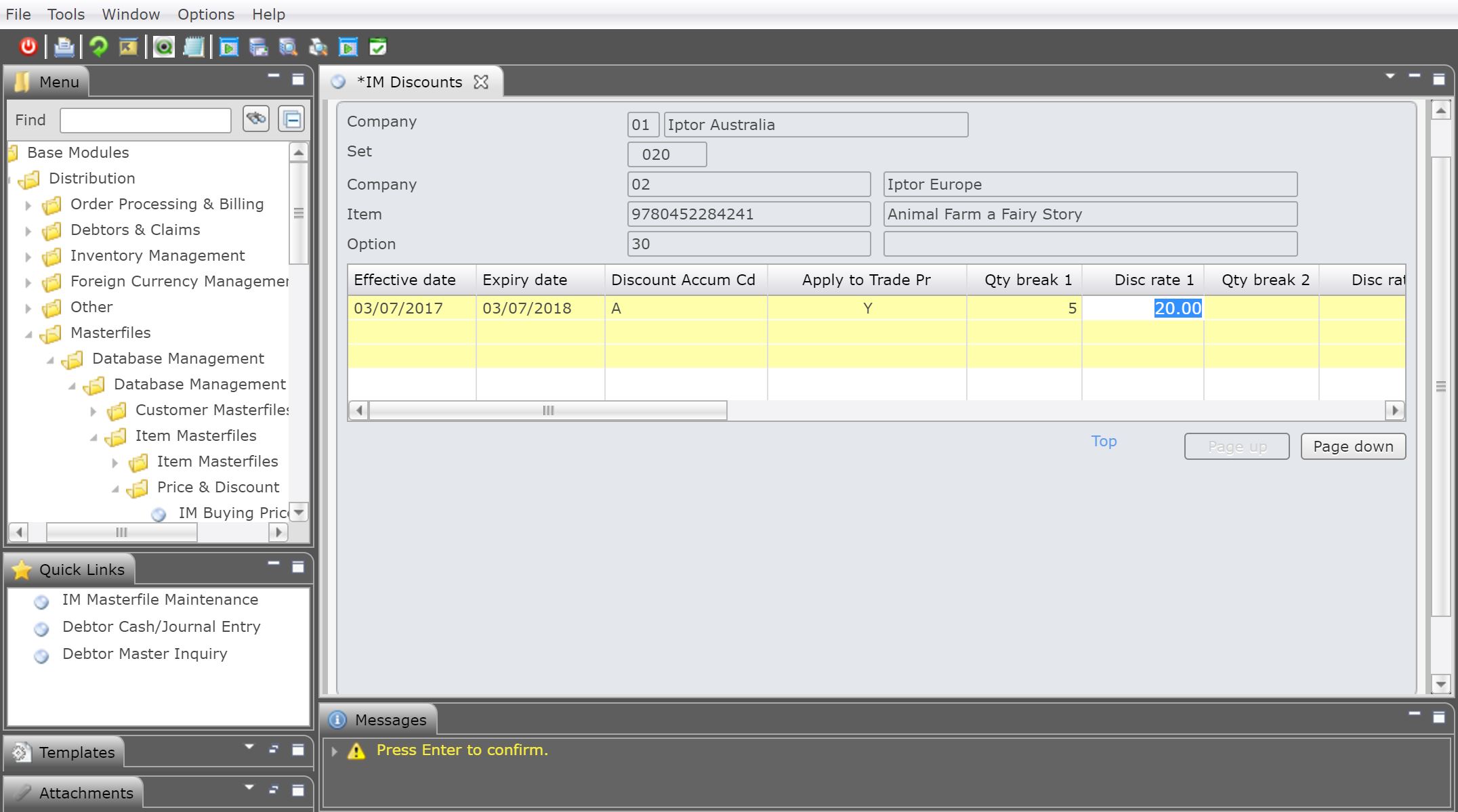
| Field | Description |
| Effective date | The discount will be effective from this date onwards to the expiry date. |
| Expiry date | Date when the discount will cease to be effective. |
| Discount accum Cd | A = Accumulate- means that when you have more than one discount for this combination on item & customer, the system will accumulate the discounts. For example,
You can set up a discount for a group of customers and items at say 25%, which will apply in normal circumstances, but you may wish to say if a particular customer from this group buys this item you want to give them a further 5% discount. You would then put A in both definitions, so it will add these 2 together so the customer will get 30% discount when they buy this item. S = Stop will use the sequence control file to say do not search for any further matches to this customer/item level after this sequence has been reached. O = Outright discount means that only one Title Discount Rate applies irrespective of the Customer Key Levels. It ignores all previous discounts and only uses this one. |
| Apply to trade Pr | In the case of a customer with multiple Customer Key Levels for one particular title, the Apply to Trade function determines how the discount price is being calculated.
A customer can have multiple customer key levels relating to one particular title. The system refers to all discount codes stored in the customer levels to form one discount price. When this flag is Y all discount rates stored in those multiple Customer Key Levels are calculated on the full trading price. If set to N the initial discount rate is calculated on the full trading price, whereas the additional discount rates stored in the corresponding Customer Levels are calculated on the now discounted trading price. |
| Qty break | It is possible to enter up to 10 quantity breaks and discount rates. For each quantity break column user can specify the minimum quantity to be purchased for the discount to be applicable. |
| Disc rate | It is possible to enter up to 10 quantity breaks and discount rates. For each break discount column specify the discount rate applicable to the minimum quantity specified in the quantity break column. |
- Click OK and the discount definition rule is added.
Discount definitions for promotions and Direct Mail campaign lists
| If you want to… | Then… |
| Add a discount definition rule against a promotion ID |
|
| Add a discount definition rule against a Direct Mail campaign list |
|
