
This program displays the generic file changes journals for review.
Display journals for review
- In the menu, expand Other Options > Cross Applications Support > Journal Management and then select Generic journal display file changes. JNI200 Display Journals panel appears, listing all the database files in the log.
- Select the file you wish to review. All the Add, Update and Delete entries for the selected file is displayed.
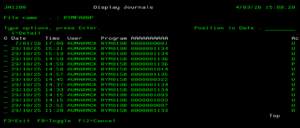
| Field | Description |
| Date | Date of the change. |
| Time | Time of the change. |
| User | User ID of the user who initiated the change. |
| Program | Database file that was changed. |
| AA/BB/CC | These columns display the database file keys for each of the records that was changed |
| Ac (Action) | U = update, D = delete, P = put (add) |
- Select the journal to view the change.

| Field | Description |
| K | Highlights the database file key. |
| Field description | Description of the field. |
| Field value | Displays the value of the field. |
The changed fields will be highlighted as displayed above. Use function F10=Before/After to display the before and after look. Note: Before and After look is only available if it is configured in control file ********/JNL-FIL. Refer to control file settings in SOP – Generic journals for file changes.
