
The program allows easy selection of orders to be picked. Picking Slips or entire Order Categories can be selected to be placed in a run.
The advantage of a Picking Slip pool is:
- Order consolidation
- Release of orders to suit warehouse productivity
If the Order Category type is defined by Carton Type and is pointing to the Device Type that is set to generate a batch carton, the picking slips are automatically split into summary picking runs based on cubed capacity of the Device Type.
If an order has 0 weights or 0 volume the order volume is kept on WHTRA00P so it is changed to use it rather than calculating the weight. This is because system stops releasing process when it reaches the maximum weight limit.
Orders that reach the warehouse and are released to pick but cannot allocate stock may either be reversed from the run and produce an error report, or they can be allowed to backorder non-pick-able lines if the reason for non-availability is selected.
Lines that cannot allocate picking stock and which are not permitted to backorder will get lost.
There is an extra option on the backordering of unavailable stock, to govern whether we can attempt to backorder and lose lines where backorder is not accepted. This “allow lines to be lost flag” would mean that lines which cannot be picked, and which cannot be backorders would cause the order to reverse to the order categories, even though other orders, which would accept backorders on non pick-able lines, would be permitted to backorder those lines and proceed with delivery of other lines.
Selection of pick plan
- In the menu, expand Base Modules > Distribution > Inventory Management > Warehouse Management > Warehouse Control > Work Management > Controls and double-click WH Release orders to pick. WHM070 Warehouse Pick Plan Selection panel appears.
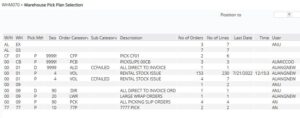
View available options on this panel
| Options | Description |
| Orders | Displays Warehouse orders by category. |
| Select | Access Pick run selection to view runs. |
| Unavaiable | Access WHI320A Unavailable item Inquiry to view unavailable item details. |
| Rtn to Cust ser | Return to Cust Service takes immediate affect by sending the orders back to Customer Service for review. |
| Functions | Description |
| Units/weight | Units/weight switches between Units/weight and Orders lines. No of units displays the total number of pick units in the entire order category available for pick plan selection. The weight is the weight in kilograms of all the units in the order category. Order lines will show the number of orders in the category and the number of lines on those orders in the category. |
| Details | Details show the date the order category was last selected for release and the user responsible for the last release of this order category. |
| Field | Description |
| W/H | The Warehouse code is made up of warehouse location and branch code. The default is set up in TMSWH/WH-DFT and can be changed if required. |
| Pick mthd | Order picking method. |
| Seq | Sequence indicates the order of priority for each order category in relation to pick plan selection. |
| Order category | The order category groups orders into manageable batches based on the order type. |
| No of orders | Indicates the number of orders contained in each order category. |
| No of lines | Indicates the number of order lines across all orders contained in the order category. This field switches to display the weight. |
- Select a record and click Select. WHM070 Pick Run Selection panel appears.

| Field | Description |
| Run description | Run descriptions are used to give the run a name by which it can be identified within the system.
In Release Orders to Pick and Build Order Replenishment W/F, a user defined Run Description is mandatory. For example if it is a replenishment run or cleanup run, this may be indicated in the description. |
| Run priority | In Release Orders to Pick, the entry in this field defaults from Order Category Maintenance but can be overridden to change the sequence in the Warehouse Run Control. Runs are placed in order of priority, including Cleanup Runs and Order Replenishment Runs, the highest being 1. The lower the priority number, the higher the priority. |
| Device type | In Release Orders to Pick for RF warehousing, the default in this field is taken from Order Category Maintenance but can be overridden if required. This field is used to assign the run to a device type which is used for picking the goods. |
| Preferred delivery date | Override the delivery date on the order header file (DSTRA00P) to be used for the delivery date on con note.
In Warehouse Order Inquiry by Category, the customer’s preferred delivery date by which the order should be processed and dispatched, displays. |
| Maximum no of orders for all selected orders | Maximum no of orders for all selected orders
In Release Orders to Pick this is one of five Optional Limit fields used to restrict the number of orders released to pick. When the total number of orders released to pick equals this limit, the current order continues onto the picking run but no further orders are released. |
| Maximum no of orders create new run when run exceeds | This is one of five Optional Limit fields used to split orders into separate picking runs. When the number of orders released to pick so far, equals this limit, a new picking run is created and number of orders accumulation recommences. |
| Maximum no of lines for all selected orders | Maximum no of lines for all selected orders
In Release Orders to Pick this is one of five Optional Limit fields used to restrict the number of orders released to pick. When the total number of order lines released to pick equals or exceeds this limit, the current order continues onto the picking run but no further orders are released. |
| Maximum no of lines create a new run when run exceeds | This is one of five Optional Limit fields used to split orders into separate picking runs. When the number of order lines released to pick so far equals or exceeds this limit, the current order continues onto the current picking run, a new picking run is created and number of order lines accumulation recommences. |
| Maximum no of units for all selected orders | Maximum no of units for all selected orders
In Release Orders to Pick this is one of five Optional Limit fields used to restrict the number of orders released to pick. When the total number of units released to pick equals or exceeds this limit, the current order continues onto the picking run but no further orders are released. |
| Maximum no of units create new run when run exceeds | This is one of five Optional Limit fields used to split orders into separate picking runs. When the number of units released to pick so far, equals or exceeds this limit, the current order continues onto the current picking run, a new picking run is created and number of units accumulation recommences. |
| Maximum weight (kg) for all selected orders | This is one of five Optional Limit fields used to restrict the number of orders released to pick. When the total weight of orders released to pick equals or exceeds this limit, the current order continues onto the picking run but no further orders are released. |
| Maximum weight (kg) for all selected orders | This is one of five Optional Limit fields used to restrict the number of orders released to pick. When the total weight of orders released to pick equals or exceeds this limit, the current order continues onto the picking run but no further orders are released. |
| Maximum weight (kg) create new run when run exceeds | This is one of five Optional Limit fields used to split orders into separate picking runs. When the weight of orders released to pick so far equals or exceeds this limit, the current order continues onto the current picking run, a new picking run is created and weight accumulation recommences. |
| Maximum volume for all selected orders | This is one of five Optional Limit fields used to restrict the number of orders released to pick. When the total volume of orders released to pick equals or exceeds this limit, the current order continues onto the picking run but no further orders are released. |
| Maximum volume create new run when run exceeds | This is one of five Optional Limit fields used to split orders into separate picking runs. When the volume of orders released to pick so far equals or exceeds this limit, the current order continues onto the current picking run, a new picking run is created and weight accumulation recommences. |
- Key in required fields and click OK. The report shows whether or not all orders were able to be selected or whether lines are backordered, checking TMSWH/PCK-BORD.
From Select Order – Override Backorder Decision (additional parameters)
This example describes how to From Select Order – Override Backorder Decision (additional parameters).
- Repeat steps 1 and 2 as in Example 1: Selection of Pick Run
- Click Add parameters for the option to override the “Backorder” decision.
| Note | To display order details/ inquiries/ return to customer service/force to backorder/ display document details, select the title and click on the corresponding option. |
WHM070 Pick Run Selection panel appears in change mode.
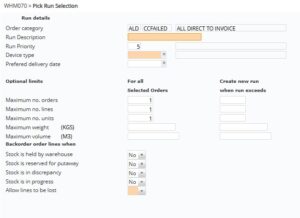
| Field | Description |
| Stock is held by warehouse | This defaults from TMSWH/PCK-BORD and can be overridden. This is used to indicate whether stock is to be backordered if it is currently held by the warehouse. |
| Stock is reserved putaway | This defaults from TMSWH/PCK-BORD and can be overridden. This is used to indicate whether stock is to be backordered if it is currently reserved for putaway. |
| Stock is in discrepancy | This defaults from TMSWH/PCK-BORD and can be overridden. This is used to indicate whether stock is to be backordered if it is currently in progress. |
| Stock is in progress | This defaults from TMSWH/PCK-BORD and can be overridden. This is used to indicate whether stock is to be backordered if it is currently in progress. |
| Allow lines to be lost | When releasing to pick if this flag is set to ‘0’, then the line will reverse rather than become lost. |
- Select required fields and click OK. The report shows whether or not all orders were able to be selected or whether lines are backordered, checking TMSWH/PCK-BORD.
