
This process allows IP1 to do an automatic collection of outstanding invoices based on a specified selection criteria. Automated AR Collection cycles can be created with batch numbers to identify each cycle. The cycle can have a biller list or a range of billing accounts included. The payment details of the cycle can be maintained, including adding/removing billers & transactions. Billers must be linked to the collection method in the collection cycle, other wise they cant be included in the collection cycle.
Invoices are selected based on the selection criteria of the collection run. Collection limits indicate the maximum amount that can be automatically collected at anyone time from a customer. Collection calculation rules will determine if claims are to be included or excluded from the collection amounts.
A report summarising the selected invoices can be generated for review by the Accounts Receivable department before the collection is finalised. Any claims or changes can be processed before the collection is finalised. Non collectables from previous collections can be removed from the collection list as well. This can be achieved by changing the collection method for the customer to either non payment collection method or leaving it blank.
With the use of Formsmaster the collection requests and advices can be emailed to the customers along with the selected payment list. The email and contact information will be retrieved from the contact database in Customer Relationship Management. If the contact email does not exist then the system will generate a letter with the selected invoices which can be printed and mailed to the customer. Standard templates can be setup for the collection request advice and the final collection advice.
When the selected payment list is verified, the collection cycle can be finalised. On successful finalisation the status of the cycle will change to closed. This will generate the collection advice (final email/letter) and a bank interface file with the direct debit or the credit card details. Specific bank interface files can be setup as per bank’s requirements. Finalisation will update the debtor invoices and create the Accounts Receivable transactions for General Ledger posting at end of day or end of month process.
If the credit card payment fails on finalisation, failure notification letter can be generated and the customer history updated with the failed transaction. The status of the cycle will remain open.
Any uncollectable amounts reported by the bank have to be adjusted via manual reversals. Customers with uncollectable amounts can be setup with a non payment collection method for further review.
Business rules setup
The following business rules have to be setup to handle AR Automated Collections. Business rules for AR Automated Collections must be setup with support from Iptor IP1 consultants. It is critical to understand the setting of control files and how it works. Control files must be setup correctly for the system to operate as intended. Any changes to the control files setup should be addressed cautiously and in consultation with Iptor IP1 consultants.
| Note | This document does not cover customised setup tasks of specific companies. Deviations from this setup should be covered by setup tasks written by individual companies. |
| Business rules | Setup |
|
TMSDS/CM-CLMT Collection method |
Set up the collection method codes that will be used as a basis for customer selection to be paid by automatic AR collection. This control file should also have the program that will be invoked to generate the bank interface file with direct debit details. If payment failure notification (letter) is required for failed credit card payment then Letter 3 can be used to specify the letter format code to be used for the notification letter. |
|
TMSDS/CM-CLLM Collection limit |
Indicate the maximum amount that can be automatically collected at any one time from the customer. 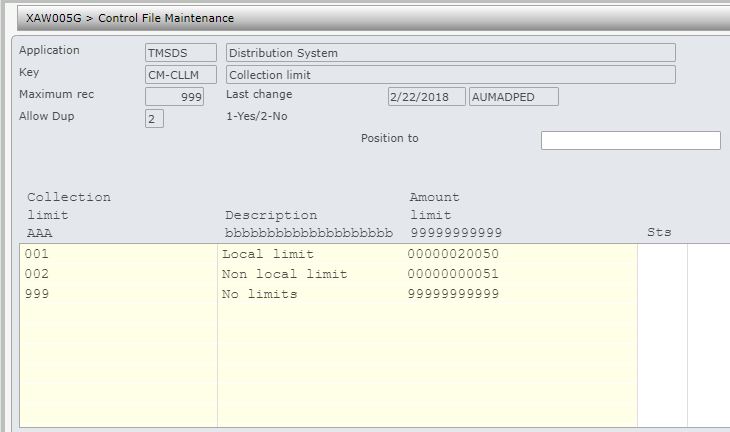
|
|
TMSDS/CM-CLCR Collection calculation rule |
This is the setup calculation rule with codes to indicate if claims should be included or excluded from the amount limit. 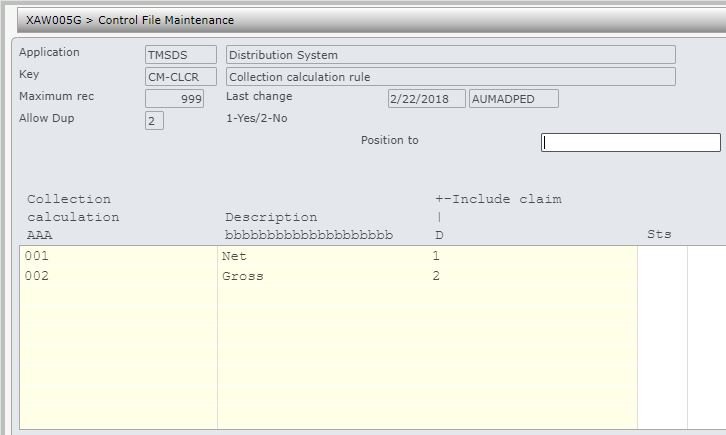
|
|
TMSAR/BK-PAYT Payment/journal types |
Add new payment type for automated payment transaction. 
|
|
TMSAR/PM-PTFLD Required fields for payment type |
Add new payment type created in TMSAR/BK-PAYT and include field STRD (start date) to store the due date from the selection run. 
|
| ********/PM-BNKV1 Bank code – Valid code by function |
Add function ‘AR-AUTCOL’ and the required bank codes. 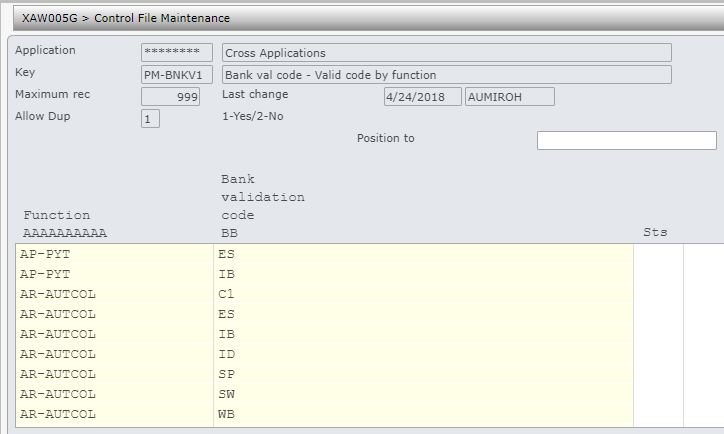
|
|
********/PM-BNKV2 Bank code – Description by company |
Add the bank codes (as setup in ********/PM-BNKV1) and its description by company code. 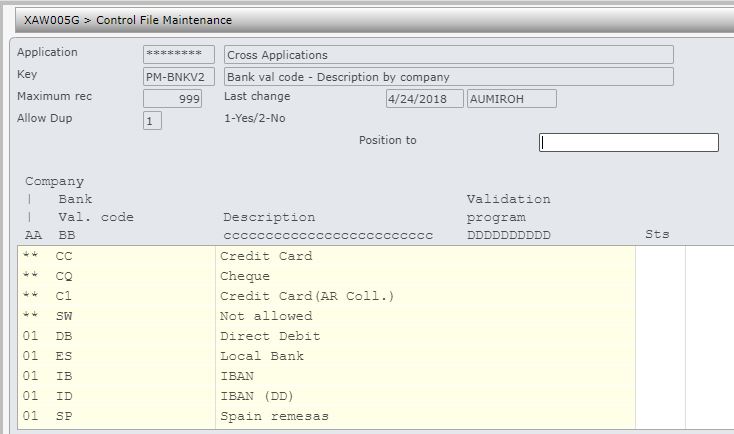
|
|
********/PM-BNKV3 Bank code – Field definition |
Add all the bank fields that will be required by the bank codes. 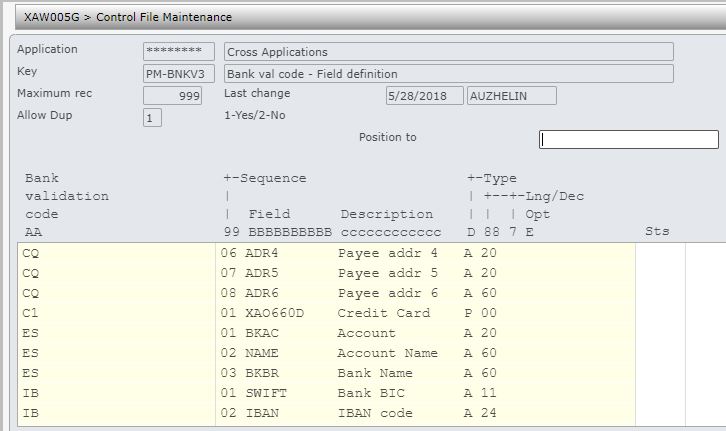
|
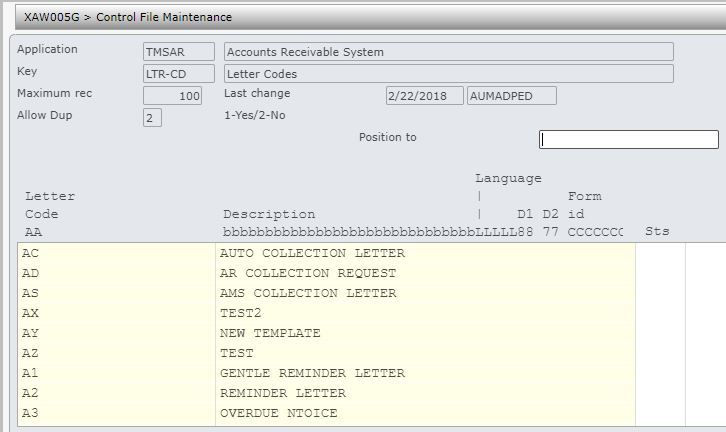
| TMSAR/LTR-CD Letter Codes |
The letter codes are used to set up different customer letter formats. Add new letter codes for:
|
| TMSAR/LTR-VAR |
This is a system control file with all the variables for various letter formats. For credit card payment failure notification ensure the following variables are defined in the control file.
|
Other setup
Customer’s payment details (bank or credit card) must be linked to a collection method before the customer (biller) can be included for payment via AR auto collections. This is done via DSM005 Customer masterfile maintenance through option AR Collection Maintenance.
Setup letter templates for the collection request (initial), collection advice (final) and payment failure notification letters to be sent or emailed to customers via Debtor Letter Format Maintenance.
Note: If letters are setup to be emailed then ensure contact email addresses are setup in contact database in Customer Relationship Management.
Collection Process
It is your responsibility to ensure that you understand this procedure before performing the following tasks.
| Note |
Deviations from this procedure should be covered by procedures written by your company. Before performing any tasks please ensure all the business rules are set-up accordingly. |
| Process | Steps |
| Create collection cycle |
Refer to Create the auto collection cycle. |
| Review summary of collection |
Refer to Print collection summary of selected transactions for checking. |
| Maintain any changes |
Maintain any changes for the collection cycle. Refer to Work with collection cycle. |
| Email collection requests | Email/Mail auto collection request (initial) letter with the selected invoices for payment. F10=Letter will automatically send the collection request to the spool file and if the contact email address exists it will email the collection request, otherwise the collection request has to be printed and mailed out. This step can be skipped in the one step process. |
| Process/update o/s claims | Update any changes to the collection cycle and process any new claims that customers put forward. |
| Finalise collection cycle |
The collection cycle can be finalised via:
This will:
If the credit card payment fails, the system will update customer history if tracking is turned on (TMSAR/CH-TYPD by field ‘STMCCF‘). It can also create a payment failure notification letter using specific letter format for credit card payment failure as specified for Letter 3 on TMSDS/CM-CLMT. Failure notification details are specified by the letter code variables defined on the letter format. |
| Review non payments |
You can view failed credit card collections via:
If there is any non payments then enter manual reversals. |
