
This is the address where the goods ordered by this customer are delivered. Each customer can have up to 999 different delivery addresses. Apart from the primary delivery address, each subsequent delivery address is identified by a three digit number and one of these addresses can be nominated as the preferred delivery number. These codes are used for all future references to the delivery addresses.
If a delivery number is the preferred deferred number the record cannot be deleted. The postal address, as entered in the main screen defaults as the main delivery address when creating a new account but can be overridden in the delivery address maintenance screen. If the postal address is the same as the delivery address (that is not a PO Box number) no changes are needed. If there is no delivery address on this field and a delivery address is not entered when a sales order is created, the system uses the customer masterfile address as the delivery address, not the billing account address. Delivery address lines 0 to 2 are text lines where building and street details are entered. Line 3 is for the suburb/city, line 4 is state, line 5 is postcode and line 6 is for the country. There is a validation option on both the suburb and postcode fields activated by setting up TMSCRM/AV-CNTRY. Sales analysis is performed on customer accounts, not delivery addresses within a customer account. During sales order entry the operator can override the main delivery address by selecting a delivery address code. Delivery address overrides during sales order entry can cause the order to pend for review by an authorized user. Refer to the Pending documentation for more details on pending matters.
- In the menu, expand Base Modules > Distribution > Masterfiles >Database Management > Database Management > Item Masterfiles >Customer Masterfiles >Customer Masterfiles and double-click CM Masterfile maintenance. DSM005 Customer Masterfile Maintenance panel appears.
- Enter the Customer no in the field provided.
- Select option Delivery Address Maintenance. DSM010 Customer Delivery Maintenance panel appears.
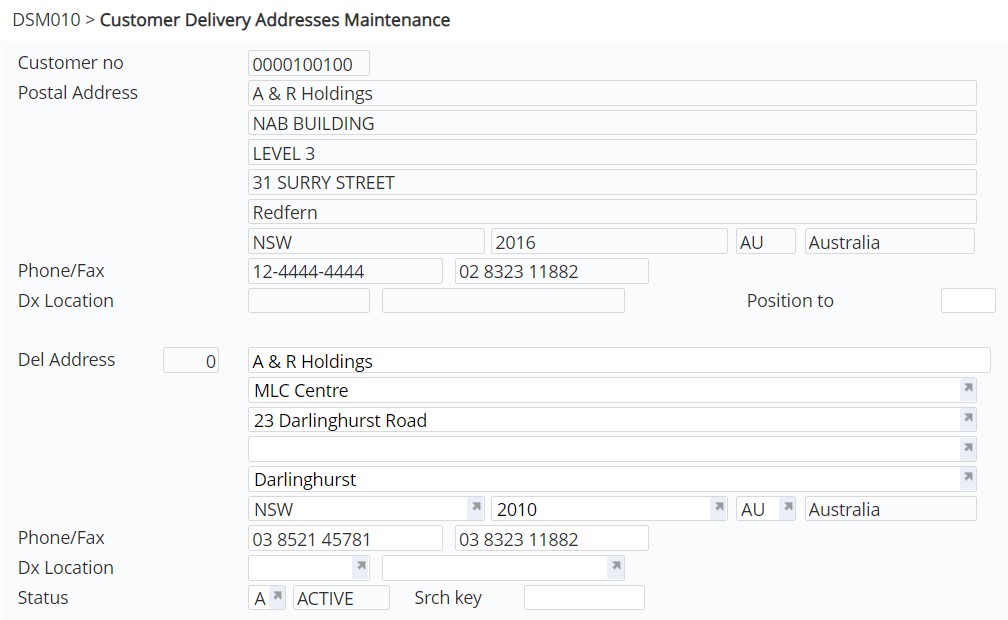
View the fields on this panel
| Field | Description |
| Customer no. | Customer account number for the delivery address. |
| Postal Address | Postal Address of the above Customer account. |
| Phone/Fax | Phone and fax number for Customer contact. |
| Dx | An optional entry field for the Document Exchange number and location (DX location). |
| Status |
This is the status of a customer account which determines whether an account is open or closed for transactions. A = Active Orders can be entered and maintained for customers with an active status and are processed normally. C = Closed Orders cannot be entered or maintained for customers with a closed status. The next time a purge of the Customer Masterfile is run, all customers with a closed status are deleted from the system if the balance of the account is zero and the transaction history has been purged. S = Stopped or Suspended Orders can still be entered and maintained for customers with a stopped status however they are always pended before Dlv Srch Key processing. |
| Srch key |
Entry of an alpha search keyword is optional. Enter the keyword you want to search for and the system positions the cursor on the matching word when found. For example if you want to search for a particular suburb. |
- Enter/maintain the above information, as required.
