
Contents
Add a new title
- In the menu, expand Base Modules > Distribution > Masterfiles >Database Management > Database Management > Item Masterfiles > Item masterfiles and double-click IM Masterfile maintenance. DSM015 Title Masterfile Maintenance panel appears.
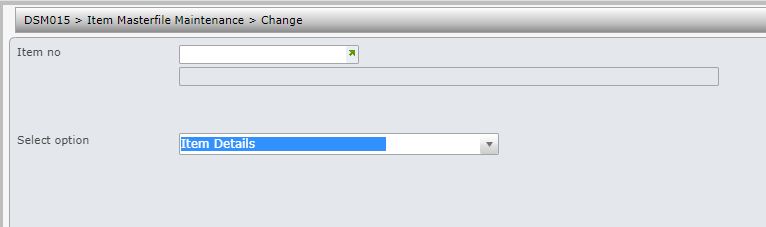
| Function | Description |
| Copy | Access title masterfile maintenance to copy selected existing title into a new definition. Information copied includes component details for packs, pricing and title classifications. Any works linked to the item being copied will not be copied across. |
| Next | Selects next title from the title masterfile. |
| Previous | Selects previous title from the title masterfile. |
- Click function Add. DSM015 Title Masterfile Maintenance in add mode appears.
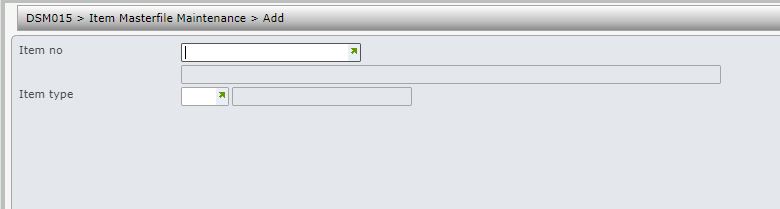
| Field | Description |
| Item no | International Standard Book Number (ISBN) that uniquely identifies a book or an inventory item in the system. It can be an alphanumeric Product code or an Item code. ISBN Lengths are determined in TMSDS/IM-LNG. If the new ISBN or Code does not equal the Control File setup, the system displays the following message: Warning Invalid Title Length In TMSDS/IM-CHKD a check digit can be setup. If the new ISBN entered does not match the check digit the system displays the following message: Warning: Invalid check digit on ISBN. If only a warning message is given, <ENTER> is pressed to continue. If the system displays the message “This ISBN already exists on the NEW Title Masterfile”, use the Transfer option available in the Unapproved Title Maintenance function to transfer the title from the New Title Masterfile to the main Title Masterfile. In Title Default Maintenance the field is referred to as Title (prefix/suffix). If a Prefix or Suffix is nominated here, titles that are created using this template have this detail added to the ISBN. If using multiple books for a project the ISBN for each book within the project must be different and the ISBN field on the project header must be left blank. Each paper code must be linked to a IP1 ISBN when paper is ordered, through the IP1 system; the corresponding IP1 ISBN is retrieved. |
| Item type | Select one of the Templates or ISBN Type codes used to identify a Template and the defaults. TMSDS/LA-IMMUT holds the user’s who must enter a Template code or Title Type when creating a new Title. HINT: If an invalid user code is setup on the Control File an optional Title Type entry is allowed. |
- Enter the above fields and click OK. The first panel for title detail entry appears.
| Function | Description |
| Long desc | Access item long description to add additional text which can be used in the search facility. Multiple long descriptions in multiple languages can be held for an item. |
| Field | Description |
| Title | This is the name or description of a new title. This is used in reports and inquiries and may be truncated depending on the space available for display purposes. 40 characters are available in this Description field and another 40 characters in the Extended Description field. |
| Level 1-5 | Level codes form part of the Item Classification hierarchy. This analysis code is important for on-line Sales Analysis, inquiries and reports. It is used, for example, in financials and purchase planning. There are 5 level hierarchy codes in the Title masterfile but not all levels have to be used. If a change is made to the hierarchy once processing has started, the Sales History files may need to be rebuilt. Level 1 - referred to as the Title class. Level 2 - referred to as Title division. Level 3 - referred to as the Title group. Level 4 - referred to as Title category. Level 5 - referred to as the Title sub category. |
| Barcode | This is the barcode that uniquely identifies this title to the warehouse system. This number can be computer generated based on the ISBN using either the (European Article Number) EAN13 Bar Code Standard or the (Australian Product Number) APN. TMSDS/IM-IBCD is setup to generate default barcodes when adding a new title and to determine which Bar-coding standard to follow. When an APN barcode is manually entered, a check digit must be entered. A scanning facility may be used to register goods that are received into the warehouse. The scanner reads and records the barcode of an incoming product, which in turn retrieves the appropriate Title and Title details. Depending on the setup in TMSDS/IM-IBCD, a barcode can be added to existing Title by selecting F4 in this field. |
| Alternate ISBN | Instead of typing the full ISBN this short cut code is entered and the system displays the full ISBN. An Alternate ISBN can be the same as the ISBN.
A valid ISBN that would be supplied as an alternative if there was insufficient stock of the main title ordered. |
| Text Content | Titles with the same content but different ISBNs can be grouped using this field. Normally this is the International Standard Text Code (ISTC) number. If grouping is required then enter a valid number; the mapping for this number is maintained in control number BP-ISTC. Use the search facility to search for all existing numbers in the system or alternatively add a new number via DSW020. |
| Supplier Item | This is the code of the product used by the supplier to identify the item. For example: ACME BOOK may be known by suppliers as BOOK 5859. |
| Status | This identifies the status of the title to the system. Valid statuses are:
A = Active. Titles with an active status can be entered and maintained on orders and are processed normally. A new record will usually have an Active status. C = Closed. Titles with a closed status cannot be entered or maintained on orders. The next time a purge of the Title Masterfile is run all titles with a closed status are deleted from the system on condition there is no history for that title. Closed Titles can be returned. TMSAR/CE-VALIS determines whether Customer Claims can be entered for closed Titles. S = Stopped or Suspended. Titles with a stopped status can still be entered and maintained on orders however the orders always pend (Reason Y) before being processed. This status is usually used as a temporary suspension. The title is never purged with a stopped status. TMSAR/CE-VALIS determines whether Customer Claims can be entered for suspended Titles. |
- Enter the above information, as required.
- Click Page down.
| Field | Description |
| Comment | Title masterfile comments allows you to record comments pertaining to this title. For example product specifications, installation notes, etc. This comment displays on the Title Masterfile Inquiry and P&A Inquiries. |
| Stock report | This code is printed on the invoice when the full quantity of a stock title ordered cannot be supplied and/or results in a backorder being created. The codes indicate the reason for insufficient stock. These are user defined codes and examples are: discontinued, indent title, faulty, out of stock, out of print. As invoice formats are user defined, the print program can print both this code and its description when advising a customer of the stock status of a title. An alternative is to pre-print the meaning on these codes on invoice stationery in the form of a legend.
These Codes display on Format 1 of the Alpha Search Screen. Stock Report codes are established in TMSDS/IM-STKR. TMSDS/IM-STKRR is setup to indicate to the system what the Stock Report code should change to when stock is received as well as whether or not the Release Date should change. Another TMSDS/IM-STKRD is setup with the default Stock Report code. TMSDS/IM-STKRV is used to determine whether or not validation on Stock Report codes is necessary. TMSDS/IM-IBORR is also used to define backorder logic. |
| Brand code | This identifies a specific imprint. This code is not used in the main sales analysis function of the system. |
| Seasonal profile code | This identifies a specific imprint. This code is not used in the main sales analysis function of the system. |
| Discount class | This code relates the title to a discount structure or matrix. It is used in conjunction with the customer discount class to determine the default discount applicable to a specific title for a specific customer. |
| Country of origin | This is the country from which this title is shipped. This is useful for exports where the country of origin is required as a schedule for Invoicing. Although for example Australia may supply New Zealand the goods could originally have come from Japan. |
| Unit of meaure | This is the unit in which the title is sold. If a pack could be broken for sale this unit of measure needs to be a single unit rather than a Pack. The List Price of the title must also be in this lowest denomination. The system also holds a Purchasing Unit so for example batteries can be ordered in individual units but stored in stock and sold as Packs. Packs could be this unit of measure if a pack cannot be broken. |
| Packaging type | Indicates the type of binding used for this title for information purposes only. This field is accessible via the Title Warehouse Details Maintenance menu option. |
| Overseas publication date | The date on which the title was published in its country of origin is recorded. This would then give an indication that purchase orders for local stocking purposes can be placed from this date onwards. This date can be updated from the Book Specification Masterfile if the book is a reprint. If this date is changed, the system changes all outstanding purchase order ETA dates to the “new” reprint date + lead time (for foreign titles only). The Control Files that initiate this action are TMSBP/PJ-PUBD and TMSBP/PJ-PUBDA. |
| Pack system ID | This field identifies whether or not the title is a pack, system, assortment, etc. Titles that have been classified as Systems or Packs, etc must then have a definition of what makes up the system or pack.
Note: Once this field is confirmed, it can never be maintained. To correct an entry, the title must be purged and then re-created. A fictional or dummy item like stereo is created and it is not a stock item in its own right, but components linked to the stereo item need to be picked. Either an individual component can be picked or the components could be packed into 1 box already and the box is picked. |
| ABC Class | This code classifies the item relative to its usage and/or value like slow moving, high value. ABC classifications can be updated automatically based on average unit costs and annual usage to provide a dollar value and a corresponding classification (based on user-defined, percentage rankings). A report, with an optional update of this field, is run at month end and shows Cost movement in descending order for each item along with the current ABC Class and the suggested ABC Class. The last 12 months movement in and out of the warehouse is accumulated. The percentage of warehouse movement is calculated as Item Cost Movement divided by Whole Warehouse Cost Movement. The ABC class is updated based on stock movement percentage as defined in TMSDS/IM-ABCS. Refer to WHS Stock Take documentation for more information. |
| Stock item | This flag determines whether a title is a stock item, non stock item or a digital item. If the flag is set to:
Non-stocked items could be freight charges, handling charges, labour, insurance, promotional materials, etc. Components for Packs and Systems can be non stock items. For non-stocked items no warehouse stock movement records are created and no cost is posted. |
- Enter the above information, as required.
- Click Page down.
| Field | Description |
| Costing method | This field indicates to the system the costing method to be used for a specific title. Valid costing method codes are:
Note 1: Costing method for Digital Products is restricted to standard. Weighted average and FIFO costing method are not valid for Digital Products as there is not stock receipting involved. Note 2: Once this field is confirmed, it cannot be maintained. To correct the field, the title must be purged and then re-created. The costing level can be set by warehouse or nationally on TMSDA/IM-CSTB. If national costing is in place, across a number of warehouses where one title is stored in all warehouses the average cost is calculated by taking the quantities in all the warehouses into account. If the costing level is by warehouse it means the same product in each warehouse could carry a different cost. |
| Currency | This is the buying price currency. |
| Buying method | The default method used to order the title from the supplier. The Buying Method indicates what the components are of the Buying Price. This default Buying Method can be overridden when the Purchase order is created. |
| Discount | This is the supplier’s discount. |
| Overseas price | The overseas price (buying price less discount) can be automatically defaulted. A switch in TMSDS/DSM015 enables or disables the connection between buying price and overseas selling price. This Control File switches the link on or off but defaults to OFF if not defined. |
| Duty rate | This is the duty rate the system defaults to under normal circumstances when purchasing this title. This percentage rate is used together with the duty basis of calculation to determine the duty cost to be included in the landed cost of this title on receipt of the goods. Duty Rate relates to Buying Method. |
| Tariff code | To cater for export customers and the resulting duty costs, tariff codes can be defined along with duty rates. This is an optional entry. Tariff codes are shown on invoices and are printed on each line item. A report is generated which shows the titles sold by tariff code, as well as the relevant duty rate. You are able to record and maintain import licenses by tariff codes, as well as print duty declaration forms and import licenses. TMSDS/IM-TRFL determines whether or not to use the Customs Code File for Tariff details. If flagged as Y and F4 is pressed in this field to search for a valid Tariff Code, a list of codes displays: TMSDS/IM-TRFC can be used instead of a Customs Code File. In this case, TMSDS/IM-TRFL is flagged as N. |
| Freight applicable | Does this item have a freight charge attached to it? Items can be excluded from the freight calculation routines, for example seminars which are non inventory. Two fields in the Carrier Masterfile determine which freight item will be used to charge freight:
Freight Charge item or Freight Charge item non-tax. |
| General ledger code | How this field is used depends on the parameters in TMSDS/IM-GLCVM Title G/L code validation method. The options in this control file are:
If Yes (Y) to validate against IM-IGLC then the General Ledger Stock Control Account used for all stock movement postings needs to be established in TMSDS/IM-IGLC. If the account must be taken from the Title Hierarchy (D) this field becomes protected (no underline) as no entry is required. If No validation is required, an account can be entered without it validating to TMSDS/IM-IGLC even though F4 lists the accounts established in that control file. |
| Price per | This is the number of units per unit price. This means the stocking unit and the sales unit do not have to be the same. You can stock in individual units but price per pack. An example the price is for 4 batteries and these 4 batteries are bubble-wrapped and sold a 1 pack. |
| Cost per | This is the number of units per unit cost. E.g. The battery could be held at a cost for 1 battery. If sold in a bubble pack of 4, the cost is multiplied by 4 |
| Tax code | The Tax Code fields are used in conjunction with the Tax Rate fields and allow you to enter different Tax rates and percentages for each component of a Title. For example, the components of a book may include the cover and pages of a book or a complimentary diskette. The cover of the book may be taxed at a rate of 22%, the pages at 11%. You can enter up to five components per Item as well as the rate at which each component is taxed and the percentage of the Item that each component constitutes. If a customer is Tax Exempt, this tax breakdown is not applicable to their sales order. |
| Tax % | This is the tax percentage for each component.
In the Title Masterfile indicate how much of the value of this title tax is. This six character field shows what percentage of the title is to be charged to tax and at what tax rate. This function can also be used for tax calculations of a composite item such as a home theatre where individual components have different tax rates. For example on 90% of the value charge 32% tax. On 10% of the value charge no tax. Another example is that of the book where the cover may constitute 30% of the book and the pages may constitute 70% of the book. Note that the Tax rates must equal 100%. If you use one Tax rate, then you must enter a Tax percentage of 100%. If you use two Tax rates, then you must ensure that the Tax percentages total 100%, eg 35% and 65% or 80% and 20%. |
- Enter the above information, as required.
- Click Page down.
| Field | Description |
| Carton quantiy | This is the quantity of this title that is usually packed within one carton. For example 1000 units are found in 1 carton, or 10 boxes are found in 1 carton.
This carton quantity is used in case of auto-generating purchase orders. This quantity is used to round the order quantity to match the carton size of the suppliers. This does not affect the carton quantities when receipting, only the total order quantity. For digital products, default the carton quantity to 1. |
| Volume | This is the physical volume of the packaged product. Typically this is used in a warehouse that is location controlled to help determine the size of storage space needed for this product.
Note: Volume, weights and dimensions must be zero for digital products |
| Volumetric weight | This is the weight measured by volume and is used in the calculation of freight. It is also used in landed cost calculations. |
| Net weight | The net weight is used by the Standard Delivery Charge Table to calculate the applicable delivery charge. Delivery charges are defined by carrier with the option to include criteria for several customers, such as branch and postcode.
The title weight and dimension formats on the Title Masterfile (DSIM00P) are converted to the format displayed on the screen and then converted back again. Entry of the net weight is measured in the format on TMSWH/CNV-DIMN. |
| Gross weight | This is the physical gross weight of the title inclusive of packaging. Used if RF picking is operational in the warehouse.
The title weight and dimension formats on the Title Masterfile (DSIM00P) are converted to the format displayed on the screen and then converted back again. Entry of the net weight is measured in the format on TMSWH/CNV-DIMN. |
| Length | This is the physical length of the title, including packaging/binding, which is used when calculating location capacity in location controlled warehouses. Locations can be managed with an unlimited capacity therefore this field is optional.
The title weight and dimension formats on the Title Masterfile (DSIM00P) are converted to the format displayed on the screen and then converted back again. Entry of the net weight is measured in the format on TMSWH/CNV-DIMN. |
| Width | This is the physical width of the title, including packaging/binding, which is used when calculating location capacity in location controlled warehouses. Locations can be managed with an unlimited capacity therefore this field is optional.
Entry of the net weight is measured in the format on TMSWH/CNV-DIMN. |
| Depth | This is the physical depth of the title, including packaging/binding, which is used when calculating location capacity in location controlled warehouses. Locations can be managed with an unlimited capacity therefore this field is optional.
Entry of the net weight is measured in the format on TMSWH/CNV-DIMN. |
| Location category | A Location category identifies the physical location (example pallet or non-pallet etc.) of stock in a warehouse. This is used to indicate from where stock is to be picked in the warehouse. |
| Putaway category | This Putaway Category is used with the warehousing setup functions for putaway. A putaway category is assigned to every title and every location in warehouses under location control. The putaway logic uses this category to match titles with their corresponding locations within a zone. That is, where possible a title with a putaway category of 100 is putaway to a location with a putaway category of 100. If no location is suitable with this category, then locations in the next highest putaway category (say 110) are interrogated. However control file TMSWH/PTWC-MAP can be used to map item putaway category to location putaway category by zone if required. |
| Carton from bulk flag | This flag determines whether or not a carton quantity ordered by a customer is to be picked directly from the bulk stock location or from the normal picking location.
Yes pick from bulk No Pick from Pick location |
| Local product | This flag determines whether or not this title is locally produced (Y) or is imported (N). This is for information only. |
| Warehouse selection code | A title can be supplied from another specified warehouse if it is not available in the normal trading warehouse.
An example of this is that an order is placed on the Melbourne warehouse which has insufficient stock to fill the order. The order may go on backorder, or, if the Sydney warehouse has been entered in this field, it is filled from Sydney and dispatched directly to the customer. From a Sales Analysis point of view it is still treated as a Melbourne sale. If an order is split so that a portion of it is delivered from the default warehouse and the other portion is delivered from the alternate warehouse, two invoices are produced. In TMSDS/WH-ORDD Warehouse Order Diversion, all the warehouse groupings are listed as well as whether or not a second warehouse option is available. Examples of a user defined setup are: Warehouse Source codes are groupings within a warehouse and can represent product categories |
- Enter all the necessary title information and click OK to confirm.
- Select option Item Fields from list of select options. DSM015 Work with Item Fields main panel is displayed.
The Customer group fields display with suggested stock status, publication date, cease date, firm sale flag; Link to Title Previous 3 titles can be added. These fields are initially defaulted from the setup and can be changed to suit each customer group.
A list of customer groups is displayed with the stock status flag, the publication and cease date, firm sale flag and link ISBN.
The customer group fields are defined in
- TMSDS/ICG IFCC Cust Group-Item Fields default CC type (System)
- TMSDS/ICG-IFLD Cust Group – Item Fields
- TMSDS/ICG-SICC Cust Group-Item Substit’n dflt CC type (System)
- TMSDS/ICG-SUBI Cust Group – Item Substitution
| Field | Description |
| Customer group | Customer groups are defined in TMSDS/CC-ICG.
Stock status, Release date, Cease date, Firm sale and Item links are defined by Customer Group. Those customers that do not belong to one of the defined Customer Groups will have their items dealt with according to the global definition. |
| Owner status | For region specific items, this field identifies the owner of the item, i.e. the region (Customer group) it was created in and any other region that owns it after creation. Please refer to SOP – Multi Region Item Management for region specific items setup & processing |
| Adoption status | Adoption status indicates if a region specific item has been approved or closed for that region. The following statuses are available:
Please refer to SOP – Multi Region Item Management for region specific items setup & processing. |
| Stock digital flag | For digital items this flag indicates if it’s a stockable digital or not. |
| Stock status | This code identifies the reason why a particular order has been placed on backorder. For example titles that are not stocked but indented would be given a specific Stock Status code as would a new product being monitored for the first 3 months after release. These codes are then used in sales analysis to determine for example what proportion of the sales figures of a group of products can be attributed to new products just released.
This code also determines how the system should handle sales orders. For example if it is a new product, are backorders allowed. These rules are determined for each Customer Group by the Stock Status of a Title and are established in the following control files. TMSDS/ICG-IFCC Cust Group-Item Fields default CC type *sys defn* TMSDS/ICG-IFLD Cust Group – Item Fields TMSDS/ICG-SICC Cust Group-Item Substit’n dflt CC type *sys defn* TMSDS/ICG-SUBI Cust Group – Item Substitution TMSDS/IM-IBORC is Indent Changes Confirmation details required for customers? TMSDS/IM-IBORR should the Release Date, Ex-factory Cost and Discount be updated on receipting? TMSDS/OE-SOHA how should stock status be used when calculating stock availability? TMSDS/OE-SOHAV allows supply of a Title by Type of Order, by Stock Status and by Customer Type. TMSDS/B/O-ACPT which stock status codes can go on backorder? These Status Codes are also used in some sales analysis reporting. |
| Publication date | In Title masterfile the date on which a title was published in the local market, a launch date is recorded. The title is usually not available for sale until this published date. In some industries orders are placed for Not Yet Published (NYP) titles and the published date can be updated at the time of Receipting the goods into stock. The publication date is system generated based on the system date. This updating process depends on parameters set in TMSDS/IM-STKRR. If the book is a NYP and not a reprint, the publication date in this Masterfile is changed using the publication date from Book Production. If the publication date is change via the Title Masterfile, all outstanding purchase order ETA dates are change to the “new” publication date + lead time (for foreign titles only). This is subject to the settings in TMSBP/PJ-PUBD. |
| Cease date | This is the date on which trading for this title ceases. When a Cease Date is entered, the product is not available for sale, purchase or used in forecasting and purchasing planning after this date. This date can be manually entered or updated via Supplier Claims processing |
| Firm sale flag | This Y/N flag determines whether or not this title is a firm sale title. During order entry, the system checks with the Title Masterfile to see if the title is marked as firm sale. If this is the case, then that particular order line is marked as firm sale. This status can be overridden if required. If a title is a firm sale title it cannot be returned via the Claims and Returns system. For example if this is an Indent title this flag is probably set to Yes as an indent title would have been purchased specifically for the sale. Another example would be a discontinued title. A special deal is probably negotiated for the sale of the title on the accepted condition that it cannot be returned. A claim or credit raised for a Firm Sale title causes the transaction to pend for authorization unless the Firm Sale flag is overridden. An original item can be flagged as a firm sale when the item comes with a bonus item. This is established in TMSDS/OE-BI. The Firm sale status is carried throughout the system, on invoices, backorders and any invoices resulting from released backorders. |
| Link to title | This is the title to which the main title is linked. This is not an automated field like the automatic substitutes but the linked titles can be displayed in inquiries if required |
| Previous ISBN 1-3 | The three titles that were previously used in the supply of orders before it’s substitution by another selected title. Forecasting uses this to look at the previous titles for the history of a specific title. |
- Enter all the required information and click OK to confirm.
- Select option Classification from list of select options. DSM195 Item Classification Maintenance main panel is displayed. Refer to document DSM195 for item classification details.
- Enter all the required item classification details and click OK to confirm.
- Select option Item rights/applicability from list of select options. DSM205 Item Applicability Maintenance main panel is displayed. Refer to document DSM205 for item rights/applicability details.
- Enter all the required item rights/applicability details and click OK to confirm.
- Select option Pricing Details from list of select options. DSM030 Price File Maintenance main panel is displayed. Refer to document DSM030 for pricing details.
- Enter all the required pricing details and click OK to confirm.
- Select option Buying Price from list of select options. PUM155 Work with Buying Price main panel is displayed. Refer to document PUM155 for buying price details.
- Enter all the required buying price details and click OK to confirm.
- Select option Synopsis from list of select options. DSM900 Item Maintenance Text Entry main panel is displayed. Refer to document DSM900 for synopsis details.
- Enter the relevant text and click OK to confirm.
New item is now added to the Title masterfile.
Add substitute title
Assortments/bins/mixtures/packs/systems/varieties
Allocate works to a title
Multiple works can be allocated and stored for a Title. Each of these works can have different contributors for example a music DVD (ISBN) can have multiple songs (works) with many contributors (singers, songwriters, producers etc.), for these songs. Please refer to DSW025 Work with Works Allocation.
| Note | Work can be automatically created when an item is created under below conditions. The Works ID for the automatically created work will be the title (ISBN) with a ‘W’ prefix and it will have 100% allocation against the new item.
Subright can be created automatically on item creation using the rights template defined in control file TMSRY/RTS-TMP if the item hierarchy matches. Work must exist before the subright can be automatically created. |
Link a title contributor
Authors and other contributors to an item can be set-up as contacts and these contacts can be linked to the item. A contact can be linked to distribution items via DSW015 Work with Item Contributor panel.
ONIX data
Standard Onix data in the book publishing industry that is applicable to most publishers are now stored in the item masterfile and can be entered via this option. Customer specific information are still stored as user defined fields. Please refer to ONW010 Work with ONIX extended data.
Generate word document with title information
