
This program recalculates and updates all Royalty balances and can be re-run repeatedly.
It refers to the Royalties Movement details for the relevant period, in order to accumulate, offset and calculate Royalties. Shares are allocated to the appropriate payees and the payee balance files are updated. It retrieves the balances from the previous period and creates a future record, for example six monthly royalty cycle.
To calculate tax on payment only the following criteria must apply:
- The agent invoice must have the field pay agent = Y.
- The tax category substitution rule must be set up in TMSRY/RY-DTTP.
TMSRY/RY-APIF2 determines the minimum payment amount by payee company by contract currency. The payee company is the company code for the payee defined on the Creditor masterfile. The company determines the currency that is being used. The minimum pay amount is in whole dollars. This amount overrides the amount defined in TMSRY/RY-APIF.
When recovering taxable cost, calculates tax amount and puts it in deferred tax transfer out, includes tax amount for recovery against other balances. Minimum payment will not include deferred tax amount.
- In the menu, expand Publishing Modules > Rights & Permission > Period Processing and Others > Close of Royalty Period and double-click Royalty Balance Update. RYO060 Royalty Balance Update panel appears.
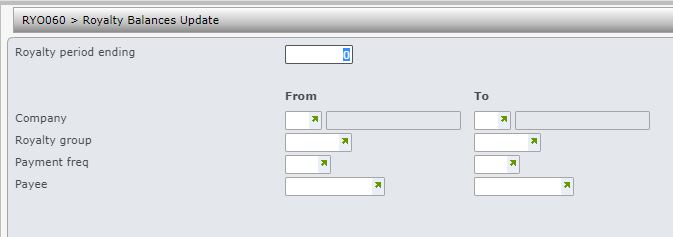
| Field | Description |
| Royalty period ending | Enter the Royalty period ending to specify for what period the balances are to be updated, |
| Company | This is the Royalty contract company. You can run the balance update for a single company or a range of companies. Only transactions for the nominated company/companies would be selected for update. User access must be setup for the company/companies in control file TMSRY/UA-ACC and TMSRY/UA-ACT. |
| Royalty group | When a contract is established, the Royalty group is nominated. Contracts belonging to a single royalty group or a range of royalty groups can be selected for Royalty balance update. Leave blank to select all royalty groups. |
| Payment frequency | When a contract is established, the Payment frequency is nominated. Contracts for a range of payment frequencies can be selected for Royalty balance update. Leave blank to select all payment frequencies. |
| Payee | Balance update can be done for a payee or a range of payees. Leave blank to select all payees. |
- Enter the above information as required and click OK.
