
The primary purpose of the Personal Information Management system in Iptor IP1 is to comply with The European Union General Data Protection Regulation (GDPR). Under the new data protection requirements, the conditions of consent has been strengthened, so the consents in standard terms and conditions is no longer applicable. It includes certain rights of individuals such as the ‘right of erasure’, whereby a person has the right to request removal of personal information (PI).
Personal Information Management system in Iptor IP1 allows customers, contacts and creditors to consent to having their PI removed. PI constitutes any information related to a person that can be used to identify that person. IP1 identifies the following as PI.
- Name
- Specific address lines
- Email address
- Phone numbers
- Bank details
- Personal ID
- Tax file number
The following data files in Iptor IP1 is covered for PI removal.
- Debtor details and related sales and AR transactions
- Contact details and related sales and AR transactions
- Cash sales and AR transactions
- Creditor details and related AP transactions and Royalty contracts
- Miscellaneous AP transactions
The request for PI removal in IP1 can be created by one of the following methods.
- Manually for debtors, creditors and contacts
- Automatically by end of day process for cash sales orders and miscellaneous AP invoices
- Indirectly via change in CRM contact attribute (for registered web users)
When a request for PI removal is created in IP1 system, the request can pend for approval. Due dates can be maintained for removal at a later date. The end of month process will check if there is any outstanding transactions for the entity as well as the due date before removing any PI. If the update fails due to an outstanding transaction, the request can either re-pend or wait for update on the next EOM process. The request to opt out can be cancelled at any stage of the process as long as the update has not occurred. Once PI has been removed for an entity, it can no longer be retrieved. The system allows timestamp tracking of each stage of the process.
View business rulesContents
Business rules setup
The following business rules have to be setup to handle Personal information management. Business rules for Personal information management. must be setup with support from Iptor IP1 consultants. It is critical to understand the setting of control files and how it works. Control files must be setup correctly for the system to operate as intended. Any changes to the control files setup should be addressed cautiously and in consultation with Iptor IP1 consultants.
| Note | This document does not cover customised setup tasks of specific companies. Deviations from this setup should be covered by setup tasks written by individual companies. |
| Business rules | Setup |
| ********/PI-ENTY Personal info: Entity |
This is a system defined control file which holds all the entity types in IP1 that can be removed using the PI Management system. |
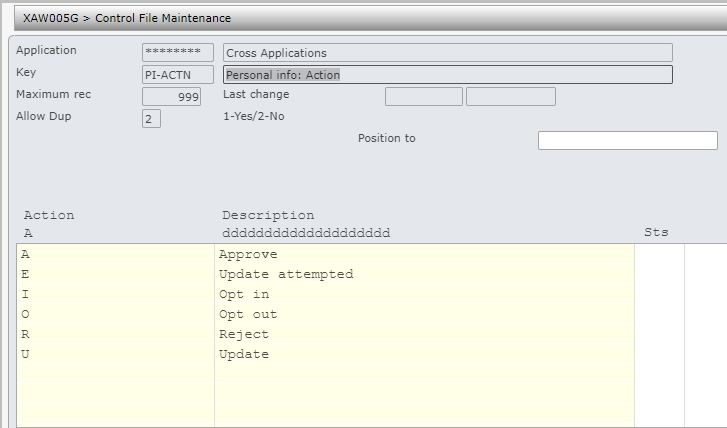
| ******/PI-ACTN Personal info: Action |
This system defined control file holds all the actions taken in the process to remove the PI. The PI tracking processor will capture these actions at each stage of the process. |
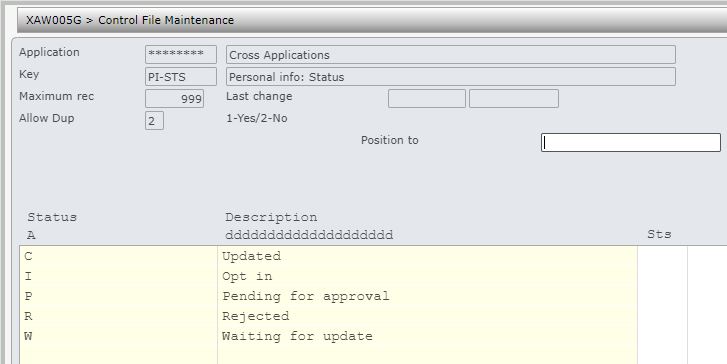
| ********/PI-STS Personal info: Status |
This system defined control file holds the status of the request to opt out.
|
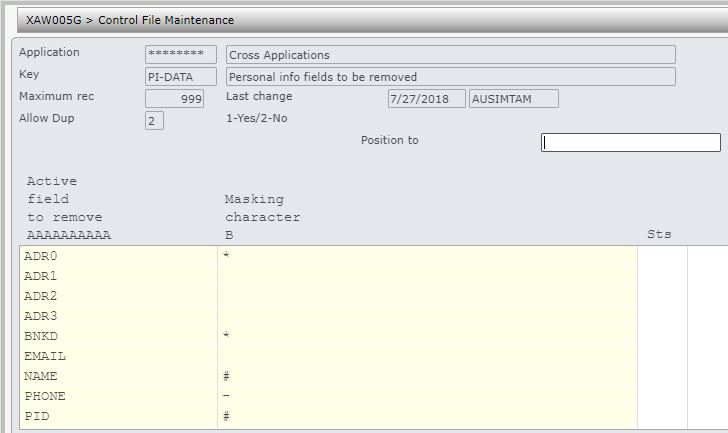
| ********/PI-DATA Personal info fields to be masked |
This control file holds all the fields that will be masked (removed) for the requested entity by the EOM update process. You can also nominate the masking character. Note: It is recommended to replace EMAIL with blanks to prevent programs attempting email operation once PI removal has occurred.
|
| ********/PI-PEND Personal info: Pend for approval |
Requests for PI removal can be set to pend for approval. This can be set by entity type in this control file. If a request has failed to update it can be set to pend again or remain at ‘W’ status for next update. |
| ********/PI-CN Personal info: Anonymous accounts |
PI held on Cash sale orders or Miscellaneous AP invoices can be setup to be automatically removed by the EOM process. This control file must be setup with cash sale/miscellaneous account and the retention period for automatic removal. Note: If the retention days is set to 0 then PI would never be removed. |
| ********/PI-CN1 Contact linked customer to include for removal |
Specify the contact type for contacts linked debtors that can be included for PI removal. Any customers linked to contacts with these contact types can be included for removal by the EOM process provided it is not linked to any other contacts and the contact is not linked to any other customers, i.e. a 1-1 relationship between the contact and the linked customer. |
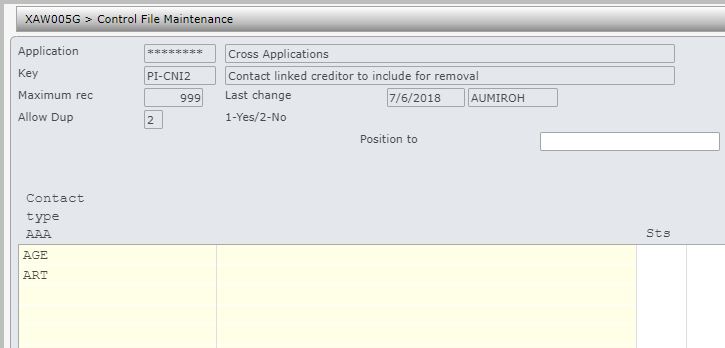
| ********/PI-CN2 Contact linked creditor to include for removal |
Specify the contact type for contact linked creditors that can be included for PI removal. Any creditors linked to contacts with these contact types can be included for removal by the EOM process provided it is not linked to any other contacts and the contact is not linked to any other creditors, i.e. a 1-1 relationship between the contact and the linked creditor. |
| ********/PI-CRM Remove contact PI linked to Cust/Cred |
This control file is used by the customer & creditor PI removal process to determine if any linked contact PI should be removed as well. For PI removal the contact cannot be linked to any other accounts.
|
| ********/PI-CC |
Setup the classification (contact attribute) and the opt in/opt out selection with retention days for registered web users. |
| ********/PI-CNX Personal info: Accounts to exclude in mass update |
This control file is used by the mass update program. Any accounts that should not be included in the mass update must be specified here. |
| Setup CRM contact attribute |
To provide an option for web users to opt out or opt in, the following must be setup.
|





Procedure
It is your responsibility to ensure that you understand this procedure before performing the following tasks.
| Note |
Deviations from this procedure should be covered by procedures written by your company. Before performing any tasks please ensure all the business rules are set-up accordingly. |
Personal information removal process
| Process | Steps |
| Create opt out request |
|
| Review pending requests | To review, approve or reject the request follow the process outlined in PI pending review. |
| Enquire on a request | To enquire on any request follow the process outlined in PI inquiry. |
| Update |
The update (removal of PI) is automatically run by the end of month process. The following conditions must be satisfied before the update can be completed.
On successful update the following will occur.
When an update has failed due to outstanding transaction the following will occur.
|
Mass removal of personal data for a test environment
| Process | Steps | ||
| Mass PI removal (XAO330) |
|
