
The system allows provisions for stock returns as a percentage of the total royalty or by a flat amount or different rates can be set up my movement type.
Add returns provision
- In the menu, expand Publishing Modules > Rights & Permission > Management and double-click Work with Royalty Contracts. RYW010 Work with Royalty Contracts selection panel appears.
- Enter the selection variables and click OK. The selected royalty contracts are displayed.
- Select the royalty contract and right click option Rtn prov. RYM170 Returns Provision Maintenance panel appears.
| Note | Returns Provision Maintenance panel would appear automatically on contract creation to allow returns provisions to be entered. |
- Click Add to add a new returns provision. RYM170 Returns Provision Maintenance panel appears in add mode.
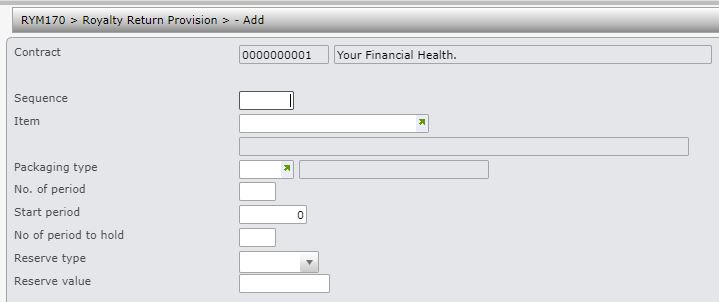
| Field | Description |
| Sequence | Sequence number determines the order of preference of the provision rules if multiple returns provisions are maintained for an item by contract. |
| Item | Item code for the returns provision. |
| Packaging type | You can enter the packaging type to allow for returns provision by item by type of packaging or accept the default for all packaging types. |
| No. of period | Determines up to what period to take up Returns Provision. This could be for the life of the book or typically it is for the first 6 months of sales which could be the first Royalty Period. If it is for the first two Royalty Periods, enter 2. Once the Provision has been taken up it must be decided how long to keep it before paying the author. This is indicated in the No. of period to hold field. The Provision calculation is based on the total transaction quantity combined with the Provision Rate. The Effective Contract Date is used to determine the start of the Royalty Periods for this Contract. |
| Start period | This is the period you want provisions to start. |
| No. of period to hold | The Number of period to hold determines how long to keep the Royalty money before paying it to the Author. If the provision is to be kept for two Royalty periods, the entry would be 2. This means the provision taken up in the first Royalty period is reversed in the third Royalty period. |
| Reserve type |
Returns provisions can be calculated as a flat amount (2=Amount) or as percentage of the total royalty (1=Rate) or it can be by movement type (3=Movement). If its by movement type then the returns provision rate must be maintained for the movement type in Movements maintenance (RYM120). |
| Reserve value | If Reserve type 1 = Rate, then enter the percentage, if it is 2 = Amount, then enter the amount for the provision. This field will not display if the Reserve type is 3=Movement; the rate would be extracted from contract movement type. |
- Enter the above information as required and click OK.
