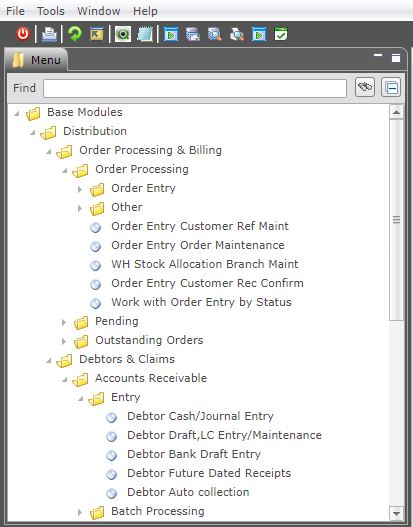
The menus are structured in a stack-like hierarchy with particular options leading into sub menus.
Your main menu may look different to the Main Menu of other users, as everyone has a different level of access. A junior clerk may only see General Inquiries on the menu while a Department Manager may see more.
An icon is displayed with the menu name showing a folder structure indicating more menu options within that menu item.
An icon is displayed with the menu option that will take you straight into the program.
Shortcuts, Hints, Tips
On the Green screen, icon is equivalent to a menu option with the symbol ( > ) after the number, for example, 1> Distribution. The icon is equivalent to a menu option with a full stop ( . ) after the number, for example, 34. Stock by Title.
Below is a sample menu.