
This program extracts any royalty amounts due to be paid (from the Payee balance files), creates invoices and flags them as paid and updates to the Accounts Payable system. It also calls RYO095 to create the royalty carry forward balance for the next period. The system will still generate the invoices for the current period even if the previous royalty period paid flag is “N” as long as it has a zero balance, i.e. the balance carried forward and the total current balance is zero for the previous period. AP interface can be selectively run by royalty groups as setup in TMSRY/RY-RGRP.
Accounts Payable interface definition is by company. This program interfaces in the currency of the contract and then converts to either the payee trade or the base currency depending on which is required as per the setup in TMSRY/RY-APIF.
This program posts at an agent level unless either the invoice is by contract or the agent is blank, or if the Pay Agent flag on the Payee Shares maintenance is N, in which case the posting is performed at the payee level.
When creating an invoice in Accounts Payable, the header text is determined in TMSRY/RY-APTXT and special instructions for agent contracts are written from this control file also.
- In the menu, expand Publishing Modules > Rights & Permission > Period Processing and Others > Close of Royalty Period and double-click Royalty Interface to AP. RYO070 Royalty Interface to AP panel appears.
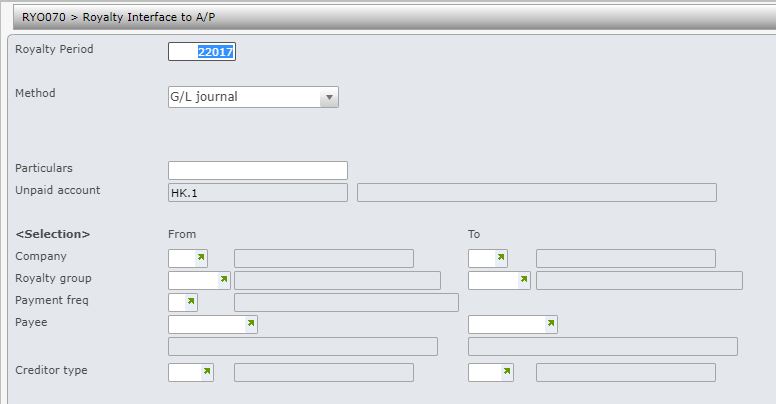
| Field | Description |
| Royalty period | Determine for which royalty period, royalties are to be interfaced to Accounts Payable. The period defaults to current processing royalty period, but can be overridden. |
| Method |
The method can be one of the following. 1 = AP invoice – creates AP invoices for payment and interfaces to AP system if the Hold flag in the creditor masterfile is # Y. If the Hold flag is set = Y then AP invoice will not be generated and the unpaid royalty amount will divert to the unpaid GL account i.e. method 2 below will apply. Control file TMSRY/RY-APIF3 must be set up with the unpaid GL account. 2 = Defer payment – royalty amount would be transferred to Unpaid GL account specified in control file TMSRY/RY-APIF3, AP invoice would not be generated BUT the user has the option to Release Royalty Unpaid Balance to create A/P invoice. 4 = G/L only – royalty amount would be transferred to Unpaid GL account specified in control file TMSRY/RY-APIF3, AP invoice would not be generated and the user CANNOT use the option to Release Royalty Unpaid Balance to create A/P invoice. Note: A separate unpaid invoice GL account can be setup in TMSRY/RY-APIF3 for each of the above methods if required. |
| Due date | This is the due date for the generated AP invoices, defaults to today’s date but can be overridden. |
| Reference | An optional reference can be entered. You can also enter ‘I‘ to put ISBN into reference or ‘*C‘ to use contract as reference. |
| Particulars | Particulars relating to a specific General Ledger account is mandatory. |
| Unpaid account | This is the unpaid GL account to be used for the GL journal that will be created for above methods. The system will display this from the setting in TMSRY/RY-APIF3 for the selected method and it cannot be maintained here. It is mandatory input for method 2 and 4 (mandatory for method 1, if the creditor is held from payment; status = ‘H’) and must be setup in TMSRY/RY-APIF3 prior to running the AP interface. |
| Company | Nominate the royalty contract company or the range of companies to be included for AP interface. Leave blank to select all. User access must be setup for the company/companies in control file TMSRY/UA-ACC and TMSRY/UA-ACT. |
| Royalty group | When a contract is established, the Royalty group is nominated. Contracts belonging to a single royalty group or a range of royalty groups can be selected to be interfaced to AP. Royalty group is mandatory. |
| Payment frequency | When a contract is established, the Payment frequency is nominated. Contracts belonging to a single payment frequency or a range of payment frequencies can be selected to be interfaced to AP. Leave blank to select all payment frequencies. |
| Payee | AP interface can be run for a payee or a range of payees if required. Leave blank to select all payees. The payee’s trade or base currency must be equal to the currency on the contract. |
| Creditor type | Contracts for payees with specific creditor type/s can be selected if required. |
- Enter the above information as required and click OK.
