
The royalty transactions extracted from the transaction files are summarized at the end of each month into a history file. This updates into the royalties movement and update programs awaiting the royalties run. The royalty history details are fully maintainable.
This program allows maintenance on the Opening and Closing stock and Transaction quantity by Movement Type, for both the current period and the previous periods.
Add history header and details
- In the menu, expand Publishing Modules > Rights & Permission > Management and double-click Royalty LTD Summary Maint. RYM060 Royalty History Maintenance selection panel appears.
- Enter the item and contract number. Contract number will default from the item (or vise versa) if there is only one contract found for the item or only one item for the contract.
- Click OK. RYM060 Royalty History Maintenance main panel appears.
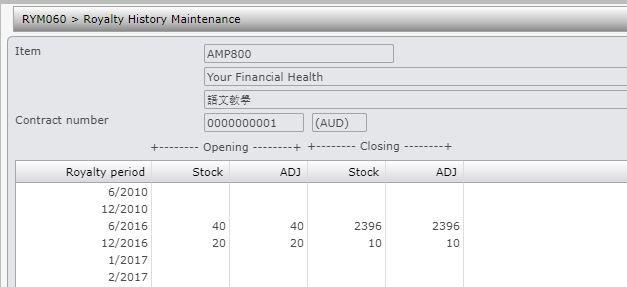
| Function | Description |
| Add header |
To add royalty history header. |
| Option | Description |
| History header |
Allows you to maintain royalty history header for the royalty period. |
| History detail |
Allows you to maintain royalty history details for the royalty period. |
- Click Add header. RYM060 Royalty History Maintenance panel appears in add mode.

| Field | Description |
| Royalty period | Period for which royalty is being maintained. |
| Opening stock qty | This is the opening stock balance at the beginning of the period. |
| Opening stock adj | This is the adjusted stock quantity at the beginning of the period. |
| Closing stock qty | This is the closing stock balance at the end of the period. |
| Closing stock adj |
This is the adjusted stock quantity at the end of the period. |
- Enter the required information and click OK. RYM060 Royalty History Maintenance panel appears to add history details.
| Field | Description |
| Mov Typ | The movement type being maintained. |
| Step | The step number for the rising stepped royalties, |
| This period qty | This is the quantity for this period for the . |
| This period amount | This is the amount for this period. |
| Prev period cuml qty | The quantity cumulated from the previous period. |
| Prev period cuml amount | The amount cumulated from the previous period. |
- Enter the required information and click OK.
New history header and history details are added for the selected item and contract number.
