
The Royalties system reads the appropriate Sales and Stock Movement files and Payee Balances files in order to calculate the Royalties and Payee shares.
All the invoices for the selected period are checked line by line and matched to the Movement types and the values update the Rising Royalty buckets according to the sequence outlined in the Contract. This process caters for the currency conversion from the transaction trade currency to the contract currency.
During the calculations or creation process the trade amount taxable and tax amount, and the currency exchange code is picked up from the transaction detail file. The recommended retail price is retrieved from either the transaction or pricing as defined by movement. The newly captured figures are then used to determine the trade amount in the contract currency by converting the retrieved currency values into the contract currency values as at the transaction period.
All possible transaction to contract currency combinations must exist in the accounts payable exchange rate maintenance so the conversion from the distribution trade currency to the contract trade currency can be performed.
The Royalty Balances are updated and Payment Shares are allocated to the relevant payees. The Royalty Report can be run to view the results and the amounts to be paid to the registered payees.
This program can be re-run repeatedly without doubling of data. It is therefore not necessary to only run it at the end of a Royalty Period. It can be run on an ad hoc basis. It should be re-run for all relevant months if there is a possibility contracts have been added or changed or movement definitions changed. This must be run each month to keep up-to-date within the royalty period.
- In the menu, expand Publishing Modules > Rights & Permission > Period Processing and Others > Monthly Royalty Run and double-click Royalty Calc Creation. RYO051 Royalty Movements Monthly Rebuild panel appears.
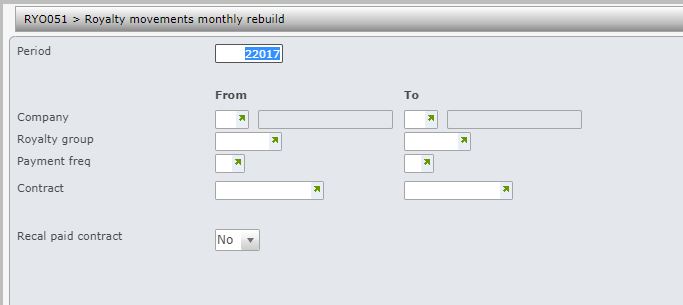
| Field | Description |
| Period | The Royalty movement monthly rebuild must be run for a selected Royalty period. The period defaults to current processing period, but can be overridden. |
| Company | This is the Royalty contract company. Contracts belonging to a range of companies can be selected for the rebuild. User access must be setup for the company/companies in control file TMSRY/UA-ACC and TMSRY/UA-ACT. |
| Royalty group | When a contract is established, the Royalty group is nominated. Contracts belonging to a range of royalty groups can be selected for Movements monthly rebuild. Accruals calculations, Accruals Post to GL & AP interface can be run for a range of Royalty groups. |
| Payment frequency | When a contract is established, the Payment frequency is nominated. Contracts for a range of payment frequencies can be selected for Movements monthly rebuild. Accruals calculations, Accruals Post to GL & AP interface can be run for a range of Payment frequencies. Royalty Statements can print for a specific Payment frequency. |
| Contract | A range of contracts can be selected for Movements monthly rebuild. |
| Recalc paid contract | Flag this field to re-calculate the accruals for contracts that are already paid in the period run (defaults to No). |
- Enter the above information as required and click OK.
