
Yearly stock extract is used to calculate the charges for how many years of excess stock is in the warehouse at the end of the period. The actual charge for the yearly stock is based on the 3PL charge matrix for the Stock by year Charge Basis, the stock at the end of the period and the Last 12 Months Gross Shipment units.
Example:
System defined; Charge basis for stock by year:
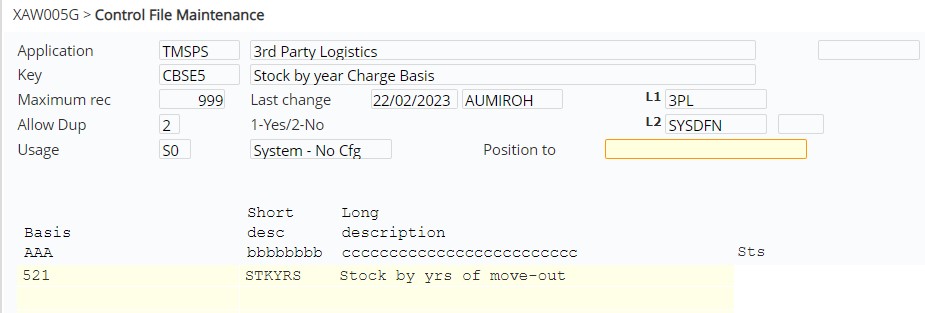
Charge matrix for the above charge basis by quantity break:

The charge to be applied is based on the above quantity break for excess stock:
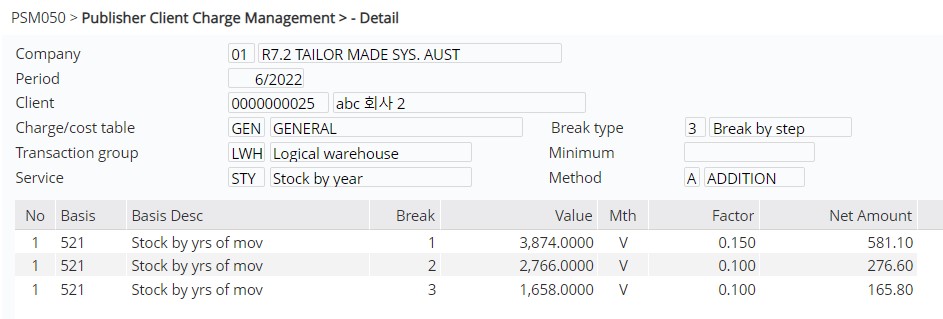
These charges are calculated as:
- Line 1 = SOHQ x 0.150
- Line 2 = SOHQ – (1st quantity break i.e. 4 x YQTY) x 0.100
- Line 3 = SOHQ – (2nd quantity break i.e. 8 x YQTY) x 0.100
where
SOHQ = ending inventory at the end of period
YQTY = Gross shipment for the last 12 months i.e. gross sales plus direct fulfilment orders for last 12 months (Invoices + Transfer outs). However for Transfer outs, the movements between the internal warehouses is excluded. (i.e. all warehouses listed in the transaction group).
Extract yearly stock
- In the menu, expand Publishing Modules > 3rd Party Logistics > Period End Processing and double-click 3PL Yearly Stock Extract. PSO021Yearly Stock Extract selection panel appears.
- Enter the Company code and Period and click OK. Company will default to your default company and the Period will default to the current period. Both selection fields can be overridden.
All the previously generated records for the selected company and period will be deleted and new records are rebuild for the selected company and period.
