
US tax transactions that do not get posted in Avalara due to errors are interfaced back to IP1 with Final status flag = U (Failed posting to Avalara). These errors could be due to Avalara connection failure or an error on the invoice (pended invoice may have been approved without addressing/fixing the pending issue).
This program allows you to interface to Avalara to repost these failed transactions. The transactions that failed due to connection issues can be just reposted, but the transactions with errors must be fixed before they are reposted.
Transactions that can not be posted for whatever reason, can be manually posted outside of IP1 system and flagged as M=manually posted.
- Expand menu Other Modules > Other Regions > US Options > Other and double- click Work with Unposted Transactions (BNW160). List of unposted transactions appears. The listed transactions are already invoiced in IP1 with status C = Complete; with just the tax component awaiting to be posted and finalised in Avalara.
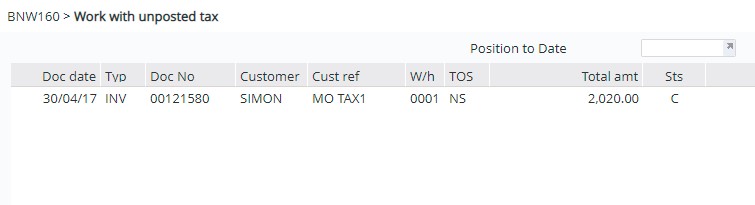
| Option/Function | Description |
| Repost | Individual transactions can be re-posted to Avalara with this option. Any known issues with the transaction should be fixed before reposting so the posting is successful. |
| Doc inq | Brings up document inquiry screen to view the details of the invoice. |
| Manually posted | If you posting the tax manually to Avalara system (externally to IP1) then use this option to change the Final status flag to M=manually posted. |
| Error inq | Displays the Avalara error message. |
| Repost all | Use this function to post all listed transactions at once. |
- Use the above options/function to take appropriate action. Once its posted via this program the Final status flag would change to R=Reposted to Avalara.
