
Introduction
This document describes the setups and processes involved in the management and the processing of Collection contracts (Subsidiary rights exploitation).
Collection contracts can be manually entered in the system or automatically created when submission contracts are approved. A publisher with the subrights can seek submissions for subright exploitation in different territories, languages or format etc. These submissions are entered in IP1 with a specific contract type to identify them as submission contracts. Multiple submission contracts can be entered for a subright. On approval of the submissions contract it is converted to a collection contract.
Business rules
Business rules for Rights & Permission – Collections must be setup with support from Iptor IP1 consultants. It is critical to understand the setting of control files and how it works. Control files must be setup correctly for the system to operate as intended. Any changes to the control files setup should be addressed cautiously and in consultation with Iptor IP1 consultants.
| Note | This document does not cover customised setup tasks of specific companies. Deviations from this setup should be covered by setup tasks written by individual companies. |
The following control files have been changed or newly created for the Rights and Permission module.
| Business rules | Setup |
| TMSRY/RY-CTYP Type of royalty contract | Define contract type ‘5=collection contract’ and ‘6=contract submission’. |
| TMSRY/RY-MMF Royalty Movement Source Type
|
Setup movement source type applicable to collections contract; R=Subrights Exploit (system defined).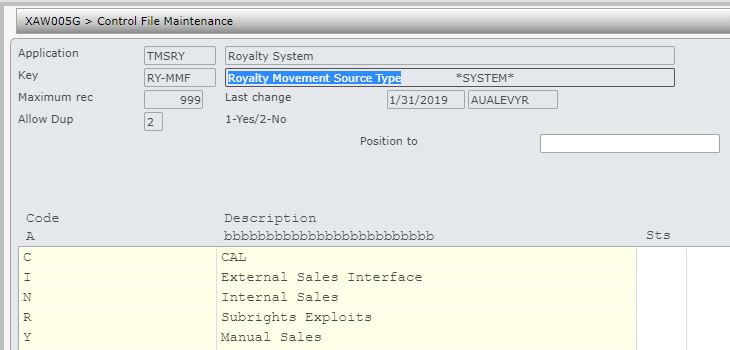 |
| TMSRY/RY-OPT Royalty options | Setup Royalty tab options used by various Royalty collections contracts.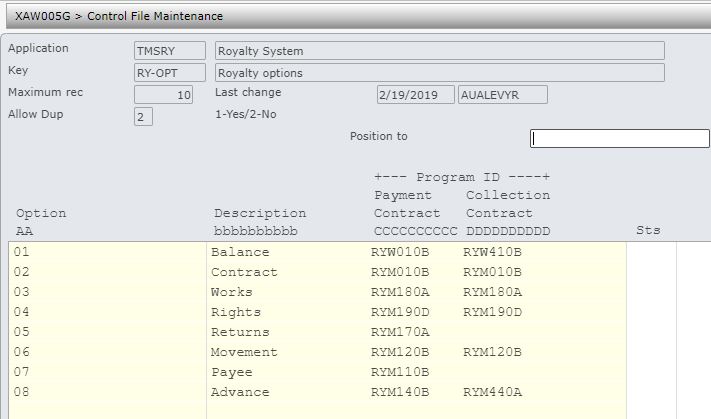 |
| TMSRY/COL-ARIF Collection Invoice – Definition | Holds the sub ledger sub type code and flag to pend pay through for invoices awaiting payment.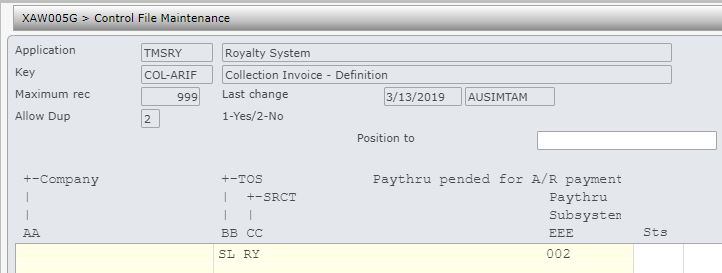 |
| TMSRY/RTS-LNG Rights language | Maintain all the languages for subrights exploitation. |
| TMSRY/RTS-RECT Rights record type | Rights record identifier; granted rights or exploited subright (system defined). |
| TMSRY/RTS-STS Rights status | Rights statuses (system defined). |
| TMSRY/SBM-STS Submission status | Status of the campaign submission for the exploitation of subrights. Should be set up if using campaign and submissions contracts for rights exploitation. |
| TMSRY/SBM-CSTS Submission Contract Status | Status of the submission contract (contract type=6) for subrights exploitation. Should be set up if using campaign and submissions contracts for rights exploitation. |
| TMSRY/RY-TTYP Text type headings | Include text type ‘CS’ for submissions contracts. (system defined). |
| TMSRY/RTS-TER Rights territories | Maintain all the territories for subrights exploitation. |
| TMSRY/RTS-TYP Rights types | Maintain all the rights types that can be exploited. |
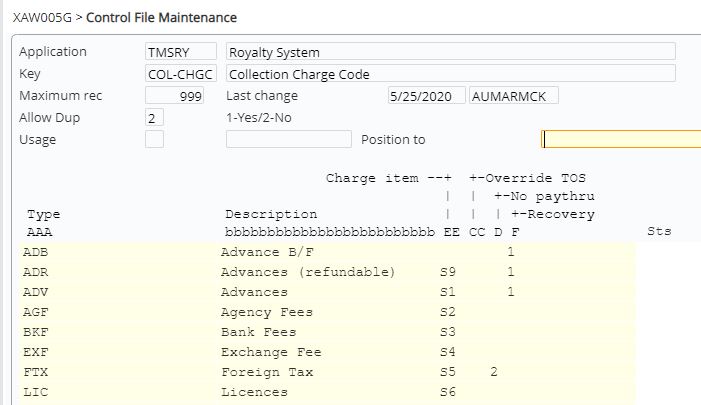
| TMSRY/COL-CHGC Collection Charge Code | Holds the collection charge types and the charge items/definitions for charges applicable to collections. Recoverable charge types must be flagged in the recovery column. The recoverable charges are paired with the reversal item codes, for example if advance is assigned to S1, then R1 will be used for the reversal invoice item. The entry for this in TMSRY/RY-ACDEF must be Type SR and Account R1.
Advance B/F charge type are recoverable and should not have a charge item and be flagged for no paythru processing as there is no invoicing.
|
| TMSRY/COL-ARST Collection Contract Invoicing Status | System defined control file holds the collection contract invoice status. |
Collections process
It is your responsibility to ensure that you understand this procedure before performing the following tasks.
| Note | Deviations from this procedure should be covered by procedures written by your company. Before performing any tasks please ensure all the business rules are set-up accordingly. |
| Process | Steps | ||
| Create collections contract manually | Create collection contracts and link to the related works. Ensure a payment contract exists for the same work for the author/payee.
(Refer to RYW010 Work with Royalty Contracts on how to create and maintain a collection contract and the related details). |
||
| Create collections contracts through submissions | Campaigns and tenders can be used to attract submissions for subrights exploitation. IP1 allows you to maintain a subrights campaign and accept vendor submissions for its exploitation in different territories, languages etc.
The vendor submissions can then be followed up/reviewed and either approved or rejected/deleted; when approved the submissions contract is changed to collections contract with contract type= 5. |
||
| Add any applicable one-off charges to the collection contract | Any one-off charges like licence or agency fees, advances etc., can be added to a collection contract and released for invoice generation.
|
||
| Invoice one-off charges as required | Once released, the one-off charges are available for invoicing.
|
||
| 3rd party sales upload | These are sales transactions from 3rd parties with collections contracts. It can be uploaded into IP1 using an excel file and must be run before the month end processes i.e. invoice generation and collection pay through to the payee (author).
|
||
| Generate invoices | After the sales data has been uploaded into the system, AR collection invoices can be generated.
|
||
| Collections contracts balance update | Collections balance update must be run every month end to update the customers balance for inquiry purposes.
|
||
| Process collection pay through | The collections received from the exploited subrights gets distributed to the payees specified on the payment contract (using other income share percentage on the payment contract).
|
||
| Run reminder report | Reminder letter/excel report can be run for the collection for exploited subrights.
|
Collections inquires & reports
| Inquiry/report | Description |
| Balance inquiry by customer (RYI410) | Displays all the collection and one-off charge invoices for the selected customer. Allows you to view the transaction inquiry by the process number. |
| Rights by Customer (RYI420) | Displays all the rights exploits detail for the selected contact/customer. |
| Collection sales report (RYR410) | This report program creates an excel report listing all the processed and unprocessed 3rd party sales for the selected period, company and customer. |
| Collection charges report (RYR420) | This report program creates an excel report listing all the processed and unprocessed charges (advances). The report selection is by period, company and customer. |
| Processed other income/Payee subrights income (RYR430) | This report program creates an excel report of collection sales that has already been processed by collection paythru process. It lists other income (3rd party sales) amount details by company, royalty period, payee, payment contract, collection contract, collection & pay through amounts. The report selection is by period, company, payee and contract number. |
