
This program reads the generated stock obsolescence provisions and creates the GL journals for posting to the General Ledger.
The value to be posted is the differential between previous month obsolescence value and current month obsolescence value from an ISBN level analysis. The journals are summarized by GL account and are posted through the normal GL interface as part of GL EOD process.
Generate GL journals for stock obsolescence
- In the menu expand, Base Modules > General Ledger > Other > Stock Obsolescence > G/L interface and then double-click Generate GL Stock Obs Journals. DSO513 Stock Obsolescence Journal Creation panel appears.
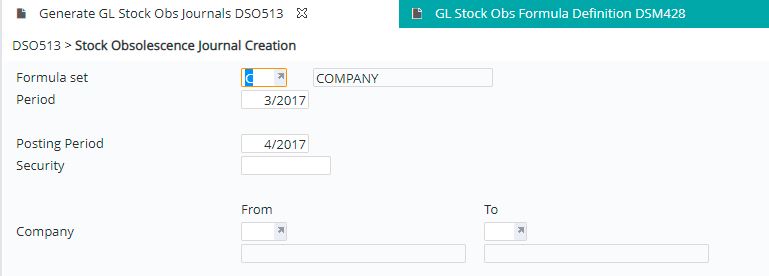
| Field | Description |
| Formula set | The formula set is used to identify the stock obsolescence, for example, company or tax. |
| Period | This is the obsolescence period which defaults to current processing period but can be overridden. |
| Posting period | Period to which the GL obsolescence journal is to be posted to. |
| Security | If posting to a period other than current or next period than the system security password is required to be entered. |
| Company | Company code/s you wish to generate the obsolescence journals for. |
- Enter the above information and click OK to confirm. Job processing panel is displayed.
- Change the job queue if required and select to run the process in batch or real time.
- Click OK to confirm the selection. General Ledger journals are created. General Ledger End of Day will post the journals. Once posted, it can be viewed in the General Ledger Inquiries.
