
The journals created in the Accrual calculations are updated to the Royalty Balances file and posted to the General Ledger by this process. This posting option can be run frequently without balances being duplicated as the system detects what has already been posted and only posts a difference if changes have been made.
The system caters for offset type ‘C’=tax credit on advances with the following:
- does not post to G/L
- does not update balance
- changes accrual status updated from ‘E’ to ‘X’
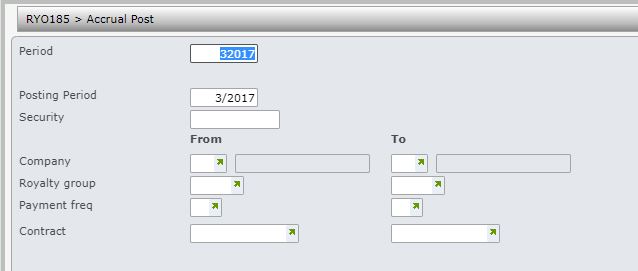
- In the menu, expand Publishing Modules > Rights & Permission > Period Processing and Others > Monthly Royalty Run and double-click Royalty Accrual Post to GL. RYO185 Accrual Post selection panel appears.
| Field | Description |
| Period | This is the contract period; defaults to the current processing period, but can be overridden. |
| Posting period | The General Ledger posting period. |
| Security | If the General Ledger posting period is not the current period or next period then a valid security password is required. A different security password is required for previous period. The password is validated against TMSGL/SEC. |
| Company | Enter the company code/range of companies for accruals posting. User access must be setup for the company/companies in control file TMSRY/UA-ACC and TMSRY/UA-ACT. |
| Royalty group | When a contract is established, the Royalty group is nominated. Contracts belonging to a range of royalty groups can be selected for GL posting as required. |
| Payment frequency | A range of payment frequencies can be selected for GL posting as required. |
| Contract | A range of contracts can be selected for GL posting as required. |
- Enter the above information as required for GL posting and click OK.
