This manual describes the design concepts, major functions and features of the IP1 Menu Master module.
The level of detail described in this manual combined with some knowledge of the IBM AS/400, enables management and operational personnel to gain a greater understanding of the System’s Concepts and therefore to determine the best application of the system to their environment.[Read more…]
| Design concepts | Menu Master is designed to provide facilities for creating and maintaining menus and controlling and monitoring user access to the menus. In order to perform these tasks two main areas are defined.
|
| Menu structure | The menus are structured in a stack-like hierarchy with particular options leading into sub menus.
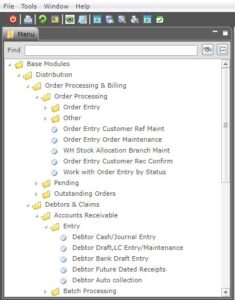
Your main menu may look different to the Main Menu of other users, as everyone has a different level of access. A junior clerk may only see General Inquiries on the menu while a Department Manager may see more. An icon is displayed with the menu name showing a folder structure indicating more menu options within that menu item. An icon is displayed with the menu option that will take you straight into the program. Shortcuts, Hints, Tips On the Green screen, icon is equivalent to a menu option with the symbol ( > ) after the number, for example, 1> Distribution. The icon is equivalent to a menu option with a full stop ( . ) after the number, for example, 34. Stock by Title. Sample menu:
|
| Users | The Menu Master requires information to be loaded regarding all authorised users in order for it to determine the operational characteristics and access authority for each user. The attributes associated with each user are:
As well as this a user access matrix is maintained to establish which options within each menu any particular user may access. This matrix not only establishes user access to various options but also specifies operational characteristics for when that user calls that option. An example of this may be that if the marketing director calls the “DAILY SALES” report it will run interactively but if the Junior Clerk calls the same option it will be automatically submitted, held to a special job queue with priority 8. This enables common menus to exist for standard functions while still maintaining flexibility in providing overrides by user in special cases. The special user overrides applicable to any command are as follows.
Jobs normally submitted for batch processing can easily be specified without the need to code the SBMJOB command. The Menu Master handles this function automatically. |
| Menu installation & setup | To install the Menu Master follow the basic steps:
|
| Defining the menus | The Menu Master is a simple and consistent package to use. Most of the screens allow multiple selections and overtyping to change existing data.
The functions required to operate the menu system include:
|
| Menu maintenance programs | Master menu maintenance |