
This program is used to maintain trading partner relationship details required for outgoing ANSI X12 EDI transactions in US. The details maintained are ISA and GS information for each outgoing transaction type.
The ISA segment is the first segment in an X12 EDI data transaction. The ISA segment contains sender and receiver information in the form of an ISA san (standard address number); a unique identifier used to signify a specific address of an organization in the publishing industry. Every retailer or supplier (publisher) is identified by a san number when sending or receiving EDI data transaction. Both the sender of an EDI transaction and receiver of an EDI transaction must have an ISA san present in the data in order for the transaction to be sent and received successfully.
The GS segment located under ISA segment identifies the application type for the EDI interchange. The GS02 position in an X12 transaction is the GS ID for the sender, and the GS03 position is the GS ID for the receiver.
Maintain trading partner relationship
- In the menu, expand Other Modules > Other Regions > US Options > EDI and double-click Working with Trading Partner. BNEDM140 Work with Trading Partner Relationships panel appears listing all the existing relationships.
- Use available options to change/delete the relationships as required.

| Note | Use Detail function to display the additional details for the trading partner relationship, including text and the User ID for the user that made the last change. |
Add trading partner relationship
- Click Add to add new Trading partner relationship. BNEDM140 Work with Trading Partner Relationships panel appears in add mode.
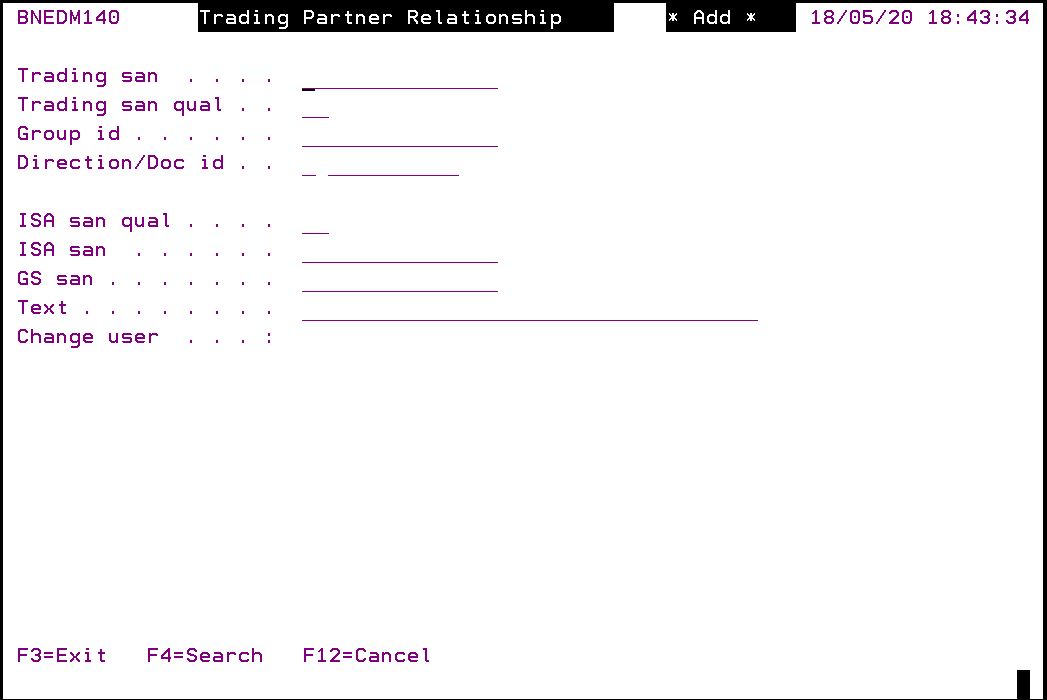
| Field | Description |
| Trading san | This is the sender’s ISA san. Trading san is maintained in control file BNADS/EDI-ISAN. |
| Trading san qual | This is the sender’s ISA san qualifier code. Each ISA san has a qualifier associated with it. The qualifier code comes before the ISA san in the transaction data, and is used to identify and describe the content that follows. ISA san qualifier codes are maintained in control file BNADS/EDI-QUAL. |
| Group ID | This is the GS ID of the sender and is the GS02 position in an X12 transaction.
Note: If the Trading san has a prefix in control file BNADS/EDI-SPFX, then the prefix must be prefixed to the Group ID in the Customer/Creditor masterfile (i.e. the Group ID in the masterfile must have the same prefix). |
| Direction/Doc ID | Direction = S for sending messages. Doc ID (Document ID) is the business document ID. The following Document ID’s are commonly used in the publishing industry:
|
| ISA san qual | This is the receiver’s ISA san qualifier code. Each ISA san has a qualifier associated with it. The qualifier code comes before the ISA san in the transaction data, and is used to identify and describe the content that follows. ISA san qualifier codes are setup in control file BNADS/EDI-QUAL. |
| ISA san | This is the receiver’s ISA san. If the Group ID = ‘PUBNET’ then ISA san be must be blank, otherwise it is mandatory.
Note: If the Trading san has a prefix in control file BNADS/EDI-SPFX, then the prefix must also be prefixed to the ISA san in the Customer/Creditor masterfile (i.e. the ISA san in the masterfile must have the same prefix). |
| GS san | This is the GS ID for the receiver and is the GS03 position in an X12 transaction. If the Group ID = ‘PUBNET’ then GS san be must be blank, otherwise it is mandatory.
Note:If the Trading san has a prefix in control file BNADS/EDI-SPFX, then the prefix must also be prefixed to the GS san in the Customer/Creditor masterfile (i.e. the GS san in the masterfile must have the same prefix). |
| Text | Text to identify/describe the relationship being maintained. |
| Change user | This will default to the User ID of the user maintaining the relationship. |
- Enter the above information for your EDI trading partner relationships.
