
Each IP1 company that is to interface to Avalara must have a unique one to one mapping to an Avalara company ID. After a company is registered in Avalara, the Avalara company ID must be mapped to IP1 company code in control file BNADS/AV-IF2. All the tax regions specified for the company in Avalara must also be updated to control file BNADS/AV-NX3. This program allows you to populate control files BNADS/AV-IF2 and BNADS/AV-NX3.
If a new tax region is added in Avalara then this program must be re-run for the respective company to update control file BNADS/AV-NX3 with the new tax region. The offline tax rates is imported/updated only for the tax regions specified in control file BNADS/AV-NX3.
- Expand menu Other Modules > Other Regions > US Options > US and Canadian Taxation and double- click Avalara Company Connection (BNO156). All the IP1 and Avalara company mapping is listed. Company IDs that are highlighted are not connected i.e. not mapped correctly in BNADS/AV-IF2.
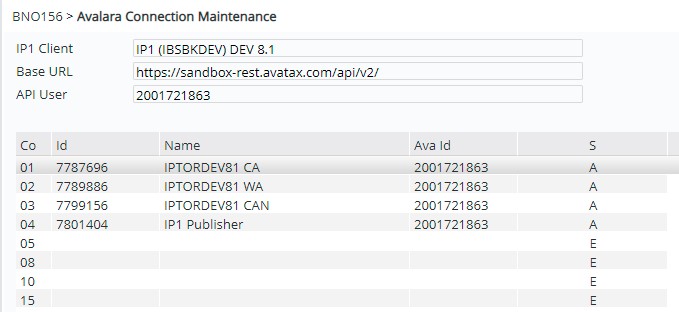
| Field | Description |
| IP1 client | IP1 environment that will be interfaced to Avalara system. |
| Base URL | URL for the Avalara environment as defined in control file BNADS/AV-IF1. |
| API User | User ID for the Avalara environment for the base URL specified above. Its tied to the Ava ID. |
| Co | Existing IP1 company codes. |
| ID | Avalara company ID mapped to the IP1 company code. |
| Name | Company name for the Avalara company that is mapped to IP1 company. |
| Ava ID | Avalara account number for the environment. |
- Select the company to update and click option Connect. This will register IP1 company code to Avalara company ID in control file BNADS/AV-IF2 and update BNADS/AV-NX3 with all the tax regions setup for the company in Avalara.
