
Card on File processing is only applicable for customers that are configured for card on file facility in control file TMSAR/PM-COF. After a new credit card information is captured by the payment gateway during Order entry, AR Cash entry or AR Collections maintenance, the system will bring up this program allowing you to store the card on file. This program can also be accessed via the menu in Accounts Receivable to view customers card information and suspend or re-activate a card.
- In the menu, expand Base Modules > Distribution > Debtors & Claims > Accounts Receivable > Other and then double-click Work with Debtor Card on File. ARW040 Work with Customer Cards selection panel appears.
- Enter the Customer number and select the Billing number you want to view/maintain card information for and click OK. List of active cards on file for the Customer and the Billing account is displayed.
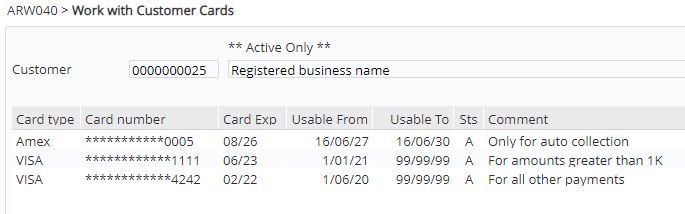
| Field | Description |
| Expiry date | The card expiry is entered on the landing page and is not maintainable after that. |
| Usable From/To | This field can be maintained to allow cards to be used only during specific dates. Usable To date is defaulted to ’99/99/99′ when the card is added to COF to allow for all future use. |
| Status | For the card to be available for use the status must be A=active. The status can be changed via this program to C=closed to disallow card payment. |
| Comment | Any text/comments relating to the card can be maintained. |
| Option | Description |
| Change |
Only the values for the following fields can be changed.
Note: The card can not be used for any payment processing if either of the following is true.
|
| Delete | With Delete option the card will be deleted only from file BUT leave other processes(AR collection, Subscription, Backorder supply etc.) still to use it. |
| Function | Description |
| Show All/Show active | This function toggles between showing all the stored cards for the selected customer and only the active cards. |
- Maintain any changes as required. You can change only the following fields.
- status to C=suspend or A= re-activate a card
- usable date range to disallow/allow a card from being used for specific dates
- comments
- Click OK to save the changes.
