
Contents
Introduction
The Payment Manager programs process all credit payments in the system including credit card payments for online or web based orders. IP1 is fully PCI compliant, it links to the payment gateway’s landing page via a web portal for entry of card details instead of keying them directly into IP1. IP1 never actually see the full credit card number, but receives masked credit card number and ‘token’ information issued by the payment gateway. The token is stored in the iSeries and is used for payment settlement for the customer it was issued for.
The process to handle and validate the credit card data via an external payment gateway is:
iSeries will execute the call to the web portal, passing the relevant URL with the parameters required to access the payment gateway to process credit card payment. This would include the process number of the transaction, pre-authorised or payment amount, merchant ID and details of the order including the flag that determines if the payment is to be deducted, pre-authorised or just the credit card validated.
The web portal will then transfer controls to payment gateway where the user can enter the credit card details, expiry date and the CCV number. The entered details are then verified and validated, pre- authorised or charged. The results of the credit card transaction including the token information would then be passed to the web portal which will in turn link to the program in the iSeries that would receive the confirmation and deal accordingly with a negative or positive response.
In IP1 there is fundamentally three ways to action Credit Card process depending on the type of order or type of payment process:
- Validate
- Pre-authorise (approximate)
- Charge
- Settle
The table below summarises the IP1 processes and the credit card actions each of these process can handle.
| IP1 Process | Credit card action |
|
AR cash entry (ARE005) Voucher sale (ARE061) |
Charge the cash entry allocated amount or the voucher sale amount. |
|
Normal order (DSE005) Pending check (DSE025) |
Validate, Pre-authorise or Charge as configured in TMSDS/OM-PAYTL. |
| Pending check | Pre-authorise if configured in TMSDS/OM-PAUTH. |
| Release to pick | Pre-authorise if configured in TMSDS/OM-PAUTH. |
| Point of Sale (DSE095)) | Charge or Pre-authorise as configured in TMSDS/POS-CASH. |
| WEB orders | If WEB orders are setup for external credit card actions (via the setups in TMSDS/OM-PAYT1 – TMSDS/OM-PAYT3) then it can be validated, pre-authorised or charged as per TMSAR/PM-EXTCC, otherwise it is pre-authorised. |
| EDI orders |
Credit cards can be validated, pre-authorised or charged as per TMSAR/PM-EXTCC setup. Otherwise, it is pre-authorised by default. |
If pre-authorisation is set for pending check or on release to pick then this pre-authorisation will only occur if there is no existing valid authorisation or the payment amount has increased. When it is flagged to pre-authorise at pending & the pre-authorisation fails, the order can pend for pending code ‘AH’ (if pending rule is defined for pending code ‘AH’). On backorder release when the order goes through pending check it can re-authorise if the pre-authorisation time has expired. The number of days/hours to hold pre-authorisation is held under field VLDAUTH in control file ********/PM-FLD.
When it is flagged to pre-authorise at release to pick and pre-authorisation fails, the order will not be released to pick and will be transferred to the sub-order category defined in this control file so that users can review all failed orders under the sub-order category.
When validating credit cards, system uses the validation amount as setup in control file ********/PM-FLD. When pre-authorising credit card system uses order value and on charging it will use full invoice value.
| Task | Instructions |
|
Enter your order via DSE005 or DSE095 |


|
|
View the payment transaction |
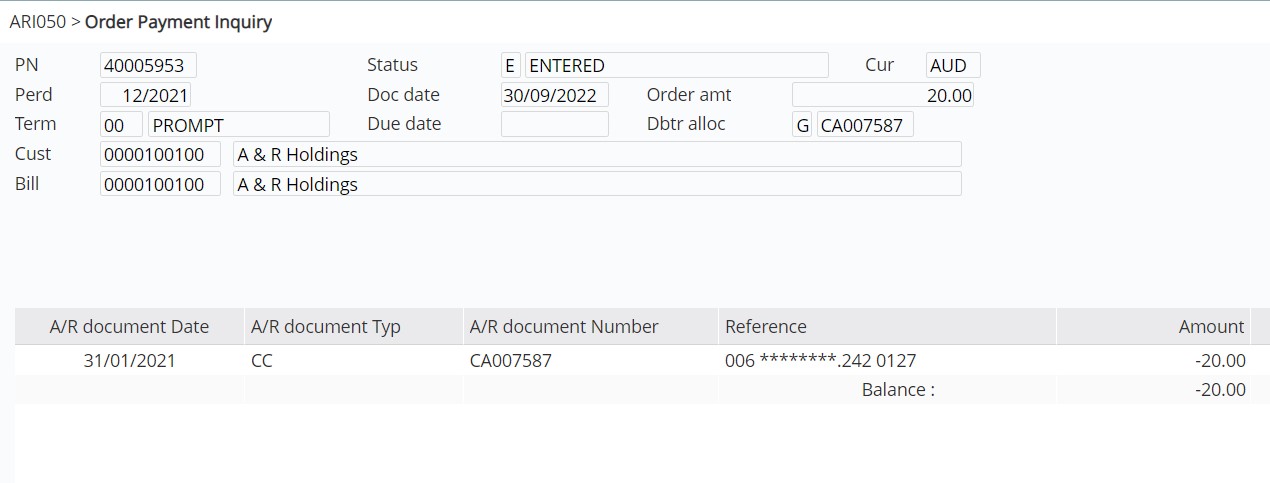
|
Payment manager configuration
View Payment Manager configuration
Payment gateways
Payment gateway service providers; Braintree, CyberSource, Curbstone, DataCash and SecurePay facilitate the credit card validation pre-authorisation and settlement of payments in IP1. Separate SOP documents for each of these payment gateways outline the specific infrastructure prerequisites and setup and configuration for Web application and iSeries. Click the links below to view and download standard operating procedures for these standard payment gateways used by IP1 system.
- Braintree Payment Gateway
- Curbstone C3 Payment Gateway
- CyberSource Payment Gateway
- DataCash Payment Gateway
- SecurePay Payment Gateway
- SecurePay (SecureFrame) Token Field Mapping v1.3.xlsx
Payment process
Validate credit card on order entry and charge on invoicing
| Task | Instructions |
| Validate CC on order entry |


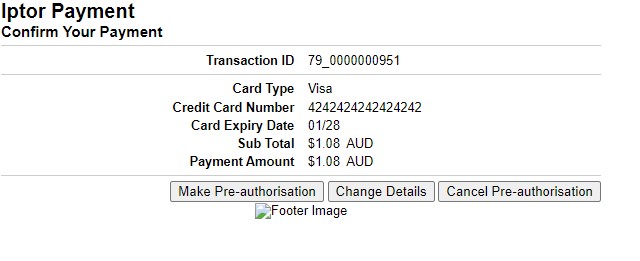


|
| View Payment inquiry |

Note: Auth code = 2 means the credit card is only validated i.e. not charged, therefore the payment amount is not reflected in the transaction. |
| Charge CC at invoicing | On invoicing the payment amount will be processed/charged with the validated credit card details. |
Orders can be configured to pre-authorise on order entry (TMSDS/OM-PAYTL), and when the order is checked for pending (DSO040) or released to pick (WHM070); depending on the setup in TMSDS/OM-PAUTH. The order amount can be pre-authorised but the amount charged at dispatch will be the actual invoice amount.
| Task | Instructions |
| Pre-authorise on order entry |

Note 1: Auth code = 3 means the order has been pre-authorised for the approximate amount as displayed. The actual amount that will be charged at invoicing may vary. Note 2: If set to pre-authorise credit card again on Pending (control file TMSDS/OM-PAUTH); the system will pre-authorise again only if the existing pre-authorisation has expired or the amount to be pre-authorised has increased. If pre-authorisation fails at pending check, the order will pend with pending code ‘AH’= ALLOCATED CASH VIA CREDIT CARD. You can review the pended orders through Pending Review (DSE025). |
| Pre-authorise on release to pick |
|
Charge credit card at order entry
Credit card surcharge
If a credit card charges a surcharge then the system can add the surcharge amount onto the payment amount when settling the payment amount. TMSAR/BK-CCSUR must be setup for the company, payment type, credit card type and debtor class with the surcharge percentage that has to be charged. The surcharge will be incurred if the payment amount is greater than or equal to the minimum payment specified on TMSAR/BK-CCSUR.
If a credit card surcharge is charged then the system will generate a journal for the surcharge amount if the journal type is specified in TMSAR/BK-CCSUR. If a surcharge item is defined instead on TMSAR/BK-CCSUR, then the system will generate a surcharge invoice (DSTR*) instead of a surcharge journal (ARTR*) so that it can print a surcharge invoice.
Different surcharge percentages can be applied by card type as setup in TMSAR/BK-CCSUR. For AR Cash entry, to apply different surcharge by card type, different payment types for each CC type must be setup so the surcharge is included in the payment amount. This is because in Cash Entry, the card type is entered on ARE210A Bank Reference panel which is after the payment amount is calculated.
Work with failed credit card
Credit card transactions that have failed due to incorrect credit card details can be amended and re-processed with this program. Refer to Work with Failed Credit Card for information on this process.
Credit card refunds
Credit card refunds can only be processed against the settled invoice payment token. The credit card that was used for the payment must be valid for the refund. When a claim is raised against an invoice
- CC payment details will default from the invoice
- Credit payment amount can be overwritten to be less than invoice payment amount
- If Credit payment amount = 0 then payment manager is not called
