
Contents
The process to handle and validate the credit card data via an external payment gateway is:
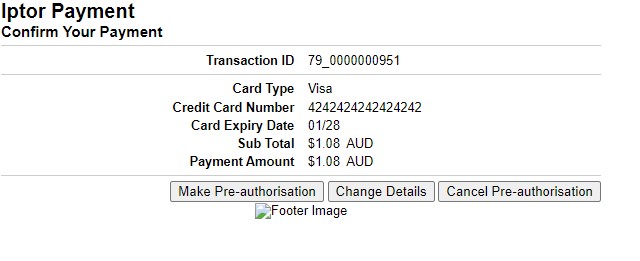
iSeries will execute the call to the web portal, passing the relevant URL with the parameters required to access the payment gateway to process credit card payment. This would include the process number of the transaction, payment amount, merchant ID and details of the order. It would also include the flag that determines if the payment is to be deducted or authorised with a return of a token.
The web portal will then transfer controls to payment gateway where the user can enter the credit card details, expiry date and the CCV number. The entered details are then verified and pre- authorised or charged. On pre-authorisation a token would be issued. The payment results including the token if issued would then be passed to the web portal which will in turn link to the program in the iSeries that would receive the confirmation and deal accordingly with a negative or positive response.
In IP1 there is fundamentally three ways to charge Credit Card payment depending on the type of order or type of payment process:
- Charge at order entry
- Pre-authorise credit card
- on pending check or
- release to pick and settle at invoice
- Validate credit card on order entry and charge at invoice
POS (Point of sales) orders are normally configured (in TMSDS/POS-CASH) to do 1 or 2.
Normal Orders via sales order entry (DSE005) can be configured to do either of above (in TMSDS/OM-PAYTL)
Web orders are hard coded to do 2.
Credit card payment via cash entry (ARE005) will charge on entry.
When validating credit cards, system uses the validation amount as setup in control file ********/PM-FLD. When charging or pre-authorising credit card, system uses full invoice/order value.
The system can be configured to pre-authorise credit card on pending check (for backorders) or prior to picking orders (TMSDS/OM-PAUTH). If flagged to pre-authorise on order release for picking and the pre-authorisation fails, then the order will not be released to pick and will be transferred to the sub-order category defined in TMSDS/OM-PAUTH so that users can review all failed orders under the sub-order category.
Configuration setup
Control files
View Control files setupBusiness rules for Payment Manager must be setup with support from Iptor consultants.
It is critical to understand the setting of control files and how it works. Control files must be setup correctly for the system to operate as intended. Any changes to the control files setup should be addressed cautiously and in consultation with Iptor IP1 consultants.
The following business rules has to be setup/maintained to handle credit card payment processing. This document does not cover customised setup tasks of specific companies. The purpose of this document is to assist Iptor consultants, setup appropriate business rules at a customer site for the specified process.
Note: Deviations from this setup should be covered by setup tasks written by individual companies.
| Control file | Setup |
| ********/PM-SYS Payment manager processing systems | Setup the Service Providers for credit card processing and the plug-in programs that apply to the respective providers. |
| ********/PM-FLD Payment manager static fields |
Use the configuration information gathered from the service provider to set up the various required fields for the respective service provider in this control file. Available fields are:
Please refer to the SOP for the service provider to see the values required for each of the service providers. |
| ********/PM-OPT Payment manager configuration | This control file is only used for SecurePay test environment. |
| ********/PM-CRD Card types | Define all the valid credit cards that can be used for card payments – system defined. |
| TMSAR/BK-PAYT Payment/journal types |
Define all the credit card payment types and the following flags.
|
| TMSAR/BK-PAYTD Default payment/journal types for debtors entry |
This control file defines payment/journal types that are used as default type for system generated A/R transactions. All payment/journal types defined here should exist in TMSAR/BK-PAYT. |
| TMSAR/BK-SEC Banking payment/journal types security by user |
Setup user access authorisation for any of the payment or journal types. |
| TMSAR/PM-PTFV1 Valid date range by payment type/field |
Setup valid date range for all fields that are flagged with field type = ‘X’ (credit card start/expiry date) in control file TMSAR/PM-PTFLD. |
| TMSAR/PM-PTFLD Required fields for payment type |
For each payment type define the reference fields and the order in which it will appear on the Bank Reference Entry panel (ARE210).
|
| TMSAR/PM-PTOPT Valid options by payment type/field | Define the valid values for each of the Payment type fields as defined in TMSAR/PM-PTFLD |
| TMSDS/OM-PAUTH Pre-Authorization Credit Card payment | This control file determines when a credit card pre-authorisation is to be carried out:
When it is flagged to pre-authorise at pending & the pre-authorisation fails, the order can pend for pending code ‘AH’ (if pending rule is defined for pending code ‘AH’). On backorder release when the order goes through pending check it can re-authorise if the number of days/hours to hold pre-authorisation has passed. This is held under field VLDAUTH in control file ********/PM-FLD. |
| TMSAR/BK-CRDC Credit Card Control | This control file defines the control rules for the credit card payment types. The payment type must initially be defined in TMSAR/BK-PAYT. Charge ONCE only is used where a credit card is pre-authorised externally and should be settled ONCE only using the externally generated token. |
| TMSDS/OM-PAYT3 Payment types allowed for payment type list | Setup all the valid payment types for each of the payment type lists. |
| TMSDS/OM-PAYTL Payment type list for program | This control file determines which payment list (list of payment types as defined above in TMSDS/OM-PAYT3) is to be used by specific programs and which of the following credit card processes the program should do:
If set with option ‘5’ to pre-authorise and the payment terms (TMSDS/CM-PAYT) is specified 100% deposit for backorder, then Bookmaster will pre-authorise for full order amount including backorder amount at the order entry and settle with full order amount at the invoice time. |
|
TMSAR/BK-CCSUR Credit Card Surcharge |
Setup the credit card surcharge percentage to be charged by company/payment type/credit card type if applicable. |
Merchant details
The default credit card provider for the system is maintained in Merchant Details Maintenance in the Cross Application Support module. Payment Manager program(XAO630) will determine the service provider and the merchant ID based on this setup (Payment manager file – XAPMA00P).
| Credit Merchant Detail Maintenance |
|
To setup or maintain merchant details
|


Credit card transaction ID
| XA-TRNID control number |
|
For credit card transaction ID, setup control number key XA-TRNID with a high limit. This transaction ID will be allocated to each credit card transaction processed in IP1.
|

Payment processing
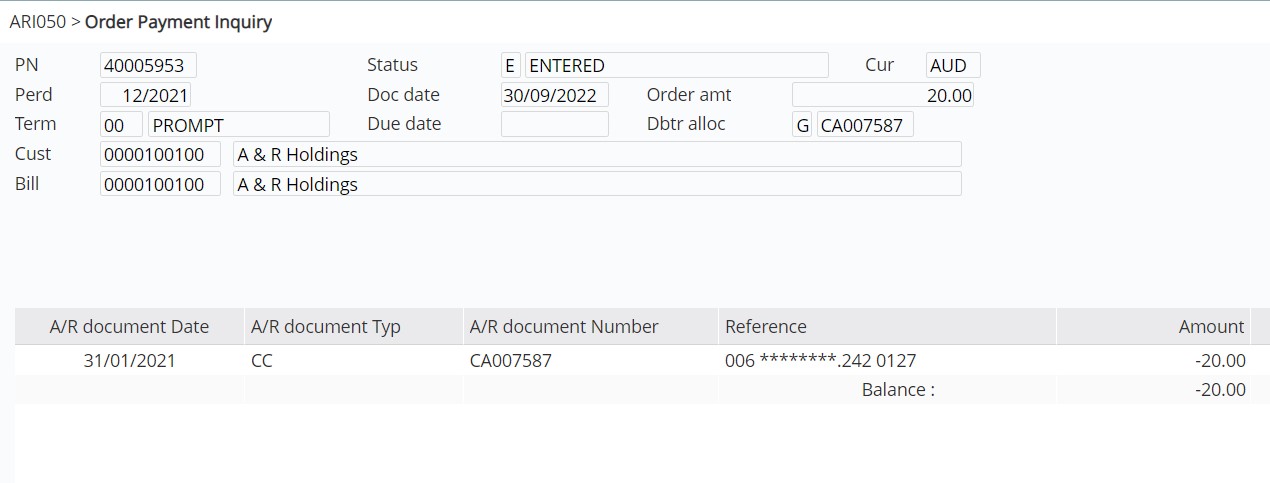
Payment/charge at Order entry
| Task | Instructions |
|
Enter your order via DSE005 or DSE095 |
|
|
View the payment transaction |
|


Validate credit card on order entry time and charge at invoice time
| Task | Instructions |
| Validate CC on order entry |
|
| View Payment inquiry |
Note: Auth code = 2 means the order has been not been pre-authorised. The credit card is only validated i.e. not charged, therefore the payment amount is not reflected in the transaction. |
| Charge CC at invoicing | On invoicing the payment amount will be processed/charged with the validated credit card details. |




Orders can be configured to pre-authorise when the order is checked for pending (DSO040) or released to pick (WHM070); depending on the setup in TMSDS/OM-PAUTH. The order amount can be pre-authorised but the amount charged at dispatch will be the actual invoice amount, even if the invoice amount is different to the pre-authorised amount.
Web Orders are hard coded to pre-authorise on order entry and settle at invoice time.
| Task | Instructions |
| Pre-authorise on pending check |
Note 1: Auth code = 3 means the order has been pre-authorised for the approximate amount as displayed and the actual amount charged at invoicing may vary. Note 2: If the order If pre-authorisation fails at pending check, the order will pend with pending code ‘AH’= ALLOCATED CASH VIA CREDIT CARD. You can review the pended orders through Pending Review (DSE025). |
| Pre-authorise on release to pick |
If pre-authorisation fails the order will not be released to pick and will be transferred to the sub-order category defined in control file TMSDS/OM-PAUTH so that user can review all failed orders under the sub-order category. |

Credit card surcharge
If a credit card charges a surcharge then the system can add the surcharge amount onto the payment amount when settling the payment amount. TMSAR/BK-CCSUR must be setup for the company, payment type, credit card type and debtor class with the surcharge percentage that has to be charged. The surcharge will be incurred if the payment amount is under a minimum amount.
If a credit card surcharge is charged then the system will generate a journal for the surcharge amount if the journal type is specified in TMSAR/BK-CCSUR. If a surcharge item is defined instead on TMSAR/BK-CCSUR, then the system will generate a surcharge invoice (DSTR*) instead of a surcharge journal (ARTR*) so that it can print a surcharge invoice.
Work with failed credit card
Credit card transactions that have failed due to incorrect credit card details can be amended and re-processed with this program. Refer to Work with failed credit card for information on this process.
