
When a request for PI removal is created in IP1 system, the request can pend for approval if setup in control file ********/PI-PEND. The request must then be approved via the appropriate pending review before any PI is removed for that entity by the EOM process.
This program lists all the pended requests, with the options to approve/reject or view related transactions.
- In the menu, expand Other Options > Cross Applications Support > Personal Information Management.
- To review customer requests, expand menu Customer and double-click Customer PI Pending Review. XAW320 Customer PI – Pending Review panel appears.
- To review contact requests, expand menu Contact and double-click Contact PI Pending Review. XAW321 Contact PI – Pending Review panel appears.
- To review creditor requests, expand menu Creditor and double-click Creditor PI Pending Review. XAW323 Creditor PI – Pending Review panel appears.
Customer PI pending review
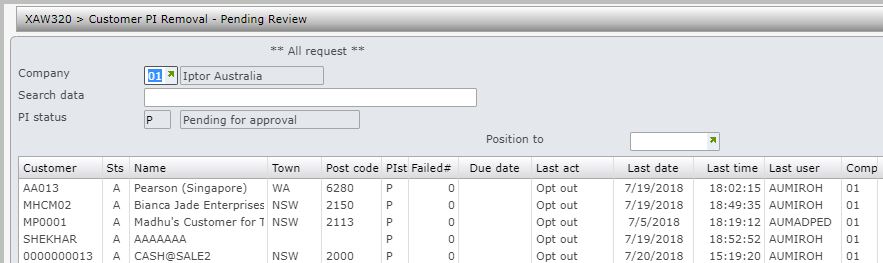
| Option | Description |
| Timestamp | Timestamp accesses inquiry program XAI320 to display PI management tracking. It lists all the actions with timestamps and the reasons. Number of failed attempts is also displayed. |
| Detail |
For Customer PI pending review, this option displays the DSI072 – Customer masterfile inquiry. For Creditor PI pending review, this option displays the API010 – Creditor masterfile inquiry. For Contact PI pending review, this option displays the CRW055 – Work with contact inquiry. |
| Order | This lists all the sales transactions for the customer/contact entity. |
| O/S order | This lists all the outstanding orders for the customer/contact entity. |
| PO | This option is only available for Customer entity. It lists all the dropship purchase orders for the customer. |
| Subscription | This lists all the subscription orders for the customer/contact entity. |
| Customers | This option is only available for Customer entity. It lists all the active customers for the selected billing number. |
| Approve | The pending request can be approved using this option. On approval the status will change to ‘W’ for wait for update. When approved the PI can be removed by the EOM process if all the criteria is met. |
| Reject | The request for PI removal can be reversed using this option. On rejection the status will change to ‘R’ for rejected. |
| Items | This option is only available for Contact entity. If the contact is a contributor then all the items for contributor will be listed. |
| AP trans | This option is only available for Creditor entity. It lists all the AP transactions for the creditor. |
| Purchase | This option is only available for Creditor entity. It lists all the purchase orders for the creditor. |
| Shipment | This option is only available for Creditor entity. It lists all the shipment invoices for the creditor. |
| Royalty contracts | This option is only available for Creditor entity. It lists all the royalty contracts for the creditor. |
| Function | Description |
| Show all/new/failed | Toggles to show either all requests, only new ones or just failed ones. |
| Inquiry mode | Toggles between inquiry & review mode. When in inquiry mode options Approve and Reject is not available. |
- Approve or reject the request as required.
- Click OK to confirm.
