
The Rights template program enables you to set up a template for subrights where parameters can be pre-defined. When an item is being created, the subright can be created automatically using the rights template defined in control file TMSRY/RTS-TMP if the item hierarchy matches. Work must exist before the subright can be automatically created.
Create a rights template
- In the menu, expand Publishing Modules > Rights & Permissions > Maintenance and double-click RY Rights Template Maintenance. RYM195 Rights Template Maintenance panel appears. All the existing rights templates are displayed.
- Click Add. RYM195 Rights Template panel appears in add mode.
- Enter the Template ID and a description and click OK.
- Click Add to enter the subright template details.
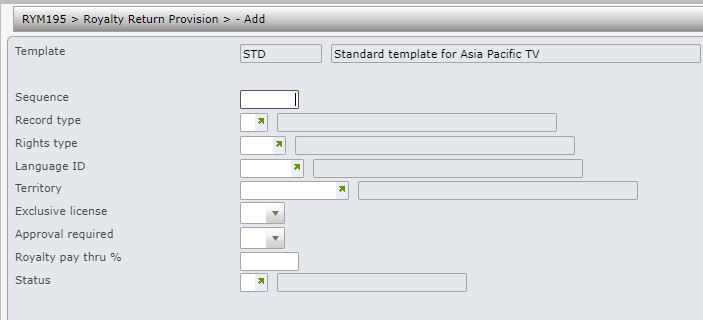
| Field | Description |
| Sequence | Multiple templates can be specified using sequence numbers. |
| Record type | This determines if the right is granted rights or subrights for 3rd party exploitation. |
| Rights type | Rights type describes the right. Select from the list in control file TMSRY/RTS-TYP. |
| Language ID | The language in which the subright can be exploited. |
| Territory | Territory in which the subright can be exploited. |
| Exclusive license | The publisher can have exclusive or non-exclusive subsidiary rights depending on the agreement between the author and the publisher. |
| Approval required | Can be used to flag if approval is to be required from the author. |
| Royalty pay thru % | This is the rate that must be paid to the author/payee when the subright is exploited to a 3rd party. The remaining amount is withheld. For example, if you enter 95% as the pay through value, the remaining 5% will be withheld and 95% of the amount will be paid to the author for any matching sales transactions. |
| Status | The subright can have status ‘A’ for Acquired/Active; ready to be exploited or ‘P’ for pending. |
- Enter the above information and click OK. The rights template gets created.
