
This program will close open balance invoices (from third party sales) and send it to Distribution to generate AR invoices for collection.
- In the menu, expand Publishing Modules > Rights & Permission > Other Incomes > Collection Contracts > Month End Processing and double-click RY Period End Invoice Generation. RYO470 Collection Invoice Generation panel appears.
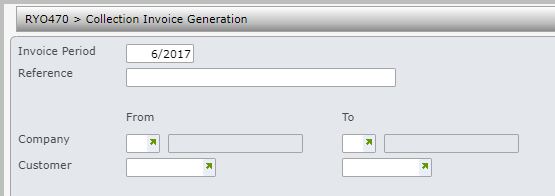
| Field | Description |
| Invoice period | This will default to the current distribution processing period and can be overwritten. |
| Reference | Enter a reference (optional) for the invoice generation run. |
| Company | Select the company you wish to generate the collection invoices for (leave blank to select all companies). |
| Customer | Select the customer you wish to generate the collection invoices for (leave blank to select all customers for the selected company). |
- Enter the above information.
- Click OK to begin the invoice generation.
| Note |
For any one-off charge type that is paythru and usage type (always paythru) the paythru amount is included as cost in the invoice (COS accrual) if the Subrights COS accrual account is defined. Important: If the Subrights COS accrual account is not defined then the COS is suppressed for the paythru amount. |
