Introduction
Making Tax Digital (MTD) is UK governments plan to streamline and modernise their tax system to make it more efficient and easier for customers to comply with their tax obligations. MTD requires businesses to record business transactions digitally and provide their VAT return information to HM Revenue and Customs (HMRC) through MTD compatible software either monthly, quarterly or on an annual basis. It is mandatory for business with tax turnovers above the VAT registration threshold from 1st of April 2019. Under MTD scheme, customers can interact digitally with HMRC to submit & retreive information via API/bridging software.
VAT data requirements
The following data is required to be submitted to HMRC under the MTD.
| Data | Description |
|
VAT due in this period on sales and other outputs |
|
VAT due on goods in this period on acquisitions from other EC member states |
|
Total VAT due (sum of 1 & 2) |
|
VAT reclaimed in this period on purchases and other inputs (including acquisitions from EC) |
|
Net VAT to be paid to Customs or reclaimed by you (Difference between 3 and 4) |
|
Total value of sales and all other outputs excluding any Tax. Incl 8 |
|
Total value of purchases and all other inputs excluding any VAT. Incl 9 |
|
Total value of all supplies of goods and related services, excluding VAT to EC |
|
Total value of all acquisitions of goods and related services, excluding VAT from EC |
Business rules setup
The following business rules have to be setup to handle MTD process. Business rules for MTD process must be setup with support from Iptor IP1 consultants. It is critical to understand the setting of control files and how it works. Control files must be setup correctly for the system to operate as intended. Any changes to the control files setup should be addressed cautiously and in consultation with Iptor IP1 consultants.
| Note | This document does not cover customised setup tasks of specific companies. Deviations from this setup should be covered by setup tasks written by individual companies. |
| Business rules | Setup | ||
| ********/TX-ENTY Tax Entity |
This control file holds the entity/organisation the VAT report would be submitted to & from, along with the company’s tax registration number & related information like reporting currency, start of the year for tax reporting and how often the tax report is to be run.
|
||
| ********/TX-PGM Tax programs |
This system defined control file holds the tax programs used to calculate the required tax data.
|
||
| ******/TX-TXBX Tax Boxes |
This control file describes all the data requirements (held in tax boxes). HMRC requires the following data (9 in total).
|
||
| ********/TX-TXBXG Tax Boxes sequence |
This control file holds the box groups with the applicable tax boxes.
|
||
| ********/TX-TXBX1 Tax Boxes – Final step after extraction |
Some of the required tax data is derived from the calculated data. This control specifies how these values are derived after the calculations are run.
|
||
| ********/TX-DFDS1 Selection criteria to define Box Group |
Defines the selection criteria for Box group.
|
||
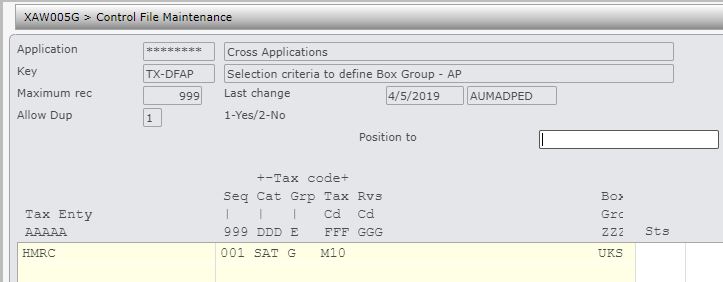
| ********/TX-DFAP Selection criteria to define Box Group – AP |
Defines the selection criteria for Box group.
|
||
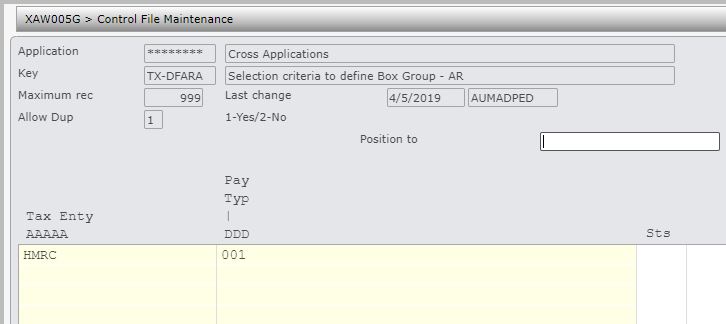
| ********/TX-DFARA Selection criteria to define Box Group – AR |
Holds AR Payment type selection criteria. |
||
| ********/TX-DFARB Selection criteria to define Box Group – AR |
Defines the selection criteria for Box group.
|
||
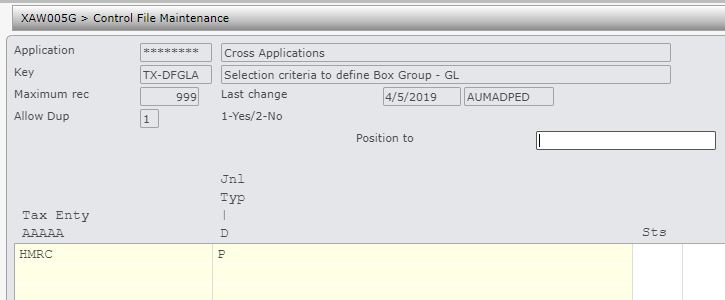
| ********/TX-DFGLA Selection criteria to define Box Group – GL |
Holds GL Journal type selection criteria.
|
||
| ********/TX-DFGLB Selection criteria to define Box Group – GL |
Defines the selection criteria for Box group.
|




Procedure
It is your responsibility to ensure that you understand this procedure before performing the following tasks.
| Note |
Deviations from this procedure should be covered by procedures written by your company. Before performing any tasks please ensure all the business rules are set-up accordingly. |
MTD process
| Process | Steps | ||
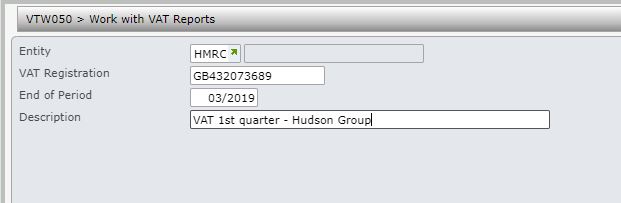
| Create report request |
|
||
| Run VAT calculations & view calculated data |
|
||
| Check VAT calculations |
|
||
| Submit/Finalise VAT report |
Once all the tax data is reviewed to be accurate, it can be submitted to HMRC.
|