
Introduction
Coupons can be created in IP1, linked to order based bonus rules with rewards. Bonus rules define all the qualifying conditions, along with the minimum value/quantity that must be satisfied before the rewards can be applied. Coupons can be set to be applied automatically to orders on sales order entry.
Business rules setup
The following business rules have to be setup to handle Coupons Processing. Business rules for Coupons Processing must be setup with support from Iptor IP1 consultants. It is critical to understand the setting of control files and how it works. Control files must be setup correctly for the system to operate as intended. Any changes to the control files setup should be addressed cautiously and in consultation with Iptor IP1 consultants.
| Note | This document does not cover customised setup tasks of specific companies. Deviations from this setup should be covered by setup tasks written by individual companies. |
| Control file | Setup | ||||||||||||||||||||||||||||||||||||||
| TMSDS/BO-CPUSL Order based bonus coupon usage level | Define all the coupon usage levels, i.e. per customer, per contact, per email address or for all. If the usage level is by customer then the number used will be maintained by customer and will be checked against maximum use specified for the coupon. | ||||||||||||||||||||||||||||||||||||||
| TMSDS/BO-RWDOP Order based bonus reward options | Setup the applicable reward options with the valid system defined reward rule. The following reward options are available.
|
||||||||||||||||||||||||||||||||||||||
| TMSDS/RTN-OBO Retention period for order bonus rules/coupons | Define the retention period (in months) by company for the order based bonus rules. If the retention period is entered as 1 month then the bonus rule will be purged 1 month after expiry date. If no value is defined or 0 is defined it will not be purged. | ||||||||||||||||||||||||||||||||||||||
| TMSDS/BO-CBCD Charge back code | Define charge back code and description that will be used for 3rd party business where order based bonus for freight needs to be charged back to their client. |
Procedure
It is your responsibility to ensure that you understand this procedure before performing the following tasks.
| Note | Deviations from this procedure should be covered by procedures written by your company. Before performing any tasks please ensure all the business rules are set-up accordingly. |
Work with coupons
- Expand menu Base > Distribution > Masterfiles > Database Management > Database Management > Promotional Package > Incentives and double-click Work with Coupons. DSW080 Work with Coupons panel appears listing all the existing coupons.
- Click Add to create a new coupon.

- Enter the following coupon information, as necessary.
| Field | Description | ||
| Coupon code | A unique code to identify the coupon. | ||
| Usage level | Usage level defines against who the coupon should be used. From the drop down, select one of the system defined usage level (per contact, per customer, per email address or for all). | ||
| Max use | Maximum number of times the coupon can be used for the usage level defined. | ||
| Note | An notes or additional information regarding the use of the coupon. | ||
| Company | Company, that the coupon is applicable for. | ||
| Currency | Currency the coupon is valid for. | ||
| Auto bonus | Flag this field with a ‘Y’ if the coupon bonus is to be automatically applied to an order, without having to to key the coupon during order entry. If the flag is not set to ‘Y’, it can be still applied to an order but the operator will have to key in the coupon. The usage will be restricted based on the coupon settings.
|
||
| Coupon status | The coupon status will automatically default to ‘A’ for Active. When the coupon expires the status can be closed. |
- Click OK to save the coupon. DSM251A Work with Order Based Bonus panel appears to add the bonus rules and rewards for the coupon.
- Click Add.
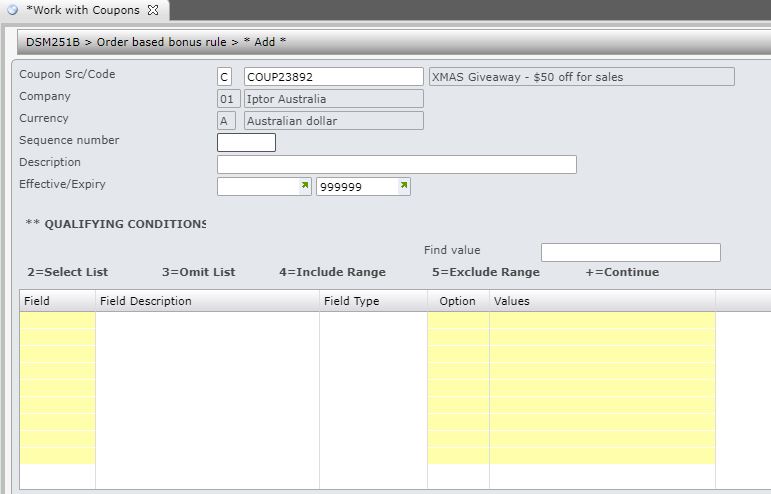
- Enter the following information, as necessary.
| Field | Description |
| Sequence number | Entering a sequence number is mandatory when creating an order based rule. The order based rules are added to the system in the ascending order of sequence numbers. The sequence number is used to decide which rule is to be used when more than one order based rule exists. When sales orders are processed, system will look at the rules in the system and will apply the first valid rule to the order. |
| Description | A descriptive text for the order based bonus rule. |
| Effective/expiry | The date range in which the order based rule will apply. |
| Field | Select the fields to be included in the order based rule. |
| Option | The option to be used for the selected field against the values specified in the next field, example 2=Select List, 3=Omit List etc. |
| Values | Values to be used with the selected field. |
- Click OK to save the order based bonus rule. DSM251C Order based bonus rewards panel appears.
- Click Add to add the bonus reward. DSM251C Order based bonus rewards panel appears in Add mode.
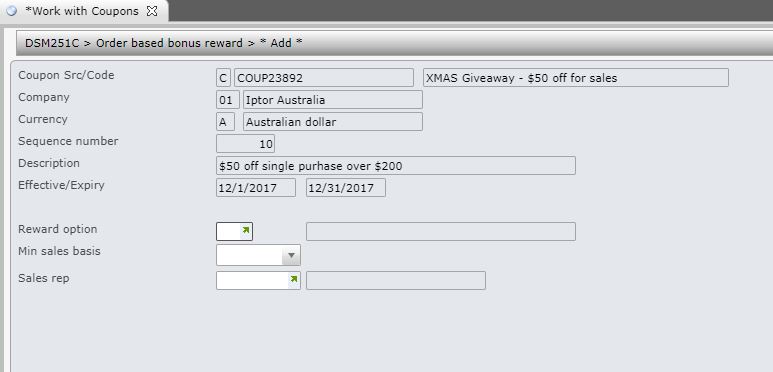
- Enter the following information, as necessary.
| Field | Description |
| Reward option | Select from the list of available reward options. These rewards options are maintained in control file TMSDS/BO-RWDOP. The reward rules in the system can be defined with one or more reward options. View Reward options and conditions for a complete list of reward options and the associated conditions and the input required. |
| Min sales basis | Specify if the reward is based on minimum sales value or minimum sales quantity. |
| Sales rep | Some of the reward options allow sales rep to be overridden on the sales order line. See reward options below to see which options allow sales rep override and enter the overriding sales rep if required for the reward option. |
- Click OK. The information displayed on the next Order based bonus rewards panel is dependent on the Reward option selected.

- Enter the required information for selected reward option.
- Click OK to save the order based bonus reward.
