
The Stock Transfer: Direct program is used to transfer stock from one internal warehouse to another. Nomination can be done not only for the warehouse the stock is to be transferred to and from, but also the warehouse location from which the stock is transferred to and from.
Transferring of stock between logical warehouses serves two main purposes:
- Change of ownership
- Ownership does not change but stock is moved to another warehouse for write-off or other reasons.
If stock is transferred across logical warehouses with a common physical warehouse, then nomination of location/extension/carton quantity is optional since this may be a transfer of ownership only and stock may not physically move.
So if location/extension/carton quantities are all blank an error message is not displayed and warehouse related updates are not performed. If any of these fields are non-blank, all existing processing is performed.
So inventory level updates are always produced (the transfer and associated stock updates). Only when stock is physically moving across warehouses and/or locations is a warehouse related activity (transfer movements and location updates) produced.
Movements are allowed out of a location even if it exceeds the number of different items specified on the dimension definition maintenance.
Items are transferred by entering the ISBN and Transfer Quantity, as well as the Sending and Receiving Warehouse Locations and Carton Quantities. The reference and text fields can be completed for additional information or instructions. On selection of the item, the system defaults to the Warehouse Locations with the highest priority, as well as the item’s default Carton Quantity. This information can be changed by the user. The stock details of each item can be accessed for reference.
To treat this transaction type as an In-Transit for, add T into the menu parameter. For example: CALL DSE070 (‘P”T’)
To make the putaway movement by container, stock is required to be stored as units rather than remaining in the carton quantities in which they were picked up. The existing putaway action code ‘P’ will retain the carton quantity, but using code ‘I’ would require individual putaway confirmations per item. This new flag, single only, on the zone definitions file will be similar to a “P” however; it will break the carton into singles at putaway time.
Transfer stock between warehouses
- In the menu, expand Base Modules > Distribution > Inventory Management > Warehouse Management > Non RF Stock Control > Stock Transfers > Stock Transfers and double-click WH Stock Transfers: DI. DSE070 Inter-warehouse Stock Transfer selection panel appears.
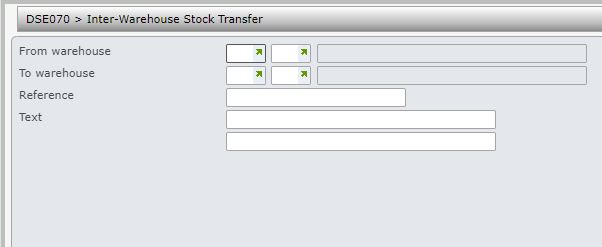
| Field | Description |
| From warehouse | Name of the warehouse from which stock is being transferred. |
| To warehouse | Name of the warehouse where the stock is being transferred to. |
| Reference | An optional entry field used to record a reference for this stock transfer. |
| Text | An optional entry field used to record additional text relevant to the stock transfer. |
- Enter the selection details and click OK. DSE070 Inter-warehouse Stock Transfer main panel appears.
- Enter the item and quantity of each item to be transferred. Warehouse location and carton quantity can also be specified. Click OK to confirm. Items and their corresponding quantities are transferred to specified warehouse.
The Volume, Volume Weight and Gross Weight of an ISBN is computed and displayed on the screen as the items are entered so that the volume and weight of the units being transferred between warehouses is known when the transactions are being created. The figures are computed based on the number of units being transferred, unit of measures and conversion factors defined in TMSWH/CNV-DIMN.
Stock transfer can be between location controlled warehouses as well as non-location controlled warehouses. If the warehouses are location controlled then the location from which to pick the stock must be given as well as the location into which the stock must be placed after receipt. If the item has an extension then this must be included in the selection to ensure the correct item is moved. Selected warehouses are updated immediately. No paperwork produced for this transfer.
