
Contents
Introduction
For region specific products, Iptor IP1 can specify the owner of an item. These items on creation, would be at status ‘Unapproved’, requiring further approval by various departments before it can be activated (promoted to ‘Active ‘ status) for processing within the region. The customer group (region) in which the item is created automatically becomes the owner of the item.
On approval to ‘Active’ status, the usage of the item would be restricted to the owner of the item, but will be available for adoption by other regions. When an item is adopted by another region, it can be configured to be approved by its internal departments before being activated for that region. Only regional specific data as identified in control file TMSDS/ICG-RFLD would be accessible to that region. Non regional specific data can only be accessed by the owner.
Business rules setup
The following business rules have to be setup to handle Multi region item processing. Business rules for Multi region item processing must be setup with support from Iptor IP1 consultants. It is critical to understand the setting of control files and how it works. Control files must be setup correctly for the system to operate as intended. Any changes to the control files setup should be addressed cautiously and in consultation with Iptor IP1 consultants.
| Note | This document does not cover customised setup tasks of specific companies. Deviations from this setup should be covered by setup tasks written by individual companies. |
| Control file | Setup |
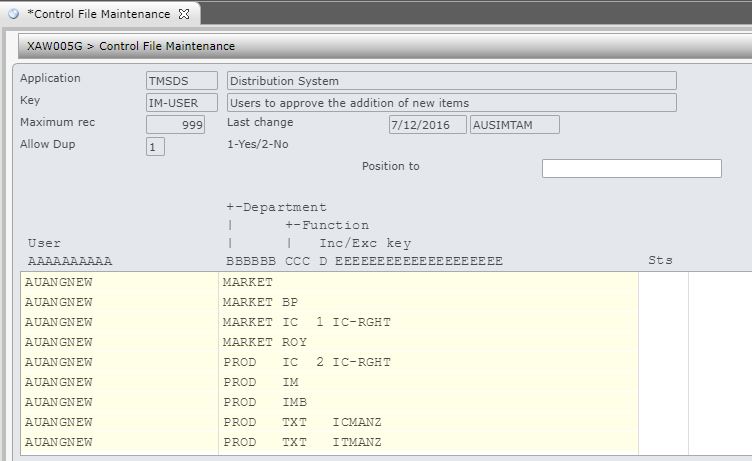
| TMSDS/IM-USER – Users to approve the addition of new items | This control file controls the maintenance of all unapproved items. Define all the users in this control file that can maintain the defined functions.
Column E further defines if a specific entry can be maintained, e.g. IC-RIGHT in item classification. A special function can be setup to denote which user can promote the item to active (or adopted) status.
|
| TMSDS/IM-DEPT – Departments that need to approve a new item |
Lists all the departments that are responsible for maintaining and approving the items. Number the sequence in order of approval, i.e. if Product department needs to be the first department to approve or reject, then the sequence for Product department must be 1. Set the sequence to ‘1’ for all departments if maintenance and approval can be done by any department at any time.
|
| TMSDS/ICG-RFLD – Customer group-function for regional data access |
This control file defines the regional data access for both unapproved and approved item. Fields which are not defined in this control file are considered owner data, hence only accessible by the owner.
|


Procedure
It is your responsibility to ensure that you understand this procedure before performing the following tasks.
| Note |
Deviations from this procedure should be covered by procedures written by your company. Before performing any tasks please ensure all the business rules are set-up accordingly. |
Create/maintain/approve a multi-region item
| Tasks | Instructions | ||
| Add a new item for multi-region, |
|
||
| Maintain an unapproved item, |
After an item is created, it becomes available for the department of the first sequence (as defined in TMSDS/IM-DEPT) to complete the functions defined in control file TMSDS/IM-USER.
Once all the functions of a department is completed then it will no longer be available to that department (i.e. users of that department can no longer maintain that item). It then becomes available to the next department in the sequence defined in control file TMSDS/IM-DEPT. |
||
| Approve an item, |
Once all the departments have approved the item, it then becomes available to be transferred to Active status.
|

Adopt multi-region item
| Tasks | Instructions | ||
| Adopt an item into another region, |
|
