
This process allows customer centric renewals whereby subscriptions for specific customer or billing account can be selected for renewal. It will generate records in subscriptions order files for the selected orders under one subscription release run and call Subscription Release Order Generation program to release the run to distribution.
The system will process all subscription orders for the selected customer with charge method of 3 = Pay in Advance on Anniversary in control file TMSSM/SL-SCM, with start date less than system date, and renewal date between system date and latest renewal date. From these records the system will select orders that match the selection parameters.
From the resulting list of subscription orders, the user will be able to select the orders that will be renewed.
The renewal confirmation screen will be presented to enter the customer reference which will be stored in the distribution invoice. Some fields can be overridden in the distribution invoice as part of the confirmation process.
The renewal item on the subscription list is used in generating the distribution invoice. The renewal product list to be used will be set-up in control file TMSSM/SMO040-D. Any item that is on this default product list will also be included in the renewal invoice as long as it is not the same as the renewal item on the subscription list. Any price or discount override on the product list will also be applied including the renewal item if it matches the item on the product list.
Upon confirmation of the renewal, the subscriptions will be created in the subscription outstanding order files with the same subscription order run number and will automatically be released to the distribution transaction files.
Renew subscriptions order for a specific customer
- In the menu, expand Publishing Modules > Subscriptions Management > Subs Release/Renewal and then double-click Subs Renewal by Customer. SMO040 Subscriptions Renewal by Customer selection panel appears.
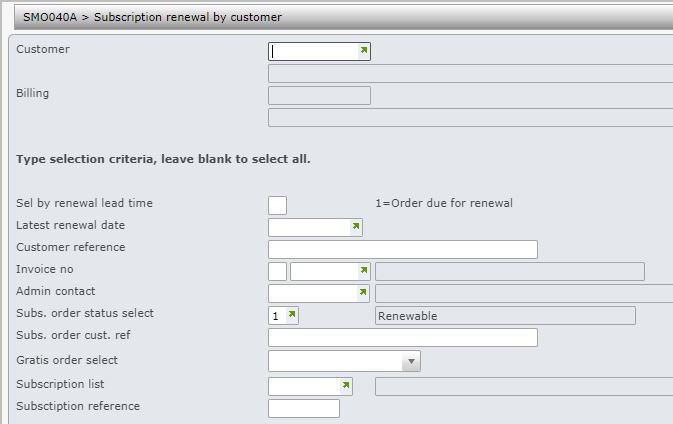
| Field | Description |
| Sel by renewal lead time | Enter ‘1’ to select all orders due for renewal in the next month, otherwise leave blank to select all. |
| Latest renewal date | This will be defaulted to system date plus number of months set-up in control file TMSSM/SMO040-D. If overridden, can not be more than the maximum number of periods from system date as set-up in the same control file. |
| Invoice number | Typically this is the distribution invoice number of the current term subscriptions. If entered, will consider for selection all subscription orders linked to the invoice. |
| Admin contact | If entered will consider for selection all subscription orders with this admin contact ID. |
| Select by Subs order status | This is a user definable list of subscription order statuses. If entered will consider for selection only those subscription orders with matching status in the list. This is set-up in control file TMSSM/SMO040-S. |
| Subs order cust ref | If entered, will consider for selection all orders with matching subscription order reference |
| Select by gratis code | Enter ‘1’ to select normal orders, ‘2’ for gratis orders only or leave blank to select all. |
| Subscription list | This will consider for selection all subscription orders on this subscription list |
| Subscription reference | If entered, this will select the specific subscription order with this key. |
- Enter the customer number and any of the above selection as required.
- Click OK to confirm. SMO040A Subscription Renewal by Customer main panel appears, listing the subs lists for the selected customer.
| Option | Description |
| Subs order | Access Subscription Order Maintenance panel in change mode. |
| Subs list | Access Subscription List Maintenance panel to display a Subscription List. |
| Subs order activity | Access SMW025 Subscription Transaction Inquiry panel to view past activities on the selected subscription list. From SMW025, you have the option to reverse the last subs action on the subs order. |
- Select the subscription list to be renewed and click OK. SMO040B Subscription Renewal by Customer panel appears. Source of order, Picking method, Special instructions and Warehouse instructions can be overridden on this panel.
- Update any changes and click OK. XAR905 Subscription Run Release panel appears.
- Indicate how the job should be run and click OK. “Renewal Process Has Been Completed Successfully” will display to indicate renewal was successful.
